







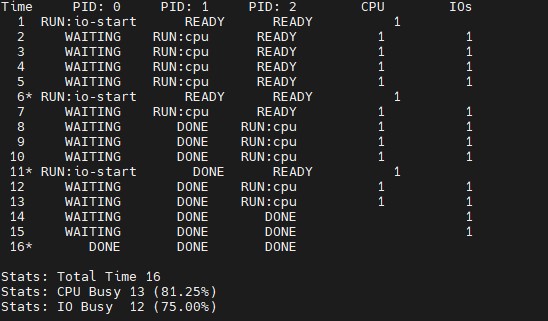
Question: Plese explain the output ( attached ) why using SWITCH _ ON _ IO and IO _ RUN _ IMMEDIATE will have this result in
Plese explain the output attachedwhy using SWITCHONIO and IORUNIMMEDIATE will have this result in deatil as i am so confuse of what the command doAlso, please answer the question below. Thankyou!
output:Time PID: PID: PID: CPU IOs
RUN:iostart READY READY
WAITING RUN:cpu READY
WAITING RUN:cpu READY
WAITING RUN:cpu READY
WAITING RUN:cpu READY
RUN:iostart READY READY
WAITING RUN:cpu READY
WAITING DONE RUN:cpu
WAITING DONE RUN:cpu
WAITING DONE RUN:cpu
RUN:iostart DONE READY
WAITING DONE RUN:cpu
WAITING DONE RUN:cpu
WAITING DONE DONE
WAITING DONE DONE
DONE DONE DONE
Stats: Total Time
Stats: CPU Busy
Stats: IO Busy
Question:Now run the same processes processrun.py but with I
IORUNIMMEDIATE set, which immediately runs the process that issued the IO
How does this behavior differ? Why might running a process that just completed an
IO again be a good idea?
Step by Step Solution
There are 3 Steps involved in it
1 Expert Approved Answer
Step: 1 Unlock

Question Has Been Solved by an Expert!
Get step-by-step solutions from verified subject matter experts
Step: 2 Unlock
Step: 3 Unlock
 Study Help