







Question: PLOTTING RANDOM POINTS IN A FIGURE IN MATLAB Hello! We have a poorly constructed baseball bat figure in matlaband we would like to know how
PLOTTING RANDOM POINTS IN A FIGURE IN MATLAB
Hello! We have a poorly constructed baseball bat figure in matlaband we would like to know how to plot 100 random points inside the figure given.
here is our current matlab code
[x,y,z]=sphere; surf(x,y,z); alpha(0.5); hold on [x1,y1,z1]=cylinder(0.8); surf(x1,y1,z1*6+0.55); hold on [x,y,z]=sphere; surf(x*0.8,y*0.8,z*0.8+6.55); alpha(0.5) axis equal;
x2=rand(100,1); y2=rand(100,1); z2=rand(100,1); scatter3(x2,y2,z2, 'o','r','filled');
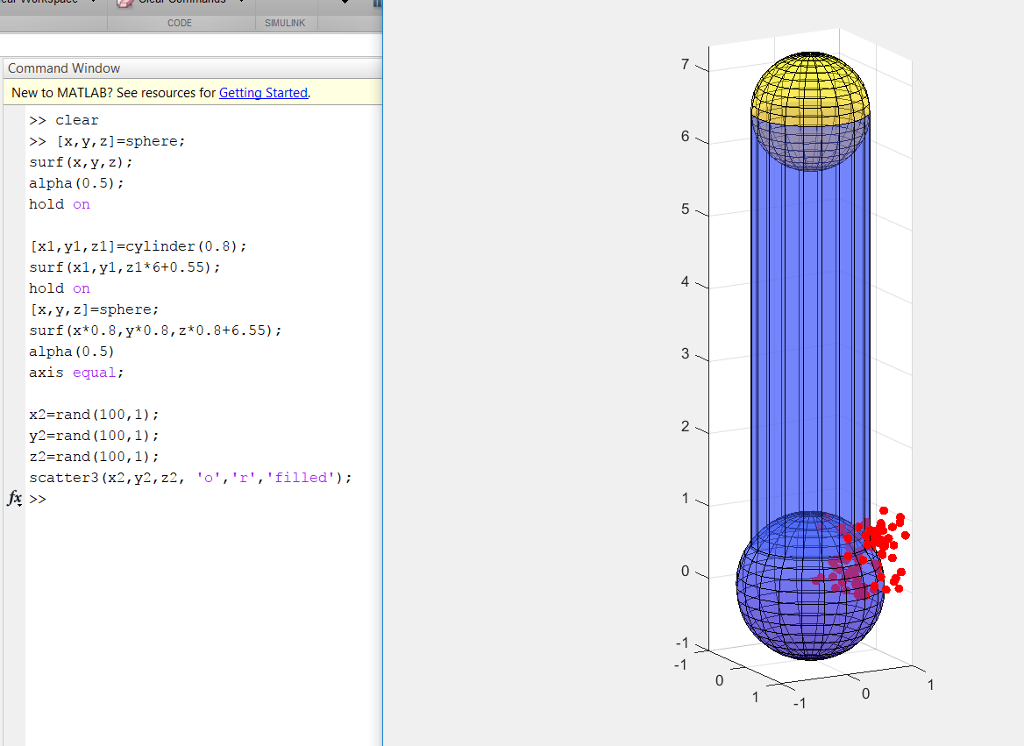
CODE SMULINK Command Window New to MATLAB? See resources for Getting Started. >>clear >> [x,y,z]=sphere; surf (x, y, z); alpha (0.5); hold on [x1,yl,z1]-cylinder (0.8); surf (x1,yl,zl*6+0.55) hold orn [x, y, 2] =sphere; surf (x*0.8,y*0.8,z*0.8+6.55); alpha (0.5) axis equal; 4 3 x2-rand (100,1); y2-rand (100,1): z2-rand (100,1); scatter3 (x2,y2,z2, 'o,'r,'filled) 2
Step by Step Solution
There are 3 Steps involved in it

Get step-by-step solutions from verified subject matter experts
 Study Help