







Question: pls use the formulas Each correct formula will begin with =,+, or -. The basic mathematical operators are,,+ and / Addition: To add the values
pls use the formulas
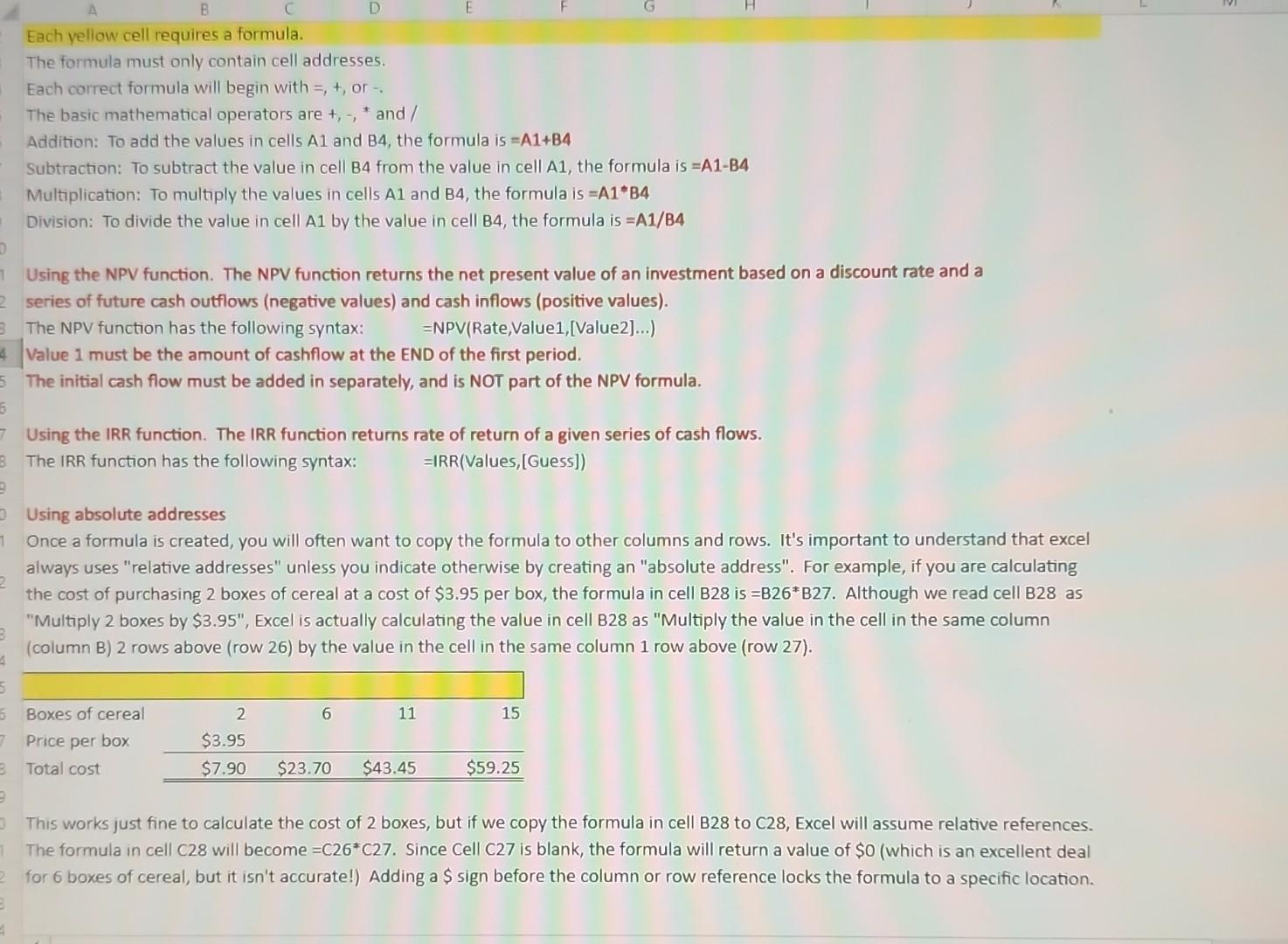
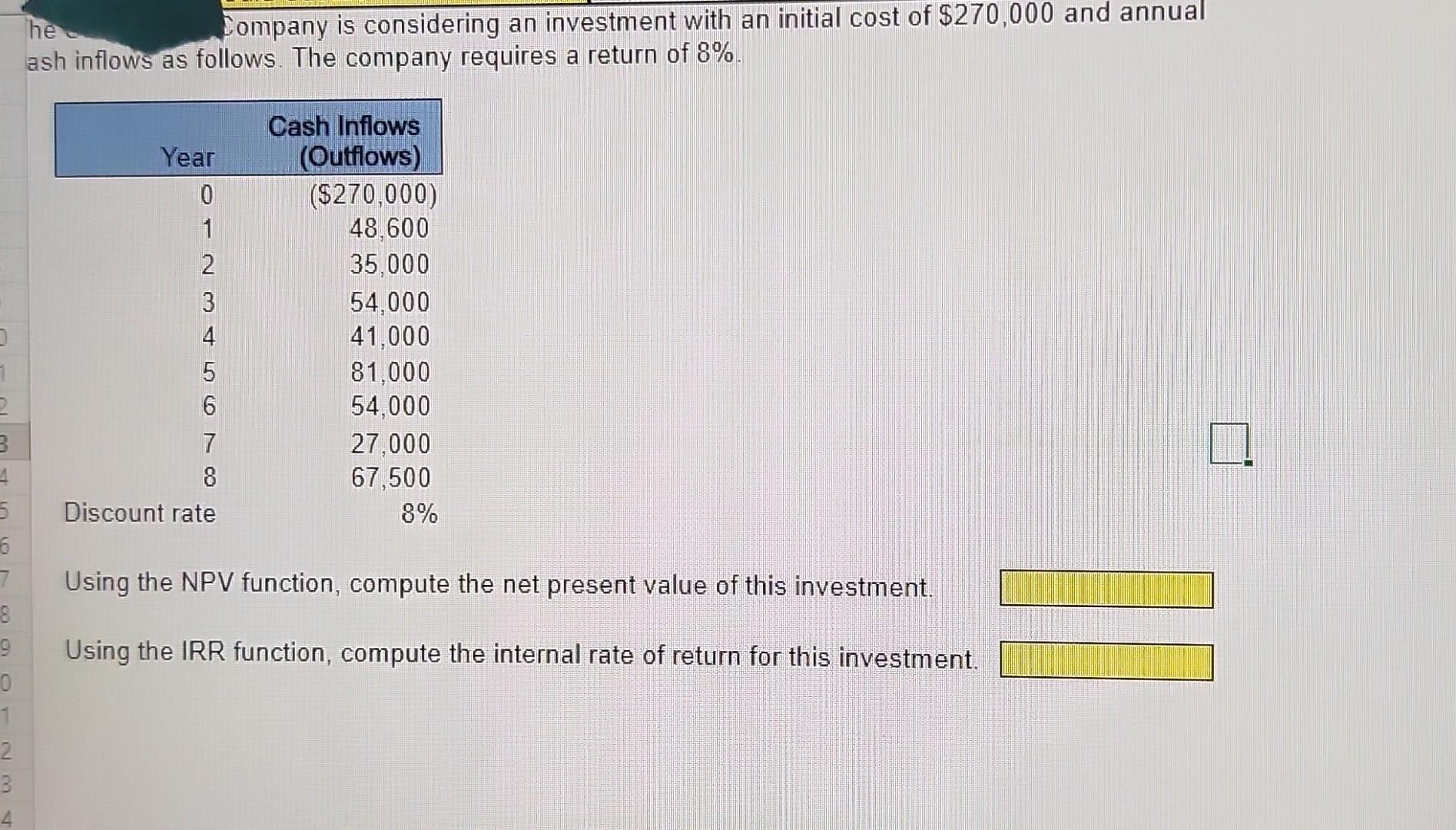
Each correct formula will begin with =,+, or -. The basic mathematical operators are,,+ and / Addition: To add the values in cells A1 and B4, the formula is =A1+B4 Subtraction: To subtract the value in cell B4 from the value in cell A1, the formula is =A1B4 Multiplication: To multiply the values in cells A1 and B4, the formula is =A1B4 Division: To divide the value in cell A1 by the value in cell B4, the formula is =A1/B4 Using the NPV function. The NPV function returns the net present value of an investment based on a discount rate and a series of future cash outflows (negative values) and cash inflows (positive values). The NPV function has the following syntax: =NPV(Rate,Value1,[ Value2]...) Value 1 must be the amount of cashflow at the END of the first period. The initial cash flow must be added in separately, and is NOT part of the NPV formula. Using the IRR function. The IRR function returns rate of return of a given series of cash flows. The IRR function has the following syntax: = IRR(Values,[Guess]) Using absolute addresses Once a formula is created, you will often want to copy the formula to other columns and rows. It's important to understand that excel always uses "relative addresses" unless you indicate otherwise by creating an "absolute address". For example, if you are calculating the cost of purchasing 2 boxes of cereal at a cost of $3.95 per box, the formula in cell B28 is =B26B27. Although we read cell B28 as "Multiply 2 boxes by $3.95 ", Excel is actually calculating the value in cell B28 as "Multiply the value in the cell in the same column (column B) 2 rows above (row 26) by the value in the cell in the same column 1 row above (row 27). This works just fine to calculate the cost of 2 boxes, but if we copy the formula in cell B28 to C28, Excel will assume relative references. for 6 boxes of cereal, but it isn't accurate!) Adding a $ sign before the column or row reference locks the formula to a specific location. Company is considering an investment with an initial cost of $270,000 and annual ash inflows as follows. The company requires a return of 8%. Using the NPV function, compute the net present value of this investment. Using the IRR function, compute the internal rate of return for this investment. Each correct formula will begin with =,+, or -. The basic mathematical operators are,,+ and / Addition: To add the values in cells A1 and B4, the formula is =A1+B4 Subtraction: To subtract the value in cell B4 from the value in cell A1, the formula is =A1B4 Multiplication: To multiply the values in cells A1 and B4, the formula is =A1B4 Division: To divide the value in cell A1 by the value in cell B4, the formula is =A1/B4 Using the NPV function. The NPV function returns the net present value of an investment based on a discount rate and a series of future cash outflows (negative values) and cash inflows (positive values). The NPV function has the following syntax: =NPV(Rate,Value1,[ Value2]...) Value 1 must be the amount of cashflow at the END of the first period. The initial cash flow must be added in separately, and is NOT part of the NPV formula. Using the IRR function. The IRR function returns rate of return of a given series of cash flows. The IRR function has the following syntax: = IRR(Values,[Guess]) Using absolute addresses Once a formula is created, you will often want to copy the formula to other columns and rows. It's important to understand that excel always uses "relative addresses" unless you indicate otherwise by creating an "absolute address". For example, if you are calculating the cost of purchasing 2 boxes of cereal at a cost of $3.95 per box, the formula in cell B28 is =B26B27. Although we read cell B28 as "Multiply 2 boxes by $3.95 ", Excel is actually calculating the value in cell B28 as "Multiply the value in the cell in the same column (column B) 2 rows above (row 26) by the value in the cell in the same column 1 row above (row 27). This works just fine to calculate the cost of 2 boxes, but if we copy the formula in cell B28 to C28, Excel will assume relative references. for 6 boxes of cereal, but it isn't accurate!) Adding a $ sign before the column or row reference locks the formula to a specific location. Company is considering an investment with an initial cost of $270,000 and annual ash inflows as follows. The company requires a return of 8%. Using the NPV function, compute the net present value of this investment. Using the IRR function, compute the internal rate of return for this investment
Step by Step Solution
There are 3 Steps involved in it

Get step-by-step solutions from verified subject matter experts
 Study Help