







Question: PL/SQL developer, you may be asked to modify an existing view. This can be done quickly in ApEx using the Object Browser window. Go to
PL/SQL developer, you may be asked to modify an existing view. This can be done quickly in ApEx using the Object Browser window.
Go to the SQL Workshop drop-down menu
Go to the Object Browser and change it from Tables to Views
Open the PRODUCT_ORDERS View click the code button.
Modify the SQL part of the code so that only orders with an ORDER_STATUS = 'COMPLETE' are returned.
Add the PRODUCT_ID to the query as the first column returned. Follow the SQL coding standards the query has. You will also need to add the "PRODUCT_ID" to the column list at the top of the view.
Click the 'Save & Compile' button.
The compiler will say:
Compilation failed,line 0 (18:38:11)
ORA-00979: not a GROUP BY expression
So add the p.product_id to the GROUP BY expression. That will get rid of the error message.
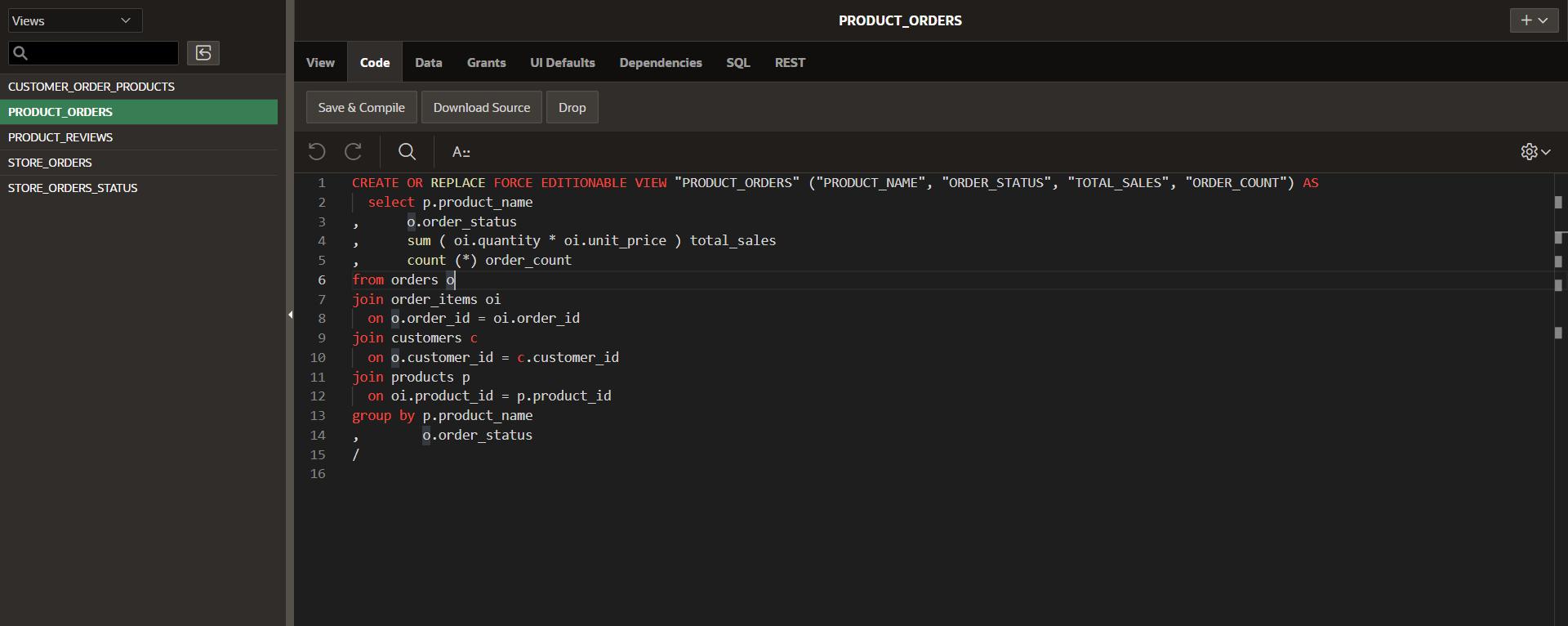
Views Q CUSTOMER_ORDER_PRODUCTS PRODUCT ORDERS PRODUCT_REVIEWS STORE_ORDERS STORE_ORDERS_STATUS View Code Save & Compile Download Source 14 15 16 > Data Grants UI Defaults Drop A:: 1 CREATE OR REPLACE FORCE EDITIONABLE VIEW "PRODUCT_ORDERS" ("PRODUCT_NAME", "ORDER_STATUS", "TOTAL_SALES", "ORDER_COUNT") AS 2 select p.product_name 3 o.order_status 4 5 6 7 8 9 10 11 12 13 group by p.product_name o.order_status > 1 > from orders o join order_items oi on o.order_id = oi.order id Dependencies SQL REST sum (oi.quantity * oi.unit_price ) total_sales count (*) order_count join customers c on o. customer_id = c.customer id join pro P on oi.product_id = p.product_id PRODUCT_ORDERS + ||
Step by Step Solution
There are 3 Steps involved in it
sql CREATE OR REPLACE FORCE EDITIONABLE VIEW PRODUCT ORDERS PRODUCTID PRODUCT ... View full answer

Get step-by-step solutions from verified subject matter experts
 Study Help