







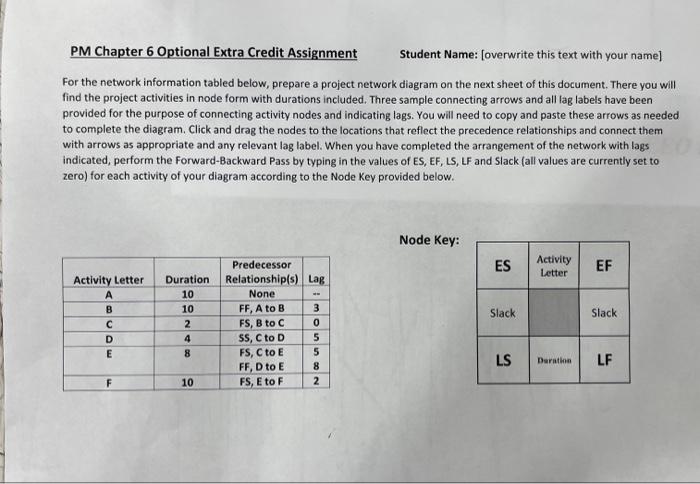
Question: PM Chapter 6 Optional Extra Credit Assignment _Student Name: [overwrite this text with your name] For the network information tabled below, prepare a project network
![text with your name] For the network information tabled below, prepare a](https://dsd5zvtm8ll6.cloudfront.net/si.experts.images/questions/2024/11/672c776def40d_405672c776d85d7c.jpg)
PM Chapter 6 Optional Extra Credit Assignment _Student Name: [overwrite this text with your name] For the network information tabled below, prepare a project network diagram on the next sheet of this document. There you will find the project activities in node form with durations included. Three sample connecting arrows and all lag labels have been provided for the purpose of connecting activity nodes and indicating lags. You will need to copy and paste these arrows as needed to complete the diagram. Click and drag the nodes to the locations that reflect the precedence relationships and connect them with arrows as appropriate and any relevant lag label. When you have completed the arrangement of the network with lags indicated, perform the Forward-Backward Pass by typing in the values of ES, EF, LS, LF and Slack (all values are currently set to zero) for each activity of your diagram according to the Node Key provided below. Node Key: \begin{tabular}{|c|c|c|} \hline 0 & A & 0 \\ \hline 0 & & 0 \\ \hline 0 & 10 & 0 \\ \hline \end{tabular} \begin{tabular}{|c|c|c|} \hline 0 & B & 0 \\ \hline 0 & & 0 \\ \hline 0 & 10 & 0 \\ \hline \end{tabular} \begin{tabular}{|l|l|l|} \hline 0 & c & 0 \\ \hline 0 & & 0 \\ \hline 0 & 2 & 0 \\ \hline \end{tabular} \begin{tabular}{|l|l|l|} \hline 0 & D & 0 \\ \hline 0 & & 0 \\ \hline 0 & 4 & 0 \\ \hline \end{tabular} \begin{tabular}{|l|l|l|} \hline 0 & E & 0 \\ \hline 0 & & 0 \\ \hline 0 & 8 & 0 \\ \hline \end{tabular} \begin{tabular}{|c|c|c|} \hline 0 & F & 0 \\ \hline 0 & & 0 \\ \hline 0 & 10 & 0 \\ \hline \end{tabular}
Step by Step Solution
There are 3 Steps involved in it

Get step-by-step solutions from verified subject matter experts
 Study Help