







Question: Points Possible 100 1. Convert the UML diagram to code by creating Circle.jave class 2. In circleAreaDemo class, call the setRadius to set the radius
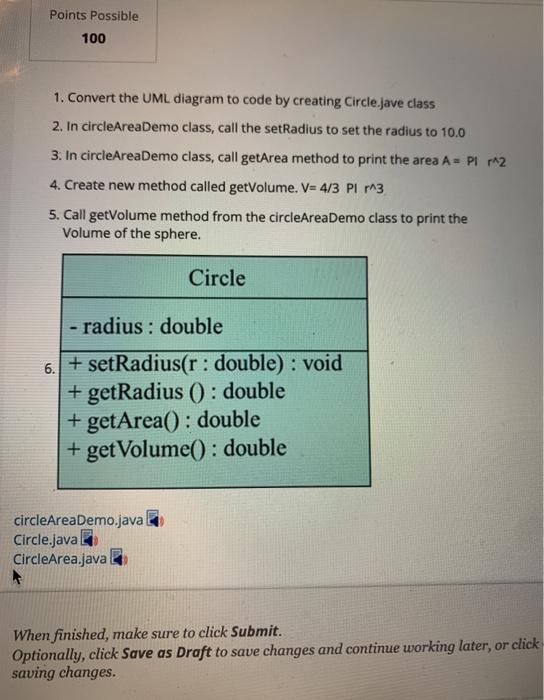
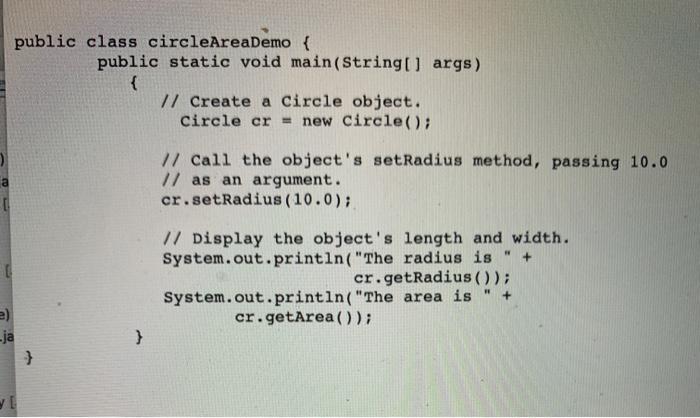
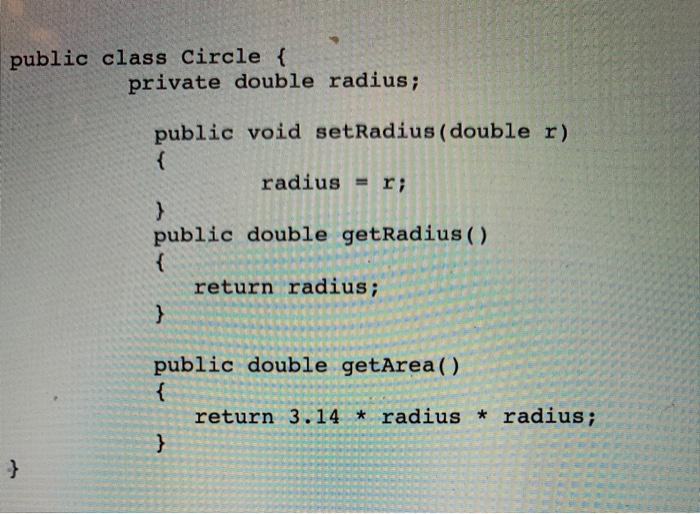
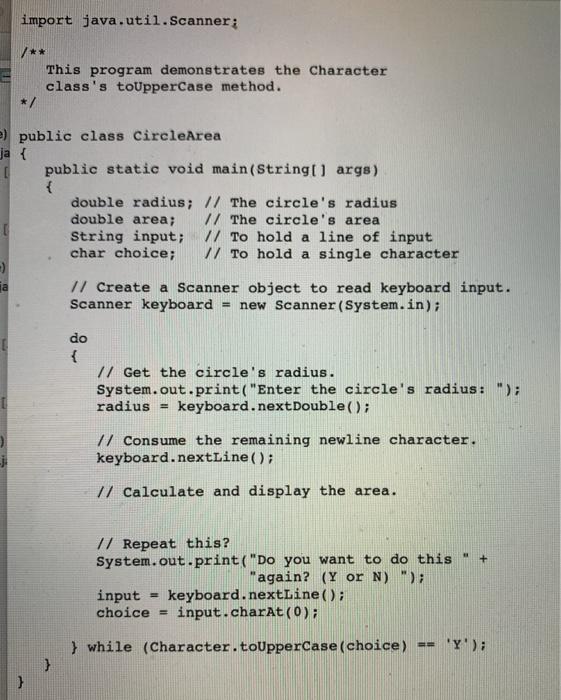
Points Possible 100 1. Convert the UML diagram to code by creating Circle.jave class 2. In circleAreaDemo class, call the setRadius to set the radius to 10.0 3. In circleAreaDemo class, call get Area method to print the area A = PI 2 4. Create new method called getVolume. V=4/3 PL 3 5. Call getVolume method from the circleAreaDemo class to print the Volume of the sphere. Circle -radius: double 6. + setRadius(r: double) : void + getRadius () : double + getArea(): double + getVolume(): double circleAreaDemo.java Circle.java CircleArea.java When finished, make sure to click Submit. Optionally, click Save as Draft to save changes and continue working later, or click saving changes. public class circleAreaDemo { public static void main(String[] args) { // Create a Circle object. Circle cr = new Circle(); // Call the object's setRadius method, passing 10.0 // as an argument. cr.setRadius (10.0); + // Display the object's length and width. System.out.println("The radius is cr.getRadius()); System.out.println("The area is cr.getArea()); } ja } public class Circle { private double radius; public void setRadius (double r) { radius = r; } public double getRadius ( ) { return radius; } public double getArea() { return 3.14 * radius * radius; } } import java.util.Scanner: This program demonstrates the character class's toUpperCase method. */ 2) public class CircleArea ja { public static void main(String[] args) { double radius; // The circle's radius double area; // The circle's area String input; // To hold a line of input char choice; // To hold a single character -) 1/ Create a Scanner object to read keyboard input. Scanner keyboard = new Scanner(System.in); do { // Get the circle's radius. System.out.print("Enter the circle's radius: "); radius = keyboard.nextDouble(); // Consume the remaining newline character. keyboard.nextLine(); // Calculate and display the area. + 17 Repeat this? System.out.print("Do you want to do this "again? (y or N)"); input = keyboard.nextLine(); choice input.charAt(0); } while (Character.toUpperCase(choice) == 'Y'); }
Step by Step Solution
There are 3 Steps involved in it

Get step-by-step solutions from verified subject matter experts
 Study Help