







Question: Points Step Instructions Possibl Start Access. Open the file named Exhibits.accdb. Save the database as Exhibits_LastFirst. 0 2 Create a form using the Form tool
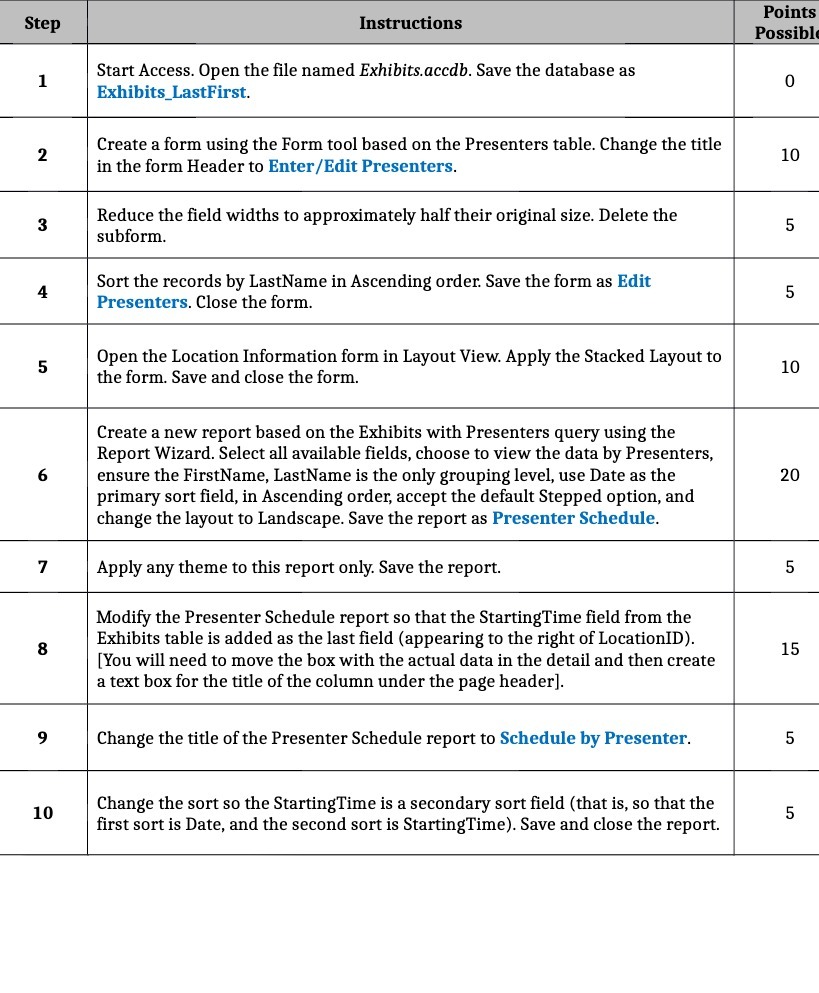
Points Step Instructions Possibl Start Access. Open the file named Exhibits.accdb. Save the database as Exhibits_LastFirst. 0 2 Create a form using the Form tool based on the Presenters table. Change the title 10 in the form Header to Enter/Edit Presenters. 3 Reduce the field widths to approximately half their original size. Delete the 5 subform. 4 Sort the records by LastName in Ascending order. Save the form as Edit 5 Presenters. Close the form. 5 Open the Location Information form in Layout View. Apply the Stacked Layout to 10 the form. Save and close the form. Create a new report based on the Exhibits with Presenters query using the Report Wizard. Select all available fields, choose to view the data by Presenters, 6 ensure the FirstName, LastName is the only grouping level, use Date as the 20 primary sort field, in Ascending order, accept the default Stepped option, and change the layout to Landscape. Save the report as Presenter Schedule. 7 Apply any theme to this report only. Save the report. 5 Modify the Presenter Schedule report so that the StartingTime field from the 8 Exhibits table is added as the last field (appearing to the right of LocationID). 15 [ You will need to move the box with the actual data in the detail and then create a text box for the title of the column under the page header]. 9 Change the title of the Presenter Schedule report to Schedule by Presenter. 5 10 Change the sort so the StartingTime is a secondary sort field (that is, so that the 5 first sort is Date, and the second sort is StartingTime). Save and close the report
Step by Step Solution
There are 3 Steps involved in it

Get step-by-step solutions from verified subject matter experts
 Study Help