







Question: pPlease use python 3.0 coding for the answer. 3. (30 points) Exercise E1.6, from the lecture notes by Bullo and Smith. Programming guidelines: Kindly follow
 pPlease use python 3.0 coding for the answer.
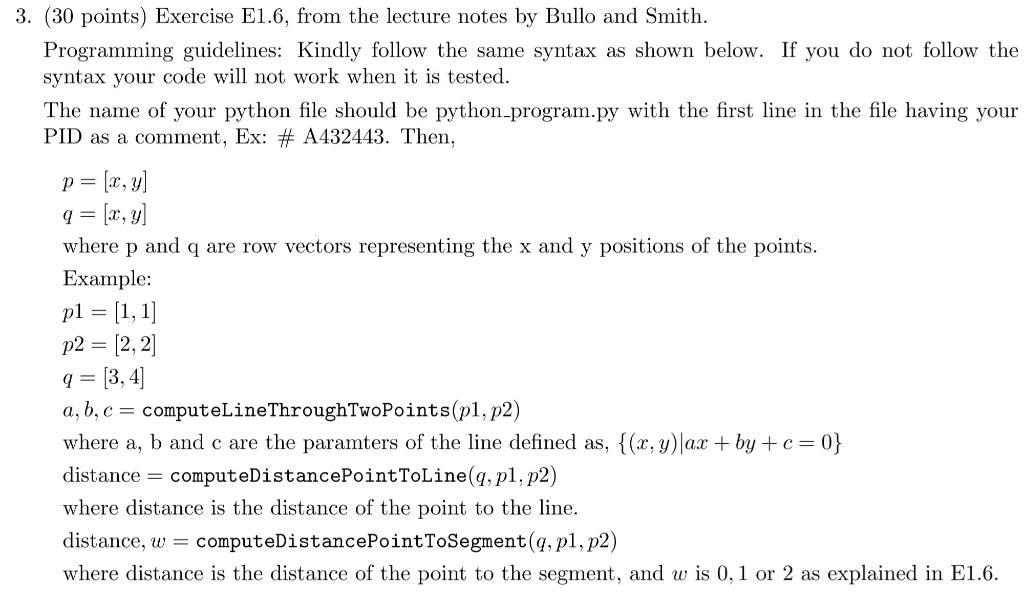
3. (30 points) Exercise E1.6, from the lecture notes by Bullo and Smith. Programming guidelines: Kindly follow the same syntax as shown below. If you do not follow the syntax your code will not work when it is tested. The name of your python file should be python-program.py with the first line in the file having your PID as a comment, Ex: # A432443. Then, p = (x,y) q = [x, y] where p and q are row vectors representing the x and y positions of the points. Example: pl = [1,1] p2 = (2,2] q = [3, 4] a, b, c = computeLineThroughTwoPoints(p1, p2) where a, b and c are the paramters of the line defined as, {(x, y)|ax + by +c=0} distance = computeDistancePointToLine(q, p1, p2) where distance is the distance of the point to the line. distance, w = computeDistancePointToSegment(q, p1, p2) where distance is the distance of the point to the segment, and w is 0,1 or 2 as explained in E1.6. 3. (30 points) Exercise E1.6, from the lecture notes by Bullo and Smith. Programming guidelines: Kindly follow the same syntax as shown below. If you do not follow the syntax your code will not work when it is tested. The name of your python file should be python-program.py with the first line in the file having your PID as a comment, Ex: # A432443. Then, p = (x,y) q = [x, y] where p and q are row vectors representing the x and y positions of the points. Example: pl = [1,1] p2 = (2,2] q = [3, 4] a, b, c = computeLineThroughTwoPoints(p1, p2) where a, b and c are the paramters of the line defined as, {(x, y)|ax + by +c=0} distance = computeDistancePointToLine(q, p1, p2) where distance is the distance of the point to the line. distance, w = computeDistancePointToSegment(q, p1, p2) where distance is the distance of the point to the segment, and w is 0,1 or 2 as explained in E1.6
Step by Step Solution
There are 3 Steps involved in it

Get step-by-step solutions from verified subject matter experts
 Study Help