







Question: Practice EX 3 - 9 d Visual Workshop Open IL _ EX _ 3 - 5 . xlsx from the location where you store your
Practice
EX d Visual Workshop
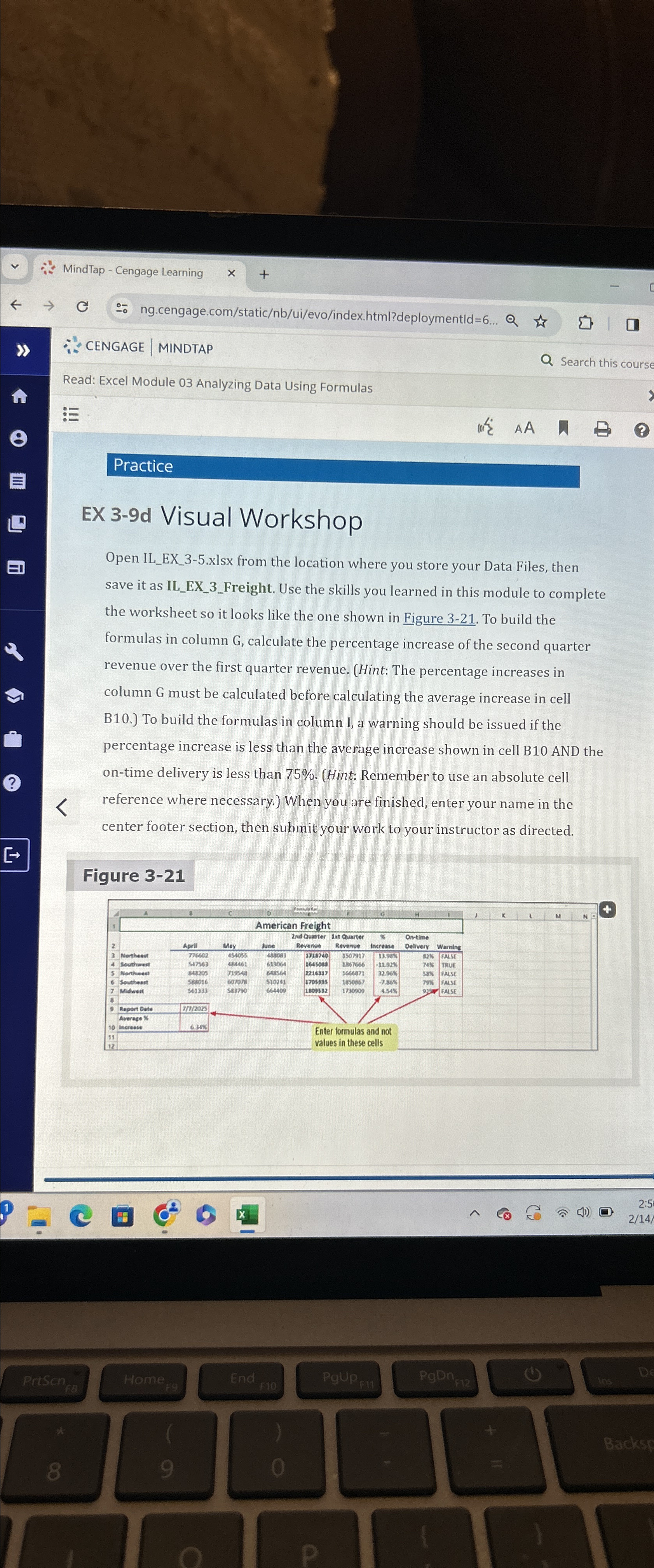
Open ILEXxlsx from the location where you store your Data Files, then save it as ILEXFreight. Use the skills you learned in this module to complete the worksheet so it looks like the one shown in Figure To build the formulas in column G calculate the percentage increase of the second quarter revenue over the first quarter revenue. Hint: The percentage increases in column G must be calculated before calculating the average increase in cell B To build the formulas in column I, a warning should be issued if the percentage increase is less than the average increase shown in cell B AND the ontime delivery is less than Hint: Remember to use an absolute cell reference where necessary. When you are finished, enter your name in the center footer section, then submit your work to your instructor as directed.
Figure
Step by Step Solution
There are 3 Steps involved in it
1 Expert Approved Answer
Step: 1 Unlock

Question Has Been Solved by an Expert!
Get step-by-step solutions from verified subject matter experts
Step: 2 Unlock
Step: 3 Unlock
 Study Help