





Question: . Practice For loops and/or do/while loops The conditional ternary) operator Extend Prelab 3 Submission Information Submit this assignment by following the instructions given by
 . Practice For loops and/or do/while loops The conditional ternary) operator

Extend Prelab 3 Submission Information Submit this assignment by following the instructions

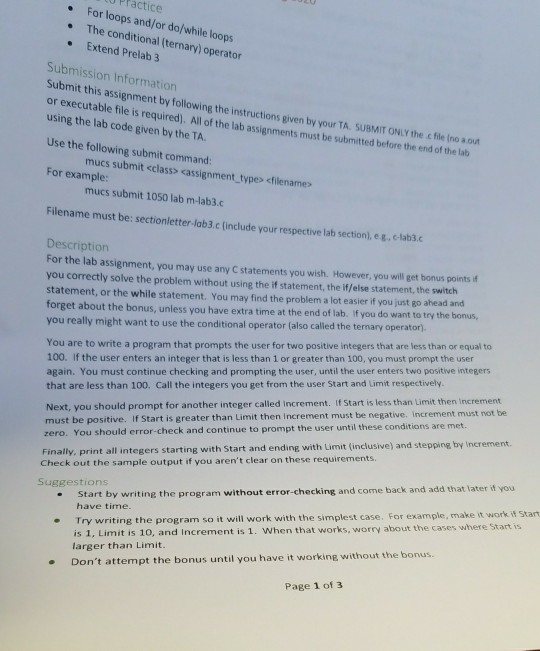
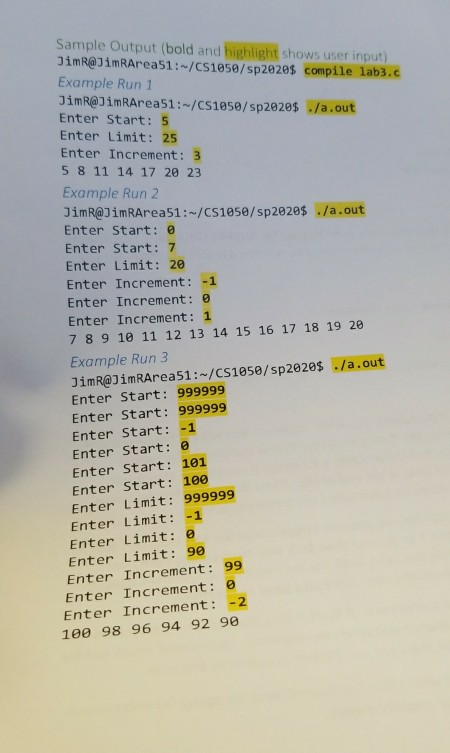
. Practice For loops and/or do/while loops The conditional ternary) operator Extend Prelab 3 Submission Information Submit this assignment by following the instructions given by your TA SUBMIT ONLY the chilenou or executable file is required). All of the lab assignments must be submitted before the end of the lat using the lab code given by the TA. Use the following submit command: mucs submit cassignment_type> For example: mucs submit 1050 lab m-lab3.c Filename must be sectionletter lab3.c include your respective la section.eu.clable Description For the lab assignment, you may use any statements you wish. However, you will get bonus points you correctly solve the problem without using the if statement, the lf/else statement, the switch statement, or the while statement. You may find the problema lot easier if you just go ahead and forget about the bonus, unless you have extra time at the end of lab. If you do want to try the bonus you really might want to use the conditional operator (also called the ternary operator) You are to write a program that prompts the user for two positive integers that are less than or equal to 100. If the user enters an integer that is less than 1 or greater than 100, you must prompt the user again. You must continue checking and prompting the user, until the user enters two positive integers that are less than 100. Call the integers you get from the user Start and limit respectively Next, you should prompt for another integer called increment. If Start is less than Limit then increment must be positive. If Start is greater than limit then Increment must be negative. Increment must not be zero. You should error-check and continue to prompt the user until these conditions are met. Finally, print all integers starting with Start and ending with Limit (inclusive) and stepping by increment. Check out the sample output if you aren't clear on these requirements. Suggestions Start by writing the program without error-checking and come back and add that later 11 you have time. Try writing the program so it will work with the simplest case. For example, make it work. 11 Start is 1, Limit is 10, and increment is 1. When that works, worry about the cases where Start is larger than Limit. Don't attempt the bonus until you have it working without the bonus Page 1 of 3 Sample Output (bold and highlight shows user input) JimR@JimRArea51:-/CS1050/sp2020$ compile lab3.c Example Run 1 JimR@JimRArea51:-/CS1050/sp2020$ /a.out Enter Start: 5 Enter Limit: 25 Enter Increment: 3 5 8 11 14 17 20 23 Example Run 2 JimR@JimRArea51:-/CS1050/sp2020$ ./a.out Enter Start: Enter Start: 7 Enter Limit: 20 Enter Increment: -1 Enter Increment: 0 Enter Increment: 7 8 9 10 11 12 13 14 15 16 17 18 19 20 Example Run 3 JimR@JimRArea51:-/CS1050/sp2020$ ./a.out Enter Start: 999999 Enter Start: 999999 Enter Start: -1 Enter Start: Enter Start: 101 Enter Start: 100 Enter Limit: 999999 Enter Limit: Enter Limit: Enter Limit: 90 Enter Increment: 99 Enter Increment: Enter Increment: -2 100 98 96 94 92 90

Step by Step Solution

There are 3 Steps involved in it

1 Expert Approved Answer
Step: 1 Unlock blur-text-image
Question Has Been Solved by an Expert!

Get step-by-step solutions from verified subject matter experts

Step: 2 Unlock
Step: 3 Unlock

Students Have Also Explored These Related Databases Questions!