







Question: Practice SQL Joins. Use the Movies database we created last week. For all result sets, make sure the column names are human-readable, you only have
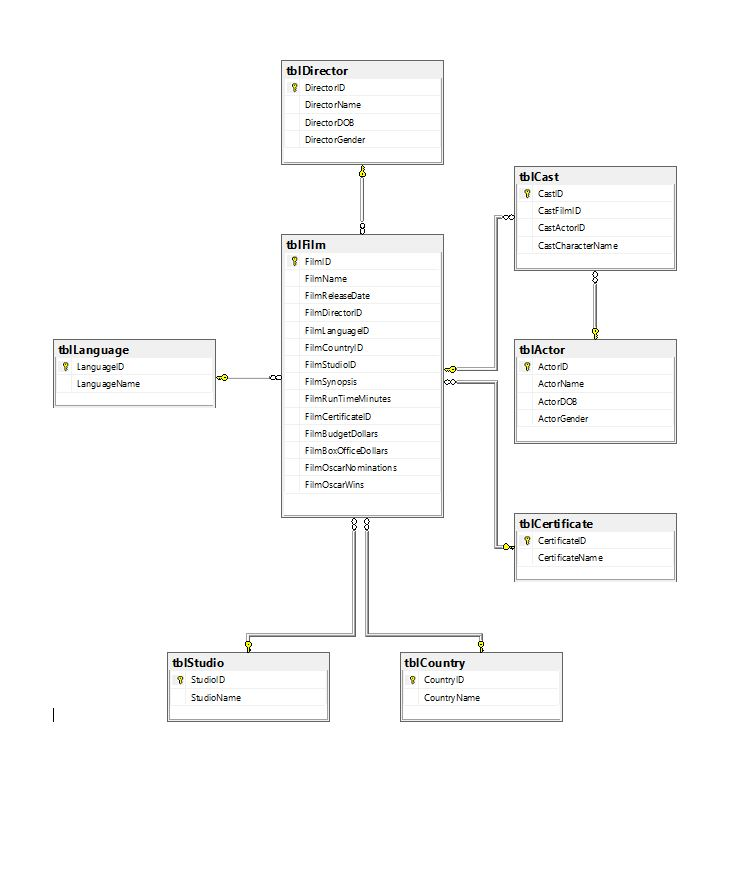 Practice SQL Joins. Use the Movies database we created last week. For all result sets, make sure the column names are human-readable, you only have the information in the result set in which a human would be interested. Turn in 1 worksheet (Excel or Google Sheets) that includes a spreadsheet per result set, so a total of 4 spreadsheets in 1 worksheet and 1 .sql file with all of your SQL statements. 1. Write a statement joining all tables to produce a result set that has all the information a human would want to know about all of the movies in the database. Export that information to a Spreadsheet. 2. Write a statement that will produce a result set that displays actor names and shows the films that they have been in. Export this to a spreadsheet. 3. Write a statement that will produce a result set of directors who don't have a movie listed in the database. Export this to a spreadsheet. 4. Write a statement that will produce a result set of the studios that don't have a movie listed in the database. Export this to a spreadsheet.
Database Movies - https://ufile.io/i73jg
tblDirector DirectorlD DirectorDO8 tblCast 9 Cast D CastCharacterName FilmCountrylD FilmStudiolD tblLanquage tblActor Language D LanguageName FilmRunTimeMinutes FilmBoxOfficeDollars FilmOscarNo minations tblCertificate CertificateName tblStudio tblCountry Country D Country Name StudioName
Step by Step Solution
There are 3 Steps involved in it

Get step-by-step solutions from verified subject matter experts
 Study Help