







Question: Pre-Lab 11b CS 122L - 5 Points Total Objectives Verify that your?code from lab 11a is correct Deliverables Submit your pre-lab answers in Bblearn under
Pre-Lab 11b
CS 122L - 5 Points Total
Objectives
Verify that your?code from lab 11a is correct
Deliverables
Submit your pre-lab answers in Bblearn under the Lab 1 pre-lab assignment area prior to the start of class.
The goal of this pre-lab is to verify that you have correctly implemented the functions that were assigned to you in Lab 11a. To get started, download the prelab11b.m file from Bblearn. Move it to the same directory as your Lab11a folder. If you have been following instructions, that folder should be located in the cs122 directory.
After your have moved the file, cd into your cs122 directory and add the cs122 folder and the Lab11a folder to your path. If you are using the addpath function, then this will require two separate function calls.
Once you have added the files to the path, simply enter the following command into the MATLAB console:
runtests(prelab11b.m)
This will run all of the tests with your code. Note that the tests will ask you to input several values. Enter appropriate values as requested or your tests will fail.
Once the tests have finished, there will be a report that tells you which tests passed and which failed. If a test fails, you should be able to tell from the name of the test which function is causing the problem. Once you have identified the issue, fix it, and then run the tests again. When you pass all tests, copy and paste the output into a word document.
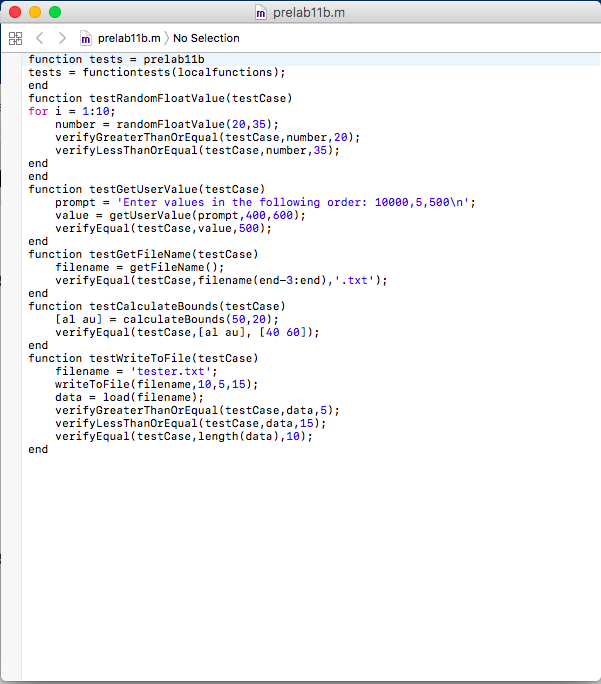
function tests = prelab11b
tests = functiontests(localfunctions);
end
function testRandomFloatValue(testCase)
for i = 1:10;
number = randomFloatValue(20,35);
verifyGreaterThanOrEqual(testCase,number,20);
verifyLessThanOrEqual(testCase,number,35);
end
end
function testGetUserValue(testCase)
prompt = 'Enter values in the following order: 10000,5,500 ';
value = getUserValue(prompt,400,600);
verifyEqual(testCase,value,500);
end
function testGetFileName(testCase)
filename = getFileName();
verifyEqual(testCase,filename(end-3:end),'.txt');
end
function testCalculateBounds(testCase)
[al au] = calculateBounds(50,20);
verifyEqual(testCase,[al au], [40 60]);
end
function testWriteToFile(testCase)
filename = 'tester.txt';
writeToFile(filename,10,5,15);
data = load(filename);
verifyGreaterThanOrEqual(testCase,data,5);
verifyLessThanOrEqual(testCase,data,15);
verifyEqual(testCase,length(data),10);
end
m prelab11b.m E m prelab11b.m No Selection function tests - prelab11b tests functiontests (localfunctions); end function testRandomFloatValue (testCase) for i-1:10; number-randomFloatValue (20,35); verifyGreaterThanOrEqual(testCase,number, 28); verifyLessThanOrEqual(testCase, number, 35); end end function testGetUserValue (testCase) prompt'Enter values in the following order 1000e,5,500 ' value getUserValue (prompt, 400,600) verifyEqual(testCase, value, 500); end function testGetFileName (testCase) filename-getFileName ) verifyEqual (testCase,filename (end-3:end), '.txt'); end function testCalculateBounds (testCase) [al aucalculateBounds (50,20); verifyEqual(testCase, [al au], [40 60]) end function testWriteToFile(testCase) filename'tester.txt' writeToFile(filename,10,5,15); dataload(filename verifyGreaterThanOrEqual(testCase,data, 5) verifyLessThanOrEqual(testCase,data, 15); verifyEqual(testCase,length (data),10) end m prelab11b.m E m prelab11b.m No Selection function tests - prelab11b tests functiontests (localfunctions); end function testRandomFloatValue (testCase) for i-1:10; number-randomFloatValue (20,35); verifyGreaterThanOrEqual(testCase,number, 28); verifyLessThanOrEqual(testCase, number, 35); end end function testGetUserValue (testCase) prompt'Enter values in the following order 1000e,5,500 ' value getUserValue (prompt, 400,600) verifyEqual(testCase, value, 500); end function testGetFileName (testCase) filename-getFileName ) verifyEqual (testCase,filename (end-3:end), '.txt'); end function testCalculateBounds (testCase) [al aucalculateBounds (50,20); verifyEqual(testCase, [al au], [40 60]) end function testWriteToFile(testCase) filename'tester.txt' writeToFile(filename,10,5,15); dataload(filename verifyGreaterThanOrEqual(testCase,data, 5) verifyLessThanOrEqual(testCase,data, 15); verifyEqual(testCase,length (data),10) end
Step by Step Solution
There are 3 Steps involved in it

Get step-by-step solutions from verified subject matter experts
 Study Help