







Question: Prepare and configure the following network using Packet Tracer, Save the File with your ID-name as the file name. GO GO1 IT Dept COMPANY Eng
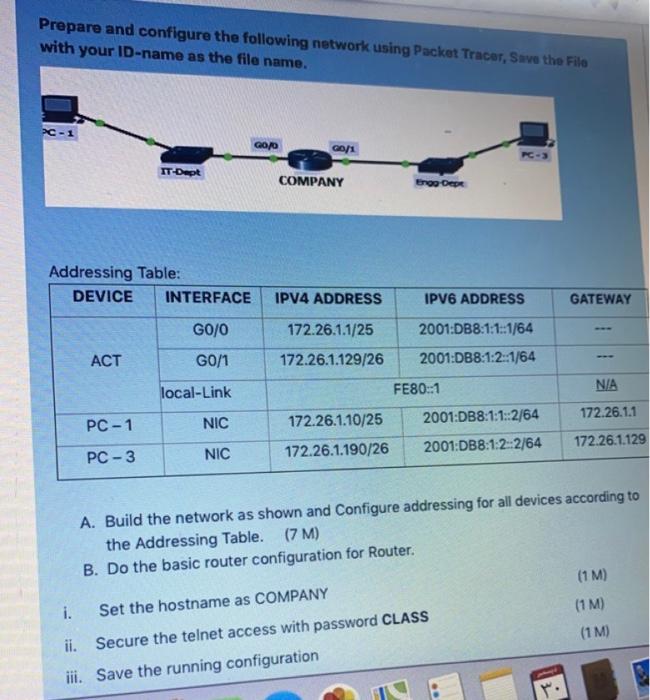
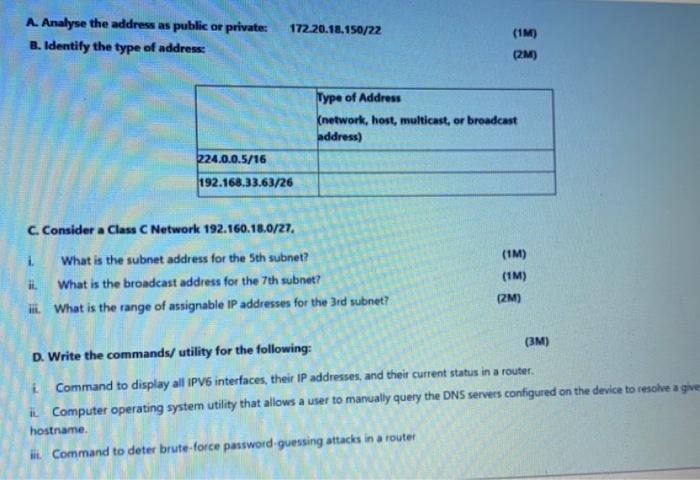
Prepare and configure the following network using Packet Tracer, Save the File with your ID-name as the file name. GO GO1 IT Dept COMPANY Eng Dee Addressing Table: DEVICE INTERFACE IPV4 ADDRESS IPV6 ADDRESS GATEWAY G0/0 172.26.1.1/25 2001:DB8:1:1:1864 ACT G0/1 172.26.1.129/26 2001:DB8:1:2::1/64 local-Link FE80::1 N/A 172.26.1.1 PC-1 NIC 2001:DB8:1:1::2/64 172.26.1.10/25 172.26.1.129 PC-3 NIC 2001:DB8:1:22/64 172.26.1.190/26 A. Build the network as shown and Configure addressing for all devices according to the Addressing Table. (7M) B. Do the basic router configuration for Router. (1 M) (1 M) (1 M) i. Set the hostname as COMPANY ii. Secure the telnet access with password CLASS iii. Save the running configuration i A. Analyse the address as public or private B. Identify the type of address: 172.20.18.150/22 (1M) (2M) Type of Address (network, host, multicast, or broadcast address) 224.0.0.5/16 192.168.33.63/26 C Consider a Class C Network 192.160.18.0/27, 1 What is the subnet address for the 5th subnet? It What is the broadcast address for the 7th subnet? ili. What is the range of assignable IP addresses for the 3rd subnet? (1M) (1M) (2M) D. Write the commands/utility for the following: (3M) i Command to display all IPV6 interfaces, their IP addresses, and their current status in a router il Computer operating system utility that allows a user to manually query the DNS servers configured on the device to resolve a give hostname Hi Command to deter brute-force password guessing attacks in a router
Step by Step Solution
There are 3 Steps involved in it

Get step-by-step solutions from verified subject matter experts
 Study Help