





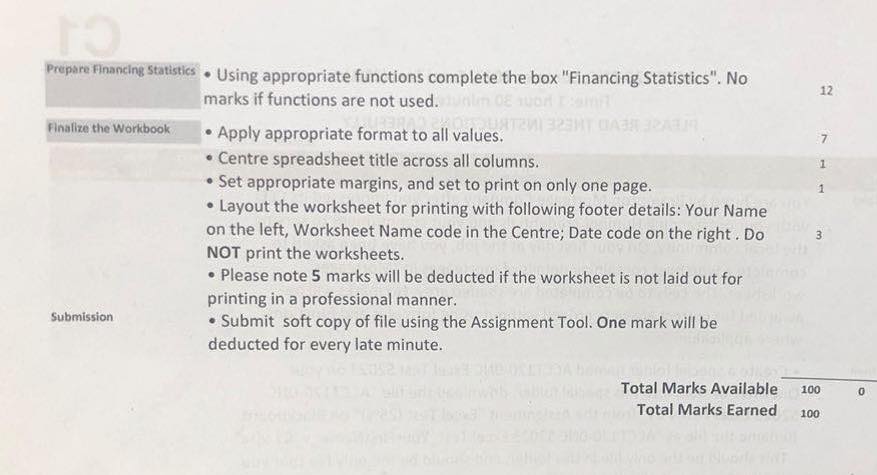
Question: Prepare Financing Statistics . Using appropriate functions complete the box Financing Statistics. No 12 marks if functions are not used. Junlin 08 wor L Finalize
Prepare Financing Statistics . Using appropriatePrepare Financing Statistics . Using appropriate
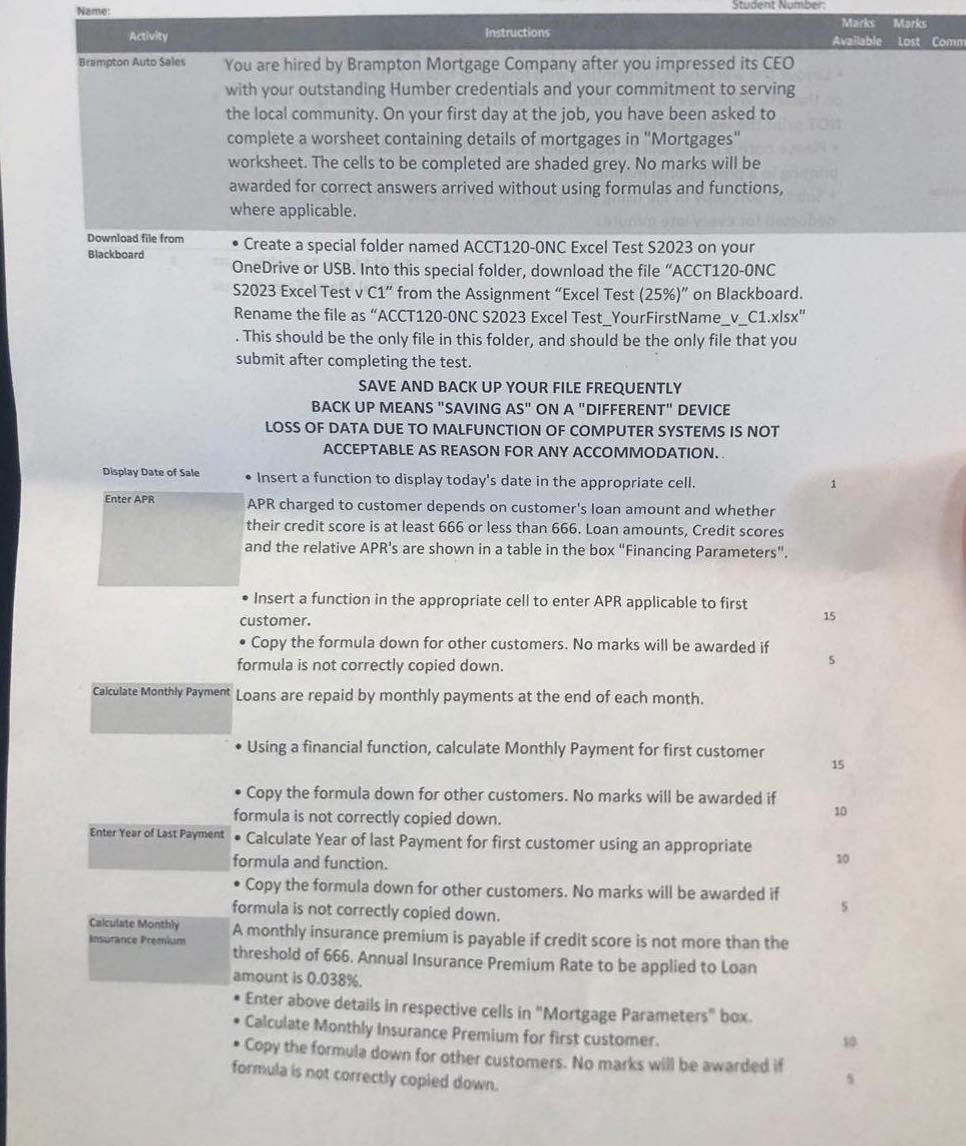
Prepare Financing Statistics . Using appropriate functions complete the box "Financing Statistics". No 12 marks if functions are not used. Junlin 08 wor L Finalize the Workbook . Apply appropriate format to all values. 7 . Centre spreadsheet title across all columns. . Set appropriate margins, and set to print on only one page. . Layout the worksheet for printing with following footer details: Your Name on the left, Worksheet Name code in the Centre; Date code on the right . Do NOT print the worksheets. . Please note 5 marks will be deducted if the worksheet is not laid out for printing in a professional manner. Submission . Submit soft copy of file using the Assignment Tool. One mark will be deducted for every late minute. Total Marks Available 100 Total Marks Earned 100Marks Marks Activity Instructions Available Lost Comm Brampton Auto Sales You are hired by Brampton Mortgage Company after you impressed its CEO with your outstanding Humber credentials and your commitment to serving the local community. On your first day at the job, you have been asked to complete a worsheet containing details of mortgages in "Mortgages" worksheet. The cells to be completed are shaded grey. No marks will be awarded for correct answers arrived without using formulas and functions, where applicable. Download file from . Create a special folder named ACCT120-ONC Excel Test $2023 on your Blackboard OneDrive or USB. Into this special folder, download the file "ACCT120-ONC $2023 Excel Test v C1" from the Assignment "Excel Test (25%)" on Blackboard. Rename the file as "ACCT120-ONC $2023 Excel Test_YourFirstName_v_C1.xisx" This should be the only file in this folder, and should be the only file that you submit after completing the test. SAVE AND BACK UP YOUR FILE FREQUENTLY BACK UP MEANS "SAVING AS" ON A "DIFFERENT" DEVICE LOSS OF DATA DUE TO MALFUNCTION OF COMPUTER SYSTEMS IS NOT ACCEPTABLE AS REASON FOR ANY ACCOMMODATION.. Display Date of Sale . Insert a function to display today's date in the appropriate cell. Enter APR APR charged to customer depends on customer's loan amount and whether their credit score is at least 666 or less than 666. Loan amounts, Credit scores and the relative APR's are shown in a table in the box "Financing Parameters". . Insert a function in the appropriate cell to enter APR applicable to first 15 customer. . Copy the formula down for other customers. No marks will be awarded if formula is not correctly copied down. Calculate Monthly Payment Loans are repaid by monthly payments at the end of each month. . Using a financial function, calculate Monthly Payment for first customer 15 . Copy the formula down for other customers. No marks will be awarded if 10 formula is not correctly copied down. Enter Year of Last Payment . Calculate Year of last Payment for first customer using an appropriate 10 formula and function. . Copy the formula down for other customers. No marks will be awarded if formula is not correctly copied down. Calculate Monthly Insurance Preenkam A monthly insurance premium is payable if credit score is not more than the threshold of 666. Annual Insurance Premium Rate to be applied to Loan amount is 0.038%. . Enter above details in respective cells in "Mortgage Parameters" box. . Calculate Monthly Insurance Premium for first customer. . Copy the formula down for other customers. No marks will be awarded if formula is not correctly copied down

Step by Step Solution

There are 3 Steps involved in it

1 Expert Approved Answer
Step: 1 Unlock blur-text-image

Question Has Been Solved by an Expert!

Get step-by-step solutions from verified subject matter experts

Step: 2 Unlock
Step: 3 Unlock

Students Have Also Explored These Related Accounting Questions!