







Question: previous | 10 of 10 I return to assignment VPython 1.1 -- Pseudocode Below is a VPython program that simulates a cart moving at constant
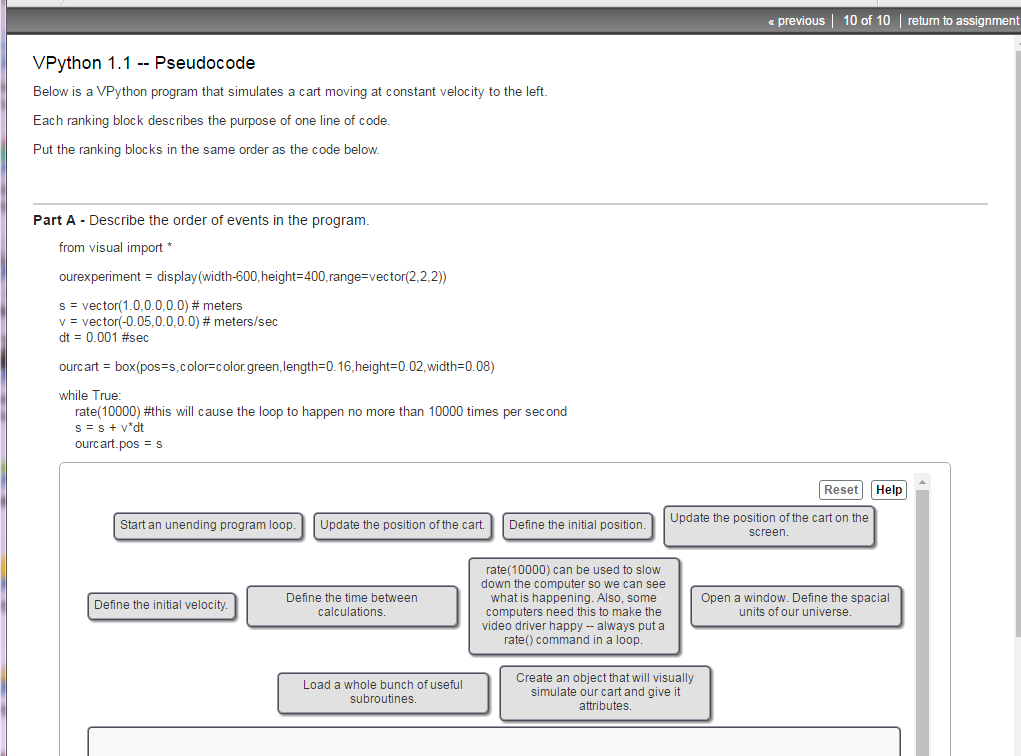
previous | 10 of 10 I return to assignment VPython 1.1 -- Pseudocode Below is a VPython program that simulates a cart moving at constant velocity to the left. Each ranking block describes the purpose of one line of code Put the ranking blocks in the same order as the code below. Part A Describe the order of events in the program from visual import ourexperimentdisplay (width-600,height 400,range-vector(2,2,2)) s-vector( 1.0.0.0.0.0) # meters v = vector(-0.05, 0.000) # meters/sec dt 0.001 #sec ourcats box(pos-s.color-color green, length-o16.height-o02.width=0.08) while True rate( 10000) #this will cause the loop to happen no more than 10000 times per second ourc art. pos s Reset Help Update the position of the cart on the screen. Start an unending program loop Update the position of the cart. Define the initial position. rate(10000) can be used to slow down the computer so we can see what is happening. Also, some computers need this to make the video driver happy-always put a rate) command in a loop Define the time between calculations Open a window. Define the spacial units of our universe Define the initial velocity Load a whole bunch of useful subroutines. Create an object that will visually simulate our cart and give it attributes
Step by Step Solution
There are 3 Steps involved in it

Get step-by-step solutions from verified subject matter experts
 Study Help