







Question: PRG 4 5 5 LAB TEST 1 B Student Name: Duration: 7 0 min Design a PC Cost Calculator Windows Forms Application as shown
PRG
LAB TEST B
Student Name:
Duration: min
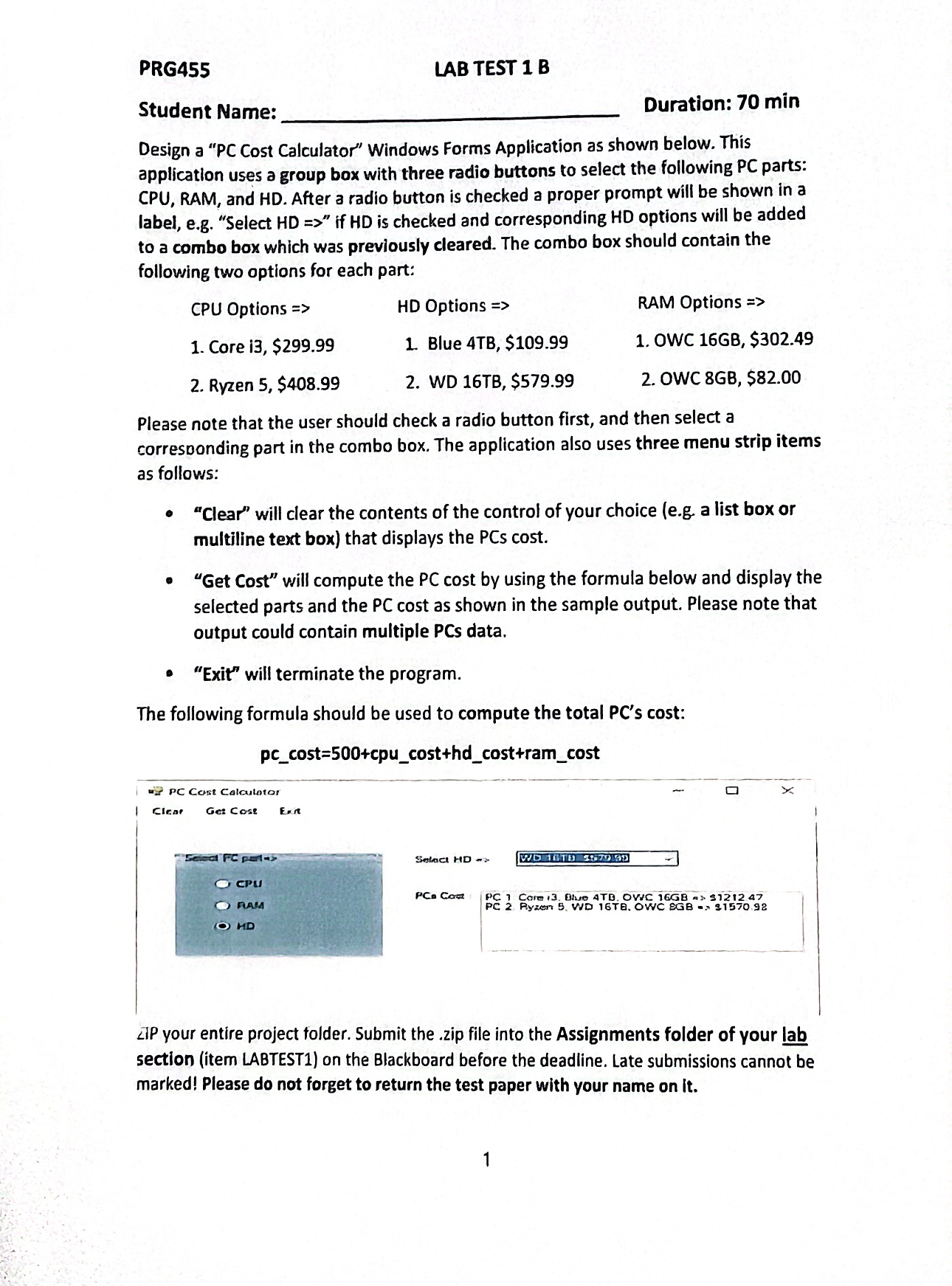
Design a PC Cost Calculator" Windows Forms Application as shown below. This application uses a group box with three radio buttons to select the following PC parts: CPU, RAM, and HD After a radio button is checked a proper prompt will be shown in a label, eg "Select HD if HD is checked and corresponding HD options will be added to a combo box which was previously cleared. The combo box should contain the following two options for each part:
CPU Options
HD Options
RAM Options
Core i $
Blue $
OWC GB $
Ryzen $
WD $
OWC GB $
Please note that the user should check a radio button first, and then select a corresponding part in the combo box. The application also uses three menu strip items as follows:
"Clear" will clear the contents of the control of your choice eg a list box or multiline text box that displays the PCs cost
"Get Cost" will compute the PC cost by using the formula below and display the selected parts and the PC cost as shown in the sample output. Please note that output could contain multiple PCs data.
"Exit" will terminate the program.
The following formula should be used to compute the total PCs cost:
DPC Cast Calculator
Clent Geacose Exr
LiP your entire project folder. Submit the zip file into the Assignments folder of your lab section item LABTEST on the Blackboard before the deadline. Late submissions cannot be marked! Please do not forget to return the test paper with your name on it
Step by Step Solution
There are 3 Steps involved in it
1 Expert Approved Answer
Step: 1 Unlock

Question Has Been Solved by an Expert!
Get step-by-step solutions from verified subject matter experts
Step: 2 Unlock
Step: 3 Unlock
 Study Help