







Question: Prior to starting this assignment watch the Chapter 1 Lecture in the Modules section: Make sure to unzip the Student Data Files onto your desktop.
Prior to starting this assignment watch the Chapter Lecture in the Modules section:
Make sure to unzip the Student Data Files onto your desktop.
Start Visual Studio Code and use the Open Folder option to open the Chapter folder and do all your work there.
When you have completed the HandsOn exercised, zip the entire Chapter folder and submit it via this Assignment,
Complete the following HandsOn exercises:
HandsOn to starting on page of the Textbook.
Make sure to upload the zipped Chapter folder
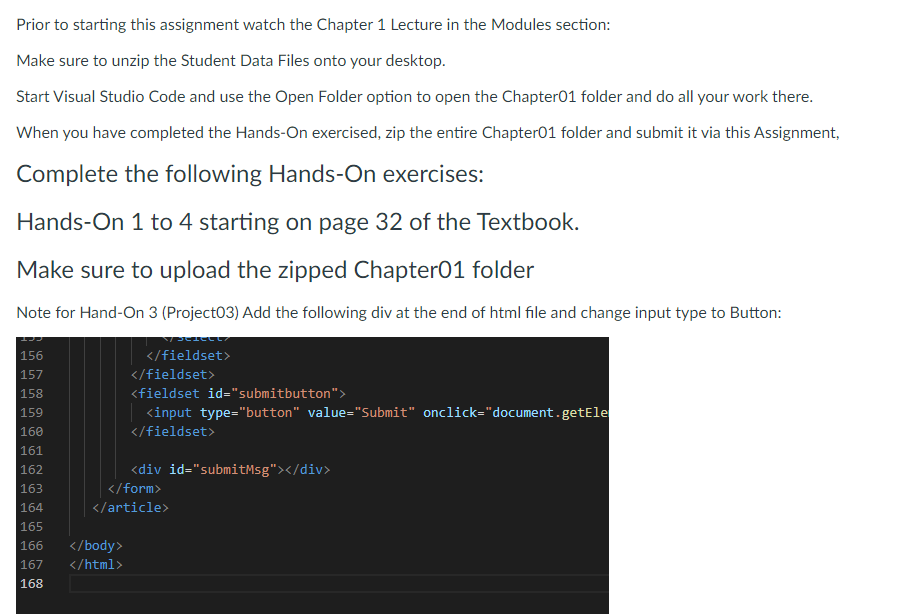
Note for HandOn Project Add the following div at the end of html file and change input type to Button:
Step by Step Solution
There are 3 Steps involved in it
1 Expert Approved Answer
Step: 1 Unlock

Question Has Been Solved by an Expert!
Get step-by-step solutions from verified subject matter experts
Step: 2 Unlock
Step: 3 Unlock
 Study Help