







Question: Problem 1 0 - 2 An auto - part manufacturing company is considering the purchase of an industrial robot to do spot welding, which is
Problem
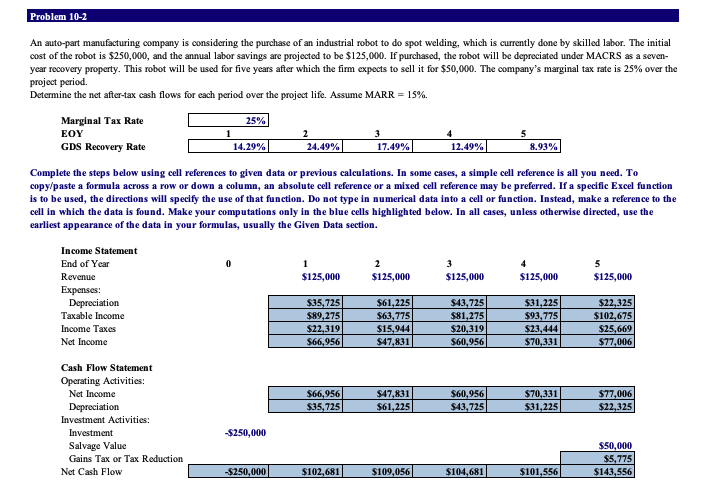
An autopart manufacturing company is considering the purchase of an industrial robot to do spot welding, which is currently done by skilled labor. The initial cost of the robot is $ and the annual labor savings are projected to be $ If purchased, the robot will be depreciated under MACRS as a sevenyear recovery property. This robot will be used for five years after which the firm expects to sell it for $ The company's marginal tax rate is over the project period.
Determine the net aftertax cash flows for each period over the project life. Assume MARR
Marginal Tax Rate
Complete the steps below using cell references to given data or previous calculations. In some cases, a simple cell reference is all you need. To copypaste a formula across a row or down a column, an absolute cell reference or a mixed cell reference may be preferred. If a specific Excel function is to be used, the directions will specify the use of that function. Do not type in numerical data into a cell or function. Instead, make a reference to the cell in which the data is found. Make your computations only in the blue cells highlighted below. In all cases, unless otherwise directed, use the earliest appearance of the data in your formulas, usually the Given Data section. Start Excelcompleted.
In cell E by using cell references, calculate the annual depreciation deduction using the MACRS method for year pt Note: Enter the depreciation amount as a positive value.
To calculate the annual depreciation deductions using the MACRS method for years through copy cell E and paste it onto cells F:H pt
In cell I by using cell references, calculate the annual depreciation deduction using the MACRS method for year pt
Note: Halfyear convention applies to year due to disposal of asset.
In cell E by using cell references, calculate the taxable income for year pt
To calculate the annual taxable income for years through copy cell E and paste it onto cells F:I pt
In cell E by using cell references, calculate the income taxes for year pt
Note:
Use a cell reference to the taxable income from Step in your calculations.
Enter the income taxes amount as a positive value.
To calculate the annual income taxes for years through copy cell E and paste it onto cells F:I pt
In cell E by using cell references, calculate the net income for year pt
Note: Use cell references to the taxable income from Step and to the income taxes from Step in your calculations.
To calculate the net income for years through copy cell E and paste it onto cells F:I pt
In cells E:I by using cell references, calculate the net income for years through pt
Note: Use cell references to the net income from Steps and
In cells E:I by using cell references, calculate the annual depreciation deductions for years through pt
Note:
Use cell references to the depreciation deductions from Steps and
Enter the annual depreciation deductions as positive values.
In cell I by using cell references, calculate the gains tax for year pt
Note:
Use cell references to the depreciation deductions from Step
Note that there can be a reduction in tax due to the loss. Enter gain tax, if any, as a negative value or enter tax reduction, if any, as a positive value.
In cell D by using cell references, calculate the net cash flow for year pt
To calculate the net cash flows for years through copy cell D and paste it onto cells E: pt
Save the workbook. Close the workbook and then exit Excel. Submit the workbook as directed.
Step by Step Solution
There are 3 Steps involved in it
1 Expert Approved Answer
Step: 1 Unlock

Question Has Been Solved by an Expert!
Get step-by-step solutions from verified subject matter experts
Step: 2 Unlock
Step: 3 Unlock
 Study Help