







Question: Problem 1 : Load Stroke Data IProblem 1 : Load Stroke Data In this assignment you will be working with data obtained from Kaggle.com relating
Problem : Load Stroke Data
IProblem : Load Stroke Data
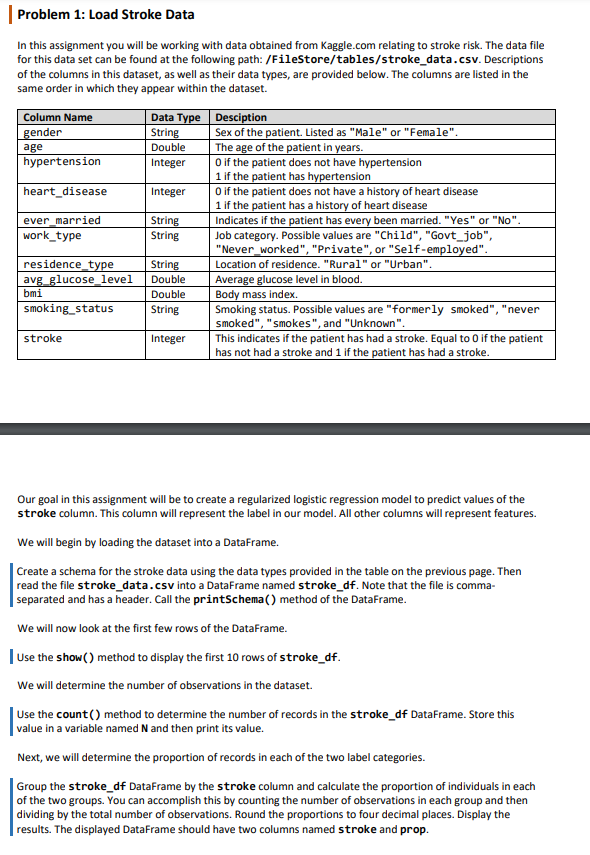
In this assignment you will be working with data obtained from
Kaggle.com relating to stroke risk. The data file
for this data set can be found at the following path: FileStoretablesstrokedata.csv Descriptions
of the columns in this dataset, as well as their data types, are provided below. The columns are listed in the
same order in which they appear within the dataset.
Our goal in this assignment will be to create a regularized logistic regression model to predict values of the
stroke column. This column will represent the label in our model. All other columns will represent features.
We will begin by loading the dataset into a DataFrame.
Create a schema for the stroke data using the data types provided in the table on the previous page. Then
read the file strokedata.csv into a DataFrame named strokedf Note that the file is comma
separated and has a header. Call the printSchema method of the DataFrame.
We will now look at the first few rows of the DataFrame.
Use the show method to display the first rows of strokedf
We will determine the number of observations in the dataset.
Use the count method to determine the number of records in the strokedf DataFrame. Store this
value in a variable named and then print its value.
Next, we will determine the proportion of records in each of the two label categories.
Group the strokedf DataFrame by the stroke column and calculate the proportion of individuals in each
of the two groups. You can accomplish this by counting the number of observations in each group and then
dividing by the total number of observations. Round the proportions to four decimal places. Display the
results. The displayed DataFrame should have two columns named stroke and prop.
Step by Step Solution
There are 3 Steps involved in it
1 Expert Approved Answer
Step: 1 Unlock

Question Has Been Solved by an Expert!
Get step-by-step solutions from verified subject matter experts
Step: 2 Unlock
Step: 3 Unlock
 Study Help