







Question: Problem #2 Filtering Data in Excel. Enter Professor Boehring's class roster, given in Problem #1, into an Excel worksheet. Then carry out the following filtering
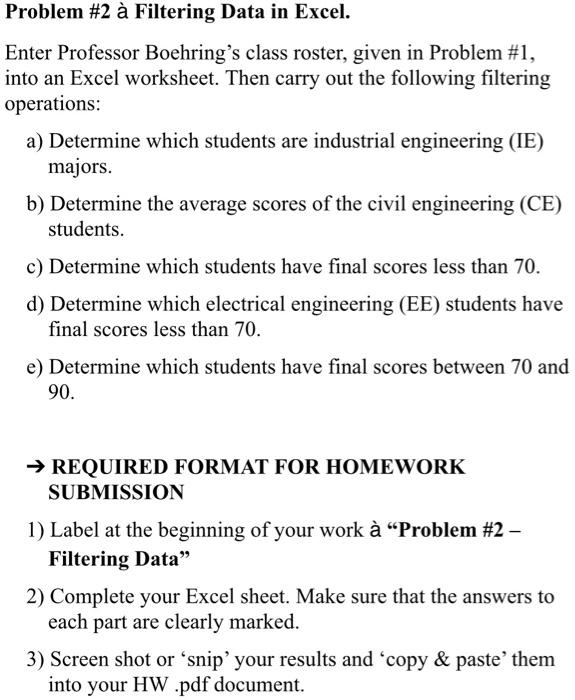
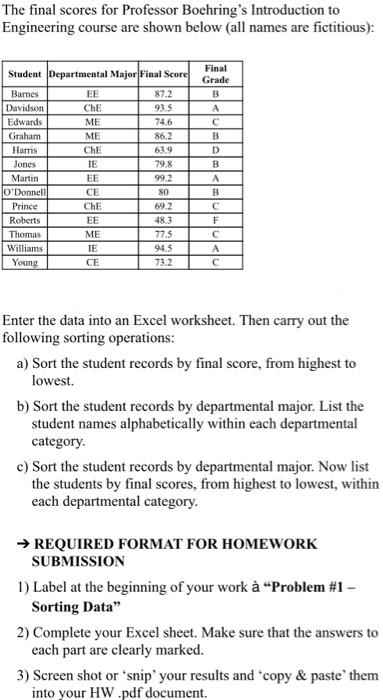
Problem #2 Filtering Data in Excel. Enter Professor Boehring's class roster, given in Problem #1, into an Excel worksheet. Then carry out the following filtering operations: a) Determine which students are industrial engineering (IE) majors. b) Determine the average scores of the civil engineering (CE) students. c) Determine which students have final scores less than 70. d) Determine which electrical engineering (EE) students have final scores less than 70. e) Determine which students have final scores between 70 and 90. REQUIRED FORMAT FOR HOMEWORK SUBMISSION 1) Label at the beginning of your work "Problem #2 - Filtering Data" 2) Complete your Excel sheet. Make sure that the answers to each part are clearly marked. 3) Screen shot or snip your results and 'copy & paste'them into your HW .pdf document. The final scores for Professor Boehring's Introduction to Engineering course are shown below (all names are fictitious): Student Departmental Major Final Score Barnes EE 87.2 Davidson ChE 93.5 Edwards ME 74.6 Graham ME 862 Harris ChE 63.9 Jones IE 79.8 Martin EE 99.2 O'Donnell CE 80 Prince ChE 69.2 Roberts EE 48.3 Thomas 77.5 Williams TE 94.5 Young CE 73.2 Final Grade B A B D D B A B F A ME Enter the data into an Excel worksheet. Then carry out the following sorting operations: a) Sort the student records by final score, from highest to lowest b) Sort the student records by departmental major. List the student names alphabetically within each departmental category. c) Sort the student records by departmental major. Now list the students by final scores, from highest to lowest, within each departmental category. REQUIRED FORMAT FOR HOMEWORK SUBMISSION 1) Label at the beginning of your work "Problem #1 - Sorting Data" 2) Complete your Excel sheet. Make sure that the answers to each part are clearly marked. 3) Screen shot or "snip your results and copy & paste' them into your HW .pdf document
Step by Step Solution
There are 3 Steps involved in it

Get step-by-step solutions from verified subject matter experts
 Study Help