







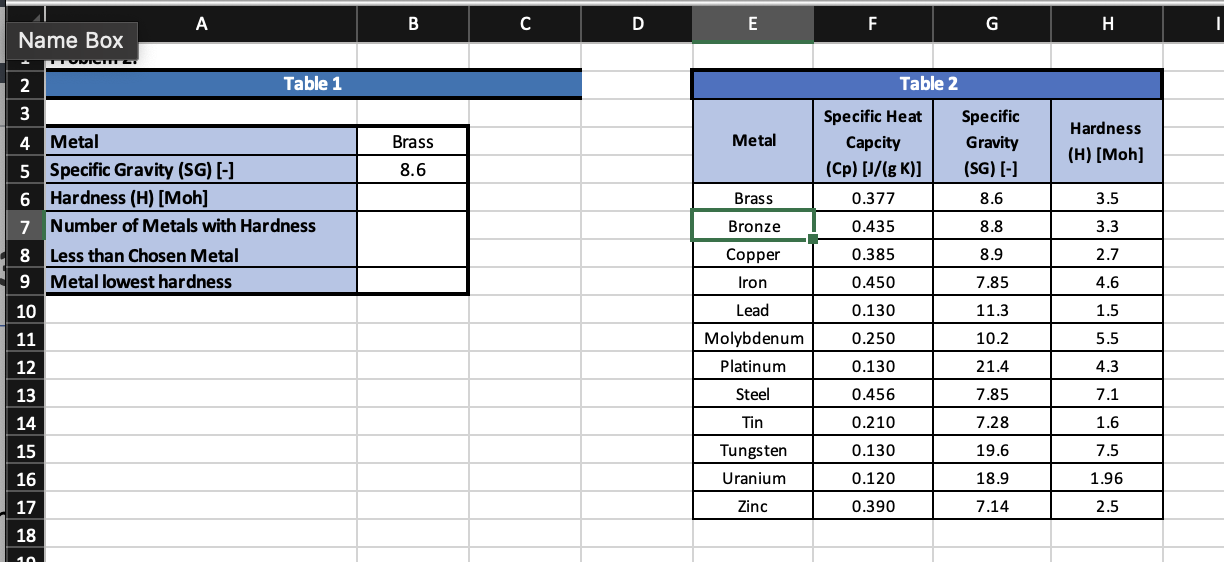
Question: Problem 2 : In worksheet Problem 2 , two tables have been created. Table 1 needs to be completed. Table 2 contains information only. In
Problem : In worksheet Problem two tables have been created. Table needs to be
completed. Table contains information only.
In cell B create a dropdown menu so the user can choose from one of the Metals
listed in the first column of Table
In cell B the value for Specific Gravity associated with the Metal chosen in B should
appear.
In cell B the value for the Hardness associated with the Metal chosen in B should
appear.
In cell calculate the number of Metals with a Hardness value LESS than the value
shown in cell Bthe metal chosen
In cell B have Excel output the Metal which has the lowest Hardness value. This may
NOT be hardcoded, and should change if Hardness values are modified.
PLEASE SHOW ALL THE FORMULA STEP BY STEP.
Step by Step Solution
There are 3 Steps involved in it
1 Expert Approved Answer
Step: 1 Unlock

Question Has Been Solved by an Expert!
Get step-by-step solutions from verified subject matter experts
Step: 2 Unlock
Step: 3 Unlock
 Study Help