







Question: Problem 3 (20 points) Get the task network title Task Network available in the Articles and Other Tools folder, within Modules on Canvas. The boxes
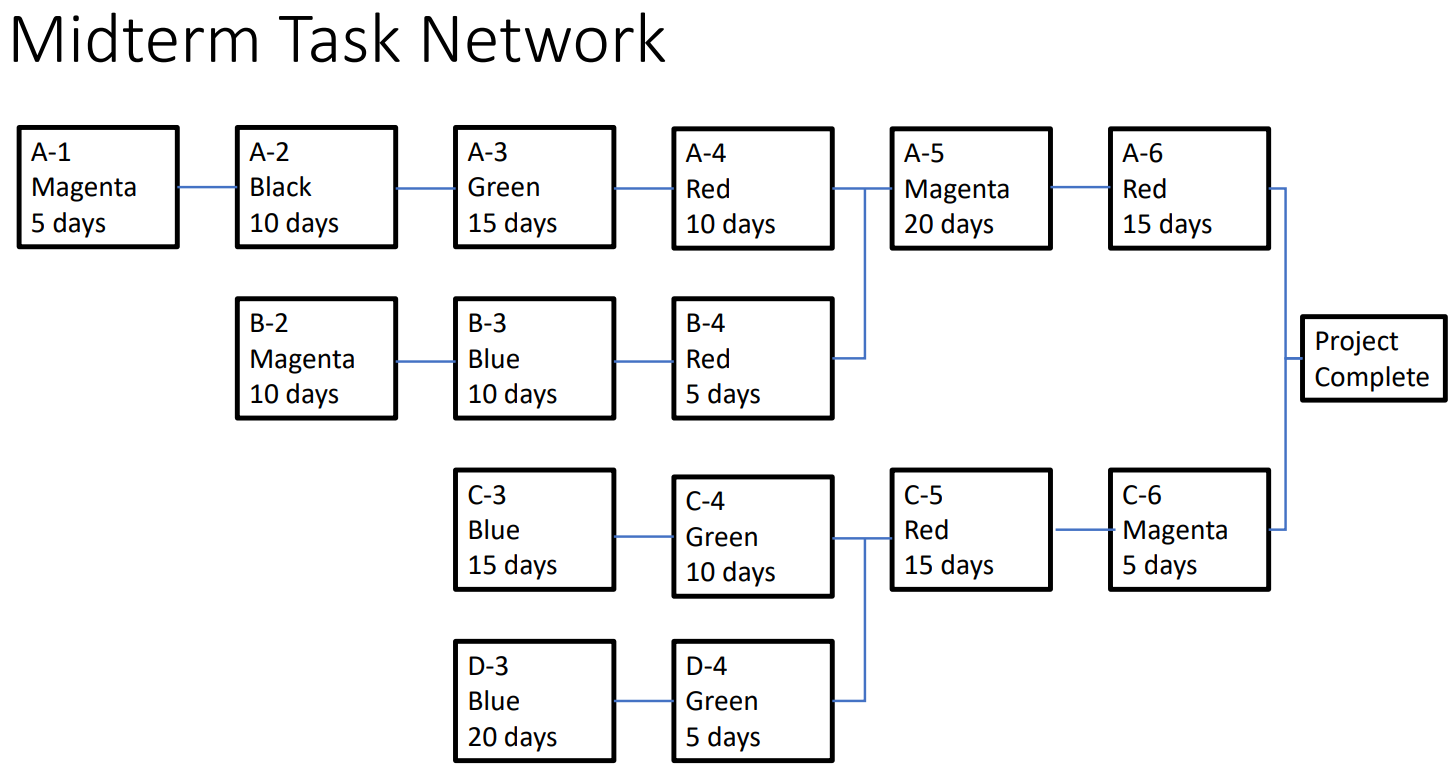
Problem 3 (20 points) Get the task network title Task Network available in the Articles and Other Tools folder, within Modules on Canvas. The boxes on the network represent tasks where the top item in each box is the task name (i.e. A-1), the middle item is the resource (i.e. Magenta), and the bottom item is the task duration in days. The task durations have already been cut by 50%.
a) Lay out the Critical Chain schedule for this project. You will first need to lay out the project network. You may use Microsoft Project, Excel, PowerPoint, or any other tool that allows you to draw the network. A hand drawn view of the project network for each step is okay if you dont have a tool you can easily use. Start the project on March 7, 2022. What is the project end date before leveling any resource conflicts? What is the project end date after leveling resources? (10 points)
b) Identify the critical chain. (5 points)
c) Lastly, size and insert the project and feeding buffers. Be sure to identify the approach you used for sizing the buffers. What is the project end date after inserting the appropriate buffers? (5 points)
Midterm Task Network
Step by Step Solution
There are 3 Steps involved in it

Get step-by-step solutions from verified subject matter experts
 Study Help