







Question: Problem 3. Leap Years using IF and ELSEIF statements First, solve the following problem using pen and paper. That is, predict the results and write
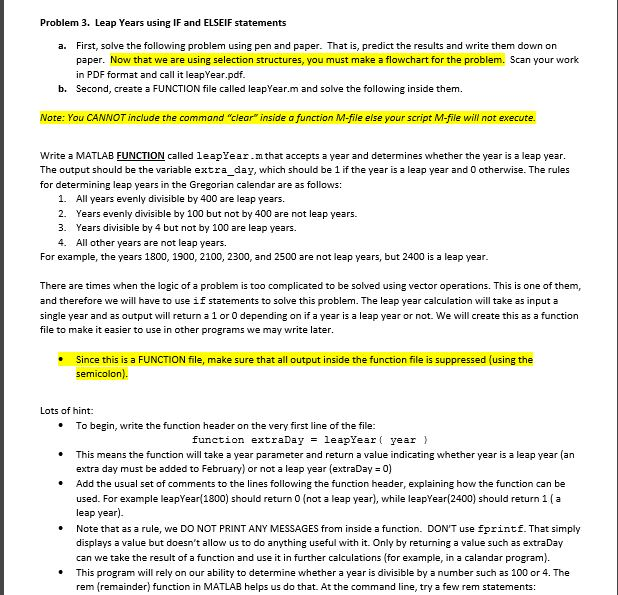
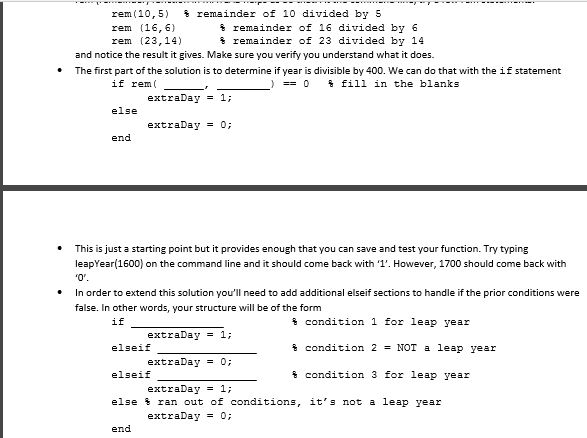
Problem 3. Leap Years using IF and ELSEIF statements First, solve the following problem using pen and paper. That is, predict the results and write them down on paper. Now that we are using selection structures, you must make a flowchart for the problem. Scan your work in PDF format and call it leapYear.pdf a. b. Second, create a FUNCTION file cled leapYear.m and solve the following inside them. Note: You CANNOT include the command "clear inside a function M-file else your script M-file will not execute. Write a MATLAB FUNCTION called leapYear.mthat accepts a year and determines whether the year is a leap year The output should be the variable extra day, which should be 1 if the year is a leap year and 0 otherwise. The rules for determining leap years in t he Gregorian calendar are as follows: 1. 2. 3. 4. All years evenly divisible by 400 are leap years. Years evenly divisible by 100 but not by 400 are not leap years. Years divisible by 4 but not by 100 are leap years. All other years are not leap years. For example, the years 1800, 1900, 2100, 2300, and 2500 are not leap years, but 2400 is a leap year There are times when the logic of a problem is too complicated to be solved using vector operations. This is one of them, and therefore we will have to use if statements to solve this problem. The leap year calculation will take as input a single year and as output will return a 1 or 0 depending on if a year is a leap year or not. We will create this as a function file to make it easier to use in other programs we may write later Since this is a FUNCTION file, make sure that all output inside the function file is suppressed (using the Lots of hint * To begin, write the function header on the very first line of the file .This means the function will take a year parameter and return a value indicating whether year is a leap year (an - Add the usual set of comments to the lines following the function header, function extraDay = 1eaoYear( year } extra day must be added to February) or not a leap year (extraDay = 0) explaining how the function can be used. For example leapYear 1800) should return 0 (not a leap year), while leapYear(2400) should return 1 (a leap year) Note that as a rule, we DO NOT PRINT ANY MESSAGES from inside a function. DON'T use fprintf. That simply displays a value but doesn't allow us to do anything useful with it. Only by returning a value such as extraDay can we take the result of a function and use it in further calculations (for example, in a calandar program). This program will rely on our ability to determine whether a year is divisible by a number such as 100 or 4. The rem (remainder) function in MATLAB helps us do that. At the command line, try a few rem statements: *
Step by Step Solution
There are 3 Steps involved in it

Get step-by-step solutions from verified subject matter experts
 Study Help