







Question: Problem 3: Write code that iterates over umich_buildings and outputs a . csv file called north_quad_distance.csv. The csv file has two columns: 1. The building
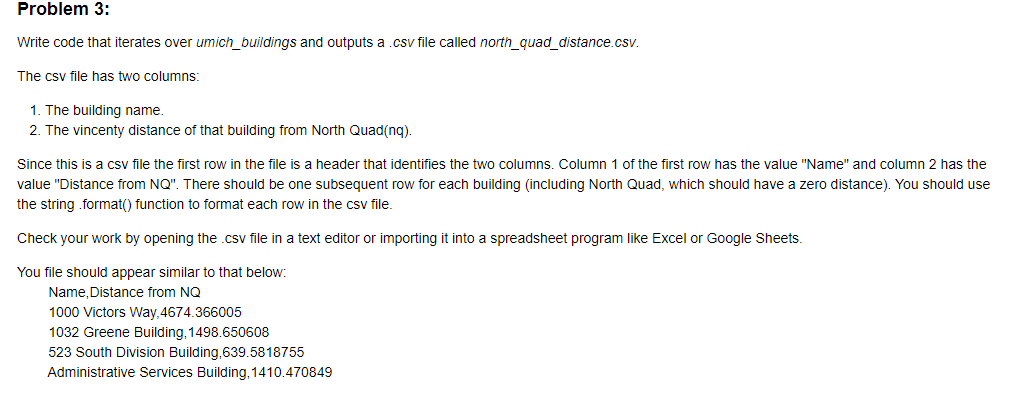
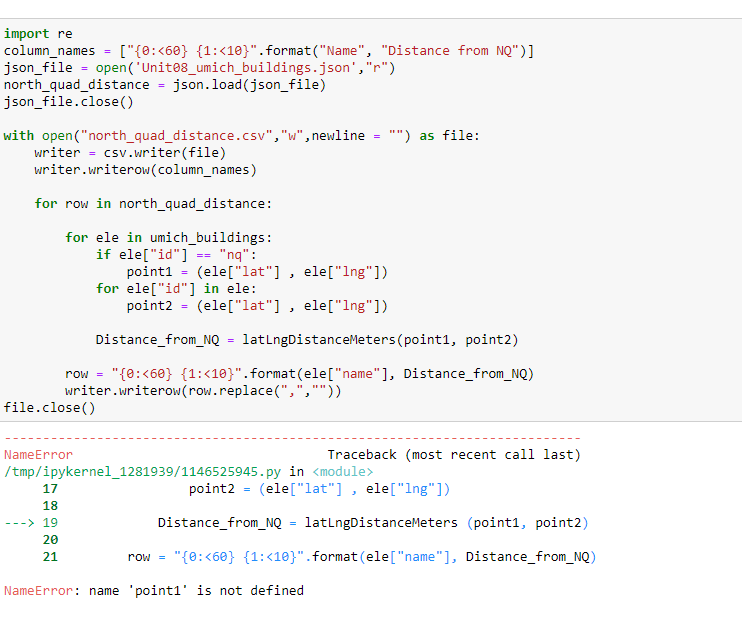
Problem 3: Write code that iterates over umich_buildings and outputs a . csv file called north_quad_distance.csv. The csv file has two columns: 1. The building name. 2. The vincenty distance of that building from North Quad(nq). Since this is a csv file the first row in the file is a header that identifies the two columns. Column 1 of the first row has the value "Name" and column 2 has the value "Distance from NQ". There should be one subsequent row for each building (including North Quad, which should have a zero distance). You should use the string .format() function to format each row in the csv file. Check your work by opening the .csv file in a text editor or importing it into a spreadsheet program like Excel or Google Sheets. You file should appear similar to that below: Name, Distance from NQ 1000 Victors Way, 4674.366005 1032 Greene Building, 1498.650608 523 South Division Building, 639.5818755 Administrative Services Building, 1410.470849import re column_names = ["{0: 17 point? = (ele["lat"] , ele["Ing"]) 18 > 19 Distance_from_NQ = latingDistanceMeters (point1, point2) 20 21 row = "{0:
Step by Step Solution
There are 3 Steps involved in it

Get step-by-step solutions from verified subject matter experts
 Study Help