







Question: Problem 5: Newton's Divided Difference in Matlab. (a). Write two functions in Matlab. The first function, called divdiff, should read in two vectors x and
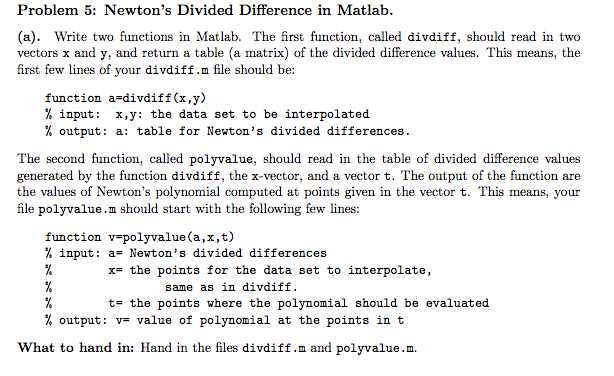
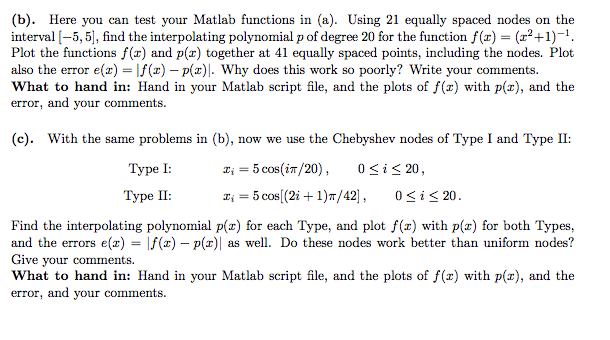
Problem 5: Newton's Divided Difference in Matlab. (a). Write two functions in Matlab. The first function, called divdiff, should read in two vectors x and y, and return a table (a matrix) of the divided difference values. This means, the first few lines of your divdiff.m file should be function a divdiff(x,y) input x,y: the data set to be interpolated output a: table for Newton's divided differences The second function, called polyvalue, should read in the table of divided difference values generated by the function divdiff, the vector, and a vector t The output of the function are the values of Newton's polynomial computed at points given in the vector t. This means, your file polyvalue In should start with the following few lines: function v polyvalue (a,x,t input a- Newton's divided differences x- the points for the data set to interpolate, same as in divdif ta the points where the polynomial should be evaluated output v- value of polynomial at the points in t What to hand in: Hand in the files divdiff.m and polyvalue.m
Step by Step Solution
There are 3 Steps involved in it

Get step-by-step solutions from verified subject matter experts
 Study Help