







Question: Problem 6 This is a Matlab exercise. 1. Save the Excel file hw3.xlsx from Blackboard or DEN in your MATLAB directory 2. Load the Excel
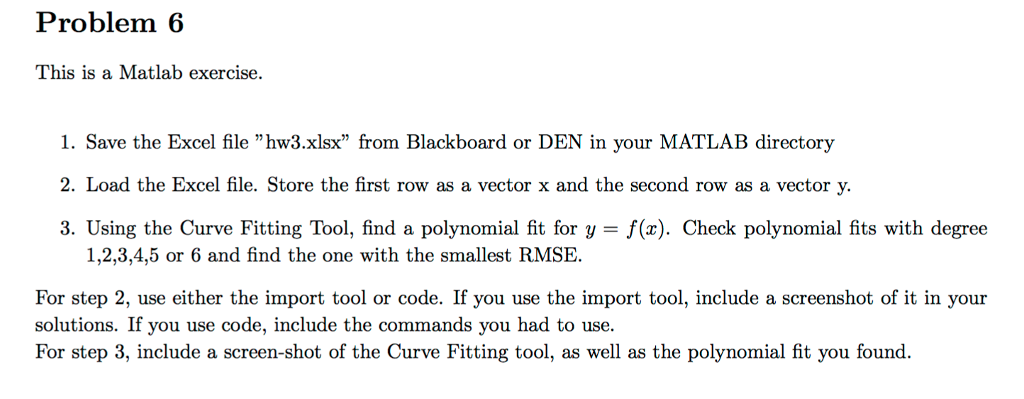
Problem 6 This is a Matlab exercise. 1. Save the Excel file "hw3.xlsx" from Blackboard or DEN in your MATLAB directory 2. Load the Excel file. Store the first row as a vector x and the second row as a vector y. 3. Using the Curve Fitting Tool, find a polynomial fit for y - f(x). Check polynomial fits with degree 1,2,3,4,5 or 6 and find the one with the smallest RMSE. For step 2, use either the import tool or code. If you use the import tool, include a screenshot of it in your solutions. If you use code, include the commands you had to use. For step 3, include a screen-shot of the Curve Fitting tool, as well as the polynomial fit you found. Problem 6 This is a Matlab exercise. 1. Save the Excel file "hw3.xlsx" from Blackboard or DEN in your MATLAB directory 2. Load the Excel file. Store the first row as a vector x and the second row as a vector y. 3. Using the Curve Fitting Tool, find a polynomial fit for y - f(x). Check polynomial fits with degree 1,2,3,4,5 or 6 and find the one with the smallest RMSE. For step 2, use either the import tool or code. If you use the import tool, include a screenshot of it in your solutions. If you use code, include the commands you had to use. For step 3, include a screen-shot of the Curve Fitting tool, as well as the polynomial fit you found
Step by Step Solution
There are 3 Steps involved in it

Get step-by-step solutions from verified subject matter experts
 Study Help