







Question: Problem B using tryit Lets consider the following table representing a students courses schedule: Sunday Monday Tueday Wednesday Thursday 08-10 13-15 1- We have two
Problem B using tryit
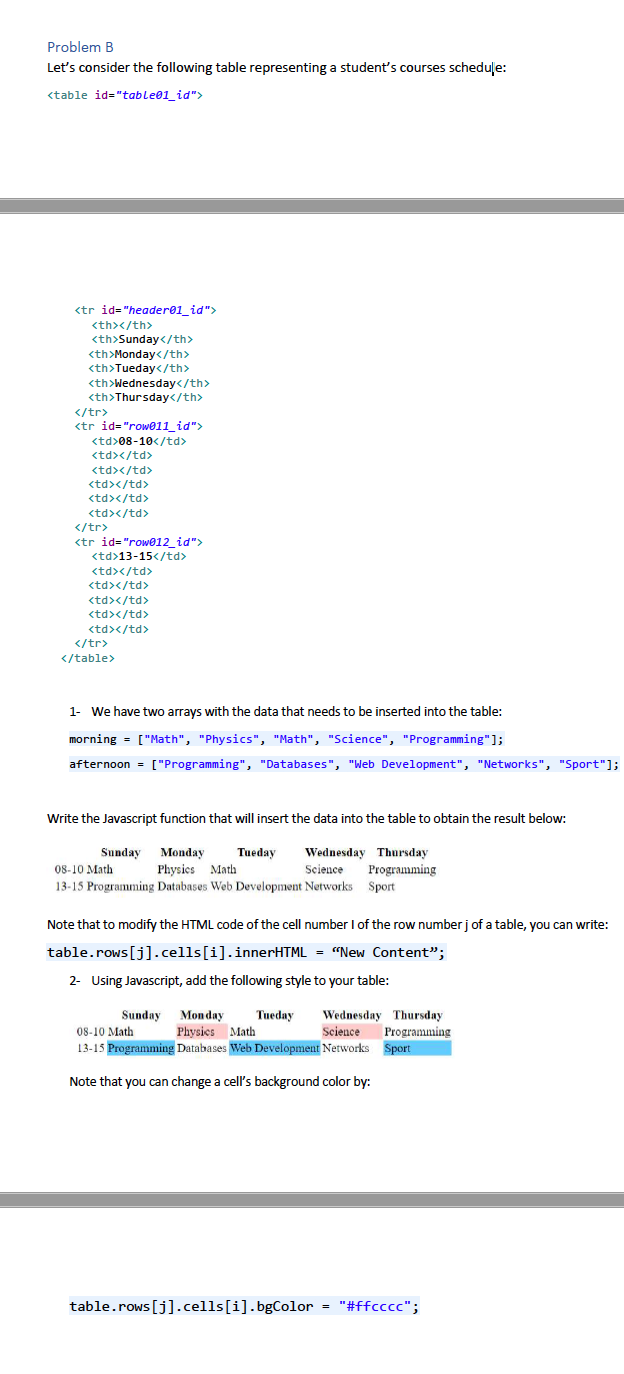
Lets consider the following table representing a students courses schedule:
| Sunday | Monday | Tueday | Wednesday | Thursday | |
|---|---|---|---|---|---|
| 08-10 | |||||
| 13-15 |
1- We have two arrays with the data that needs to be inserted into the table:
morning = ["Math", "Physics", "Math", "Science", "Programming"];
afternoon = ["Programming", "Databases", "Web Development", "Networks", "Sport"];
Write the Javascript function that will insert the data into the table to obtain the result below:
Note that to modify the HTML code of the cell number I of the row number j of a table, you can write:
table.rows[j].cells[i].innerHTML = New Content;
2- Using Javascript, add the following style to your table:
Note that you can change a cells background color by:
table.rows[j].cells[i].bgColor = "#ffcccc";
Problem B Let's consider the following table representing a student's courses schedule:
| Sunday | Monday | Tueday | Wednesday | Thursday | ||
|---|---|---|---|---|---|---|
| 08-10 | ||||||
| 13-15 |
1- We have two arrays with the data that needs to be inserted into the table: morning = ["Math", "Physics", "Math", "Science", "Programming"]; afternoon = ["Programming", "Databases", "Web Development", "Networks", "Sport"]; Write the Javascript function that will insert the data into the table to obtain the result below: Sunday Monday Tueday Wednesday Thursday 08-10 Math Physics Math Science Programming 13-15 Programming Databases Web Development Networks Sport Note that to modify the HTML code of the cell number of the row numberj of a table, you can write: table.rows[j].cells[i].innerHTML = "New Content"; 2- Using Javascript, add the following style to your table: Sunday Monday Tueday Wednesday Thursday 08-10 Math Physics Math Science Programming 13-15 Programming Databases Web Development Networks Sport Note that you can change a cell's background color by: table.rows[j].cells[i].bgColor = "#ffcccc
Step by Step Solution
There are 3 Steps involved in it

Get step-by-step solutions from verified subject matter experts
 Study Help