Question: Problem Description: This program covers the above concepts(Purpose) with an example that is dealing with bank transactions. Generally a person can have an account like
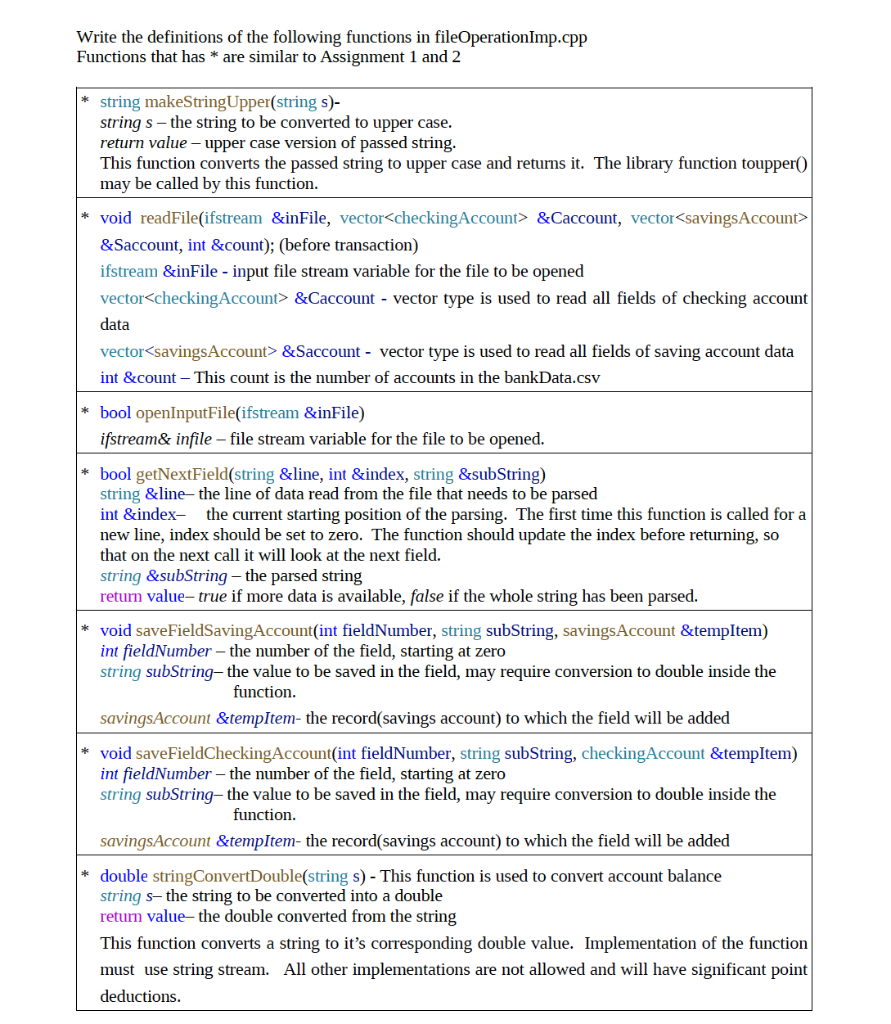
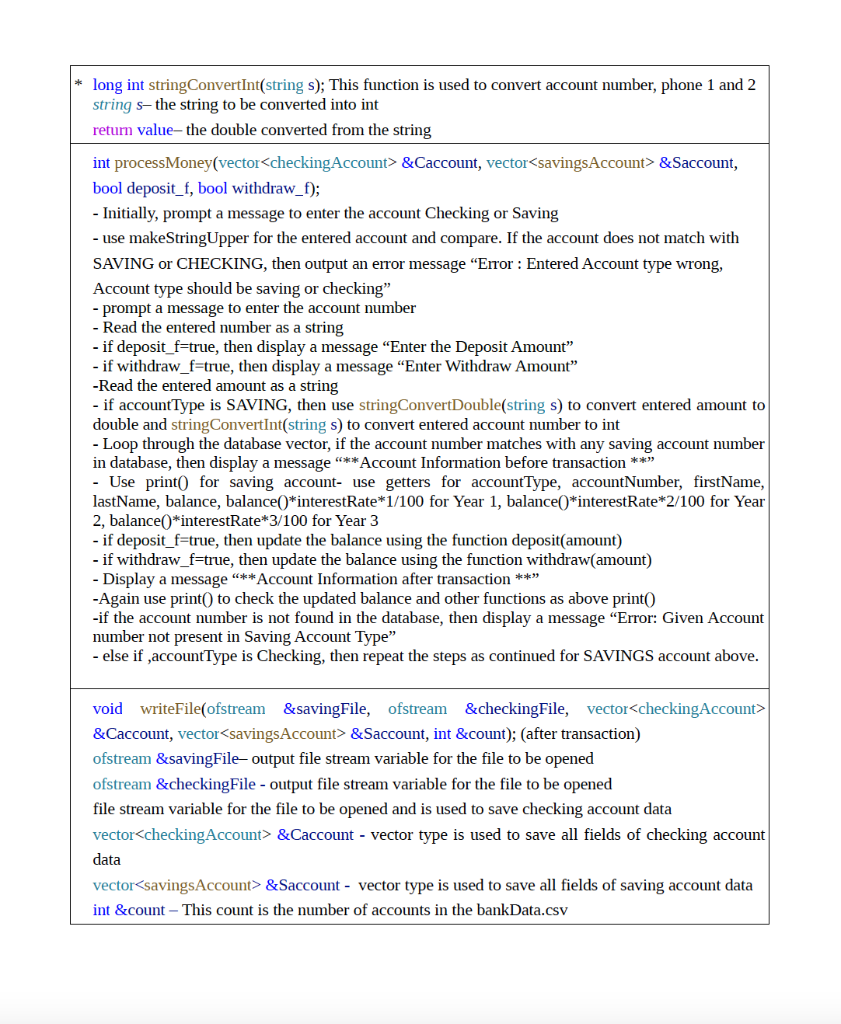
Problem Description: This program covers the above concepts(Purpose) with an example that is dealing with bank transactions. Generally a person can have an account like checking or savings, and/or both in any bank. This example particularly deals with deposit and withdraw amount in saving or checking account. The transaction will be successful only if the following 2 conditions are met: i)Entered account number should match with account type(checking or savings). Separate account number for checking and savings account. ii)Entered account number details should be in the bankData.csv file. When you exit/quit the program, two separate data files (saving_account.csv and checking_account.csv) will be generated with the updated information of the accounts specifically withdraw and deposit. This program will not change the bankData.csv after the transactions. Supplied: The main.cpp program is provided as the driver for the assignment. Please do not change the main.cpp program. This assignment has several header files(bankAcoount.h, checking Account.h, savings Account.h, fileoperation.h). All the header files need not to be changed/modified. This assignment will give an opportunity to excel in multiple file implementation. In this assignment, you will write the implementation file for each header file. To compile you need all the cpp files along with main.cpp file. Expected Submissions: You have to submit a zip file like ast3_firstname.zip. The file should be submitted online via the class Canvas website. No late submissions will be accepted. Problem: This program will implement the same functionality as Assignment 1, but as a C++ class. The class definition is provided and should not be modified except as specified. Refer to the Assignment 1 write up for program functionality. Files associated with this assignment: A skeleton code has been provided for you to use. All header files and bankmain.cpp do not need any change. You can change for testing purpose only. Interface files(Header files): bankAccount.h; checking Account.h; savings Account.h; fileoperation.h Implementation files (cpp files): BankAccountImp.cpp; checking AccountImp.cpp; savings AccountImp.cpp; fileoperationImp.cpp Main cpp file: bankmain.cpp . Coding the assignment: A skeleton code has been provided for you to use. bankAcoount.h, checking Account.h savings Account.h fileoperation.h bankmain.cpp Note: No changes required for above bankmain.cpp and header files. You will code the following files: BankAccountImp.cpp checking Account Imp.cpp savings Account Imp.cpp fileoperationImp.cpp Detailed Function Descriptions: Every bank offers the accounts like checking, savings. The class checking Account and savingAccount are derived (public) from the class bankAccount. This class inherits members to store the account number and the balance from the base class. In this assignment, a customer with a checking account can deposit money and withdraw money. With the withdraw option, make sure that the customer can nor draw more than the amount in his/her account. A customer with savings account will have the same operations as checking account. However, a customer with a savings account typically receives interest, makes deposits, and withdraws money. The interest rate will be calculated for every 1, 2 and 3 year and should display the final amount for each year. The class Fileclass is an other base class that deals with file input/output operations. This class has a constructor and destructor. In FileClass(), saving_account.csv and checking_account.csv files are created and open those files every time you compile the program. Also it has the logic to prompt a message to enter the filename and if the file is not open, then it should re-prompt to enter the file name. In ~FileClass() destructor, you should close all the files - bankData.csv, saving_account.csv and checking_account.csv. Function Descriptions: The following are more detailed descriptions of the required functions: class bankAccount is a base class. bankAccounth is provided- Do not make any changes In bankAccountImp.cpp file: Write the definition of the member functions set so that protected members are set according to the parameters. The values of the int and double instance variables must be non-negative. Functions: void setAccount Number(int acct); void setAddress(string address); void setAccountType(string accType); void setCity(string city); void setFirstName(string firstName); void setPhone1(long int phonel); void setLastName(string lastName); void setPhone2(long int phone2); void setCompanyName(string companyName); void setBalance(int balance); Write the definition of the member functions get to return the values of the instance variable. Functions: int getAccount Number() const; string getAddress() const; string getAccountType() const; string getCity const; string getFirstName() const; long int getPhonel() const; string getLastName() const; string getCompanyName() const; long int getPhone20) const; double getBalance() const; void withdraw(double amount);- This function should subtract the amount from the balance and update the balance. void deposit(double amount); - This function should add the amount from the balance and update the balance. class checking Account is a derived class from base class bankAccount and is inherited as public. It has 2 functions. public: void withdraw(double amount); void print() const; checking Accounth is provided - Do not make any changes In checking AcountImp.cpp file: void withdraw(double amount); - This function should check, if the requested withdraw amount is less than or equal to the balance and if it is above then display a message !! Not enough money in the checking account !!; else update the balance after withdrawal amount. void print() const; - This function should outputs the values of instance variables like AccountType, Account Number, FirstName, LastName, Balance. You no need print all the instance variables. (Hint: Use getters) class savingsAccount is a derived class from base class bankAccount and is inherited as public. It has 2 functions. public: void withdraw(double amount); void print const; protected: double interestRate; savings Account.h is provided- Do not make any changes In savingsAcountImp.cpp file: void withdraw(double amount); - Similar to withdraw function in checking AccountImp.cpp void print() const; - Similar to print function in checking AccountImp.cpp; In addition to them, you have to print "Interest you can earn after 1 Year, 2 Year, and 3 Year in a separate line." The interest rate is calculated as follows: Interest you can eam after 1 Year: balance*interestRate*1)/100; Interest you can earn after 2 Year: balance*interestRate*2)/100 Interest you can earn after 3 Year: balance*interestRate*3)/100 savings Account(double intRate = DEFAULT_INTEREST_RATE_SAVINGS); // Constructor with a parameter having a default value - Write the definition of this constructor with the instance variable interestRate(protected member) class FileClass is another base class that deals with file input/output operations. This class has a constructor, destructor and other functions. In FileClass(), saving_account.csv and checking_account.csv files are created every time you compile the program. Open those files in the constructor. Also it should have the logic to prompt a message to enter the filename and if the file is not open, then it should re-prompt to enter the file name. In ~FileClass() destructor, you should close all the files - bankData.csv, saving_account.csv and checking_account.csv. Write the definitions of the following functions in fileOperationImp.cpp Functions that has * are similar to Assignment 1 and 2 string makeStringUpper(string s)- string s - the string to be converted to upper case. return value upper case version of passed string. This function converts the passed string to upper case and returns it. The library function toupper() may be called by this function. * void readFile(ifstream &inFile, vector &Caccount, vector &Saccount, int &count); (before transaction) ifstream &inFile - input file stream variable for the file to be opened vector &Caccount - vector type is used to read all fields of checking account data vector &Saccount - vector type is used to read all fields of saving account data int &count This count is the number of accounts in the bankData.csv * bool openInputFile(ifstream &inFile) ifstream& infile - file stream variable for the file to be opened. * bool getNextField(string &line, int &index, string &subString) string &line the line of data read from the file that needs to be parsed int &index- the current starting position of the parsing. The first time this function is called for a new line, index should be set to zero. The function should update the index before returning, so that on the next call it will look at the next field. string &subString - the parsed string return value-true if more data is available, false if the whole string has been parsed. * void saveFieldSavingAccount(int fieldNumber, string subString, savingsAccount &tempItem) int fieldNumber the number of the field, starting at zero string subString, the value to be saved in the field, may require conversion to double inside the function. savingsAccount &tempItem- the record(savings account) to which the field will be added * void saveFieldChecking Account(int fieldNumber, string subString, checking Account &tempItem) int fieldNumber - the number of the field, starting at zero string subString, the value to be saved in the field, may require conversion to double inside the function. savings Account &tempItem- the record(savings account) to which the field will be added * double string ConvertDouble(string s) - This function is used to convert account balance string s-the string to be converted into a double return value the double converted from the string This function converts a string to it's corresponding double value. Implementation of the function must use string stream. All other implementations are not allowed and will have significant point deductions. * long int string ConvertInt(string s); This function is used to convert account number, phone 1 and 2 string s-the string to be converted into int return value-the double converted from the string int processMoney(vector &Caccount, vector &Saccount, bool deposit_f, bool withdraw_f); - Initially, prompt a message to enter the account Checking or Saving - use makeStringUpper for the entered account and compare. If the account does not match with SAVING or CHECKING, then output an error message "Error : Entered Account type wrong, Account type should be saving or checking" - prompt a message to enter the account number - Read the entered number as a string - if deposit_f=true, then display a message "Enter the Deposit Amount" if withdraw_f=true, then display a message "Enter Withdraw Amount" -Read the entered amount as a string - if account Type is SAVING, then use string ConvertDouble(string s) to convert entered amount to double and string ConvertInt(string s) to convert entered account number to int - Loop through the database vector, if the account number matches with any saving account number in database, then display a message "**Account Information before transaction ** - Use print() for saving account- use getters for accountType, account Number, firstName, lastName, balance, balance()*interestRate*1/100 for Year 1, balance()*interestRate*2/100 for Year 2, balance()*interestRate*3/100 for Year 3 - if deposit_f=true, then update the balance using the function deposit(amount) - if withdraw_f=true, then update the balance using the function withdraw(amount) - Display a message "**Account Information after transaction ** -Again use print() to check the updated balance and other functions as above print() -if the account number is not found in the database, then display a message "Error: Given Account number not present in Saving Account Type" - else if accountType is Checking, then repeat the steps as continued for SAVINGS account above. void writeFile(ofstream &savingFile, ofstream &checkingFile, vector &Caccount, vector &Saccount, int &count); (after transaction) ofstream &savingFile-output file stream variable for the file to be opened ofstream &checkingFile - output file stream variable for the file to be opened file stream variable for the file to be opened and is used to save checking account data vector &Caccount - vector type is used to save all fields of checking account data vector &Saccount - vector type is used to save all fields of saving account data int &count - This count is the number of accounts in the bankData.csv Problem Description: This program covers the above concepts(Purpose) with an example that is dealing with bank transactions. Generally a person can have an account like checking or savings, and/or both in any bank. This example particularly deals with deposit and withdraw amount in saving or checking account. The transaction will be successful only if the following 2 conditions are met: i)Entered account number should match with account type(checking or savings). Separate account number for checking and savings account. ii)Entered account number details should be in the bankData.csv file. When you exit/quit the program, two separate data files (saving_account.csv and checking_account.csv) will be generated with the updated information of the accounts specifically withdraw and deposit. This program will not change the bankData.csv after the transactions. Supplied: The main.cpp program is provided as the driver for the assignment. Please do not change the main.cpp program. This assignment has several header files(bankAcoount.h, checking Account.h, savings Account.h, fileoperation.h). All the header files need not to be changed/modified. This assignment will give an opportunity to excel in multiple file implementation. In this assignment, you will write the implementation file for each header file. To compile you need all the cpp files along with main.cpp file. Expected Submissions: You have to submit a zip file like ast3_firstname.zip. The file should be submitted online via the class Canvas website. No late submissions will be accepted. Problem: This program will implement the same functionality as Assignment 1, but as a C++ class. The class definition is provided and should not be modified except as specified. Refer to the Assignment 1 write up for program functionality. Files associated with this assignment: A skeleton code has been provided for you to use. All header files and bankmain.cpp do not need any change. You can change for testing purpose only. Interface files(Header files): bankAccount.h; checking Account.h; savings Account.h; fileoperation.h Implementation files (cpp files): BankAccountImp.cpp; checking AccountImp.cpp; savings AccountImp.cpp; fileoperationImp.cpp Main cpp file: bankmain.cpp . Coding the assignment: A skeleton code has been provided for you to use. bankAcoount.h, checking Account.h savings Account.h fileoperation.h bankmain.cpp Note: No changes required for above bankmain.cpp and header files. You will code the following files: BankAccountImp.cpp checking Account Imp.cpp savings Account Imp.cpp fileoperationImp.cpp Detailed Function Descriptions: Every bank offers the accounts like checking, savings. The class checking Account and savingAccount are derived (public) from the class bankAccount. This class inherits members to store the account number and the balance from the base class. In this assignment, a customer with a checking account can deposit money and withdraw money. With the withdraw option, make sure that the customer can nor draw more than the amount in his/her account. A customer with savings account will have the same operations as checking account. However, a customer with a savings account typically receives interest, makes deposits, and withdraws money. The interest rate will be calculated for every 1, 2 and 3 year and should display the final amount for each year. The class Fileclass is an other base class that deals with file input/output operations. This class has a constructor and destructor. In FileClass(), saving_account.csv and checking_account.csv files are created and open those files every time you compile the program. Also it has the logic to prompt a message to enter the filename and if the file is not open, then it should re-prompt to enter the file name. In ~FileClass() destructor, you should close all the files - bankData.csv, saving_account.csv and checking_account.csv. Function Descriptions: The following are more detailed descriptions of the required functions: class bankAccount is a base class. bankAccounth is provided- Do not make any changes In bankAccountImp.cpp file: Write the definition of the member functions set so that protected members are set according to the parameters. The values of the int and double instance variables must be non-negative. Functions: void setAccount Number(int acct); void setAddress(string address); void setAccountType(string accType); void setCity(string city); void setFirstName(string firstName); void setPhone1(long int phonel); void setLastName(string lastName); void setPhone2(long int phone2); void setCompanyName(string companyName); void setBalance(int balance); Write the definition of the member functions get to return the values of the instance variable. Functions: int getAccount Number() const; string getAddress() const; string getAccountType() const; string getCity const; string getFirstName() const; long int getPhonel() const; string getLastName() const; string getCompanyName() const; long int getPhone20) const; double getBalance() const; void withdraw(double amount);- This function should subtract the amount from the balance and update the balance. void deposit(double amount); - This function should add the amount from the balance and update the balance. class checking Account is a derived class from base class bankAccount and is inherited as public. It has 2 functions. public: void withdraw(double amount); void print() const; checking Accounth is provided - Do not make any changes In checking AcountImp.cpp file: void withdraw(double amount); - This function should check, if the requested withdraw amount is less than or equal to the balance and if it is above then display a message !! Not enough money in the checking account !!; else update the balance after withdrawal amount. void print() const; - This function should outputs the values of instance variables like AccountType, Account Number, FirstName, LastName, Balance. You no need print all the instance variables. (Hint: Use getters) class savingsAccount is a derived class from base class bankAccount and is inherited as public. It has 2 functions. public: void withdraw(double amount); void print const; protected: double interestRate; savings Account.h is provided- Do not make any changes In savingsAcountImp.cpp file: void withdraw(double amount); - Similar to withdraw function in checking AccountImp.cpp void print() const; - Similar to print function in checking AccountImp.cpp; In addition to them, you have to print "Interest you can earn after 1 Year, 2 Year, and 3 Year in a separate line." The interest rate is calculated as follows: Interest you can eam after 1 Year: balance*interestRate*1)/100; Interest you can earn after 2 Year: balance*interestRate*2)/100 Interest you can earn after 3 Year: balance*interestRate*3)/100 savings Account(double intRate = DEFAULT_INTEREST_RATE_SAVINGS); // Constructor with a parameter having a default value - Write the definition of this constructor with the instance variable interestRate(protected member) class FileClass is another base class that deals with file input/output operations. This class has a constructor, destructor and other functions. In FileClass(), saving_account.csv and checking_account.csv files are created every time you compile the program. Open those files in the constructor. Also it should have the logic to prompt a message to enter the filename and if the file is not open, then it should re-prompt to enter the file name. In ~FileClass() destructor, you should close all the files - bankData.csv, saving_account.csv and checking_account.csv. Write the definitions of the following functions in fileOperationImp.cpp Functions that has * are similar to Assignment 1 and 2 string makeStringUpper(string s)- string s - the string to be converted to upper case. return value upper case version of passed string. This function converts the passed string to upper case and returns it. The library function toupper() may be called by this function. * void readFile(ifstream &inFile, vector &Caccount, vector &Saccount, int &count); (before transaction) ifstream &inFile - input file stream variable for the file to be opened vector &Caccount - vector type is used to read all fields of checking account data vector &Saccount - vector type is used to read all fields of saving account data int &count This count is the number of accounts in the bankData.csv * bool openInputFile(ifstream &inFile) ifstream& infile - file stream variable for the file to be opened. * bool getNextField(string &line, int &index, string &subString) string &line the line of data read from the file that needs to be parsed int &index- the current starting position of the parsing. The first time this function is called for a new line, index should be set to zero. The function should update the index before returning, so that on the next call it will look at the next field. string &subString - the parsed string return value-true if more data is available, false if the whole string has been parsed. * void saveFieldSavingAccount(int fieldNumber, string subString, savingsAccount &tempItem) int fieldNumber the number of the field, starting at zero string subString, the value to be saved in the field, may require conversion to double inside the function. savingsAccount &tempItem- the record(savings account) to which the field will be added * void saveFieldChecking Account(int fieldNumber, string subString, checking Account &tempItem) int fieldNumber - the number of the field, starting at zero string subString, the value to be saved in the field, may require conversion to double inside the function. savings Account &tempItem- the record(savings account) to which the field will be added * double string ConvertDouble(string s) - This function is used to convert account balance string s-the string to be converted into a double return value the double converted from the string This function converts a string to it's corresponding double value. Implementation of the function must use string stream. All other implementations are not allowed and will have significant point deductions. * long int string ConvertInt(string s); This function is used to convert account number, phone 1 and 2 string s-the string to be converted into int return value-the double converted from the string int processMoney(vector &Caccount, vector &Saccount, bool deposit_f, bool withdraw_f); - Initially, prompt a message to enter the account Checking or Saving - use makeStringUpper for the entered account and compare. If the account does not match with SAVING or CHECKING, then output an error message "Error : Entered Account type wrong, Account type should be saving or checking" - prompt a message to enter the account number - Read the entered number as a string - if deposit_f=true, then display a message "Enter the Deposit Amount" if withdraw_f=true, then display a message "Enter Withdraw Amount" -Read the entered amount as a string - if account Type is SAVING, then use string ConvertDouble(string s) to convert entered amount to double and string ConvertInt(string s) to convert entered account number to int - Loop through the database vector, if the account number matches with any saving account number in database, then display a message "**Account Information before transaction ** - Use print() for saving account- use getters for accountType, account Number, firstName, lastName, balance, balance()*interestRate*1/100 for Year 1, balance()*interestRate*2/100 for Year 2, balance()*interestRate*3/100 for Year 3 - if deposit_f=true, then update the balance using the function deposit(amount) - if withdraw_f=true, then update the balance using the function withdraw(amount) - Display a message "**Account Information after transaction ** -Again use print() to check the updated balance and other functions as above print() -if the account number is not found in the database, then display a message "Error: Given Account number not present in Saving Account Type" - else if accountType is Checking, then repeat the steps as continued for SAVINGS account above. void writeFile(ofstream &savingFile, ofstream &checkingFile, vector &Caccount, vector &Saccount, int &count); (after transaction) ofstream &savingFile-output file stream variable for the file to be opened ofstream &checkingFile - output file stream variable for the file to be opened file stream variable for the file to be opened and is used to save checking account data vector &Caccount - vector type is used to save all fields of checking account data vector &Saccount - vector type is used to save all fields of saving account data int &count - This count is the number of accounts in the bankData.csv









 Study Help