







Question: Problem In this project, you practice alternating between the insert and command modes in the vi editor. Next, you type text on which to practice.
Problem
In this project, you practice alternating between the insert and command modes in the vi editor. Next, you type text on which to practice.
To access the insert and command modes:
1. Type i (but do not press Enter).
Like most vi commands, the i command does not appear (or echo) on your screen. The command switches you from command mode to insert mode; you dont need to press Enter to signal the commands completion. Notice that -- INSERT -- appears at the bottom of the screen when you are in insert mode.
2. Press Esc to go back into command mode. What happens to the line at the bottom of the screen?
3. Press i to reenter insert mode.
4. Type the following text, pressing Enter after each line to move to the next line. Be certain that you press Enter after the final line you type to move the cursor to the next line. If you need to delete characters, press the Backspace key.
Files contain text.
Text contains lines.
Lines contain characters.
Characters form words.
Words form text.
5. Your cursor should now be at the beginning of the sixth line with no text on that line. (See Figure 3-6.) Leave the vi editor open for Hands-on Project 3-3.
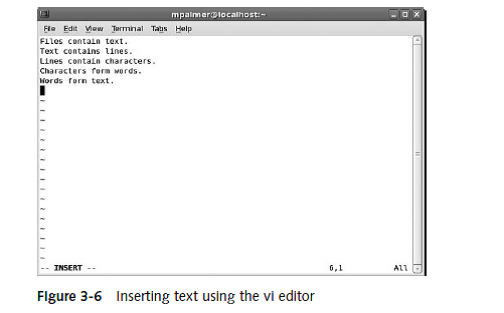
Flgure 3-6 Inserting text using the vl ealtor
Step by Step Solution
There are 3 Steps involved in it

Get step-by-step solutions from verified subject matter experts
 Study Help