







Question: Log into your UNDX system and create a new file named vi _ practice.txt using the vi editor. In the file, type your
Log into your UNDX system and create a new file named
vipractice.txt using the vi editor. In the file, type your full name on
the first line and the current date on the second line. Paste a
screenshot showing what you did.
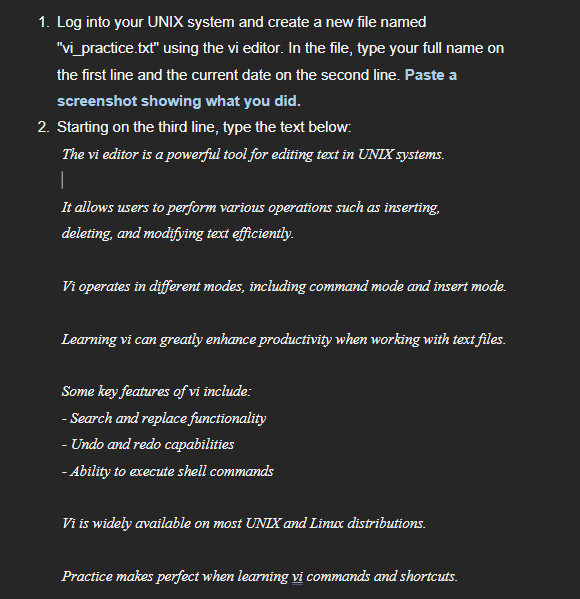
Starting on the third line, type the text below:
The vi editor is a powerglul tool for saliting taxt in UNDX Aystems.
It allows wsors to parform various operations swch as inserting.
delsting, ond modiffing text sfficientiy.
Vi oparates in duforent modes, including command mods and insert mods.
Learning vi can greathy shhancs productivity when working with text fles.
Sows key fantures of vi incluale:
Search abd replacs fluctionality
Undo and redo capabilities
Ability to executs shall cowmands
Fi is wilely available on most UDIX and Linax distributions.
Practics makes perfoct when learning vi commands and shorte wits.
Remember to sans your changss befors sxiting the editor
Practice the following editing operations and paste a screenshot
after you made the editing operations a c:
a Delete the word "powerful" using the appropriate vi command
b Change the word "tool" to "application" using the change
command
c Add the phrase "and Linux" after "UNIX systems" using the append
command
Use the undo command to reverse your last edit. Paste a
screenshot showing the result of the undo. Then redo the edit.
Use the search function to find the word "editor" in your file.
Save your changes and exit vi
Reopen the file and add two more lines of text describing what
you've learned about vi so far. Paste a screenshot showing the two
lines you just added.
I Need Help on how to create this Log into your UNIX system and create a new file named
vipractice.txt using the vi editor. In the file, type your full name on
the first line and the current date on the second line. Paste a
screenshot showing what you did.
Starting on the third line, type the text below:
The vi editor is a powerful tool for editing text in UNLX systems.
It allows users to perform various operations such as inserting,
deleting, and modifying text efficiently.
Vi operates in different modes, including command mode and insert mode.
Learning vi can greatly enhance productivity when working with text files.
Some key features of vi include:
Search and replace fimctionality
Undo and redo capabilities
Ability to execute shell commands
Vi is widely available on most UNLX and Limux distributions.
Practice makes perfect when learning vi commands and shortcuts. Remember to save your changes before exiting the editor!
Practice the following editing operations and paste a screenshot
after you made the editing operations a c:
a Delete the word "powerful" using the appropriate vi command
b Change the word "tool" to "application" using the change
command
c Add the phrase "and Linux" after "UNIX systems" using the append
command
Use the undo command to reverse your last edit. Paste a
screenshot showing the result of the undo. Then redo the edit.
Use the search function to find the word "editor" in your file.
Save your changes and exit vi
Reopen the file and add two more lines of text describing what
you've learned about vi so far. Paste a screenshot showing the two
lines you just added.
Step by Step Solution
There are 3 Steps involved in it
1 Expert Approved Answer
Step: 1 Unlock

Question Has Been Solved by an Expert!
Get step-by-step solutions from verified subject matter experts
Step: 2 Unlock
Step: 3 Unlock
 Study Help