







Question: PROBLEM PROMPT - Music Library For this assignment you will implement a music library for organizing songs. This program must include a GUI that roughly
PROBLEM PROMPT Music Library
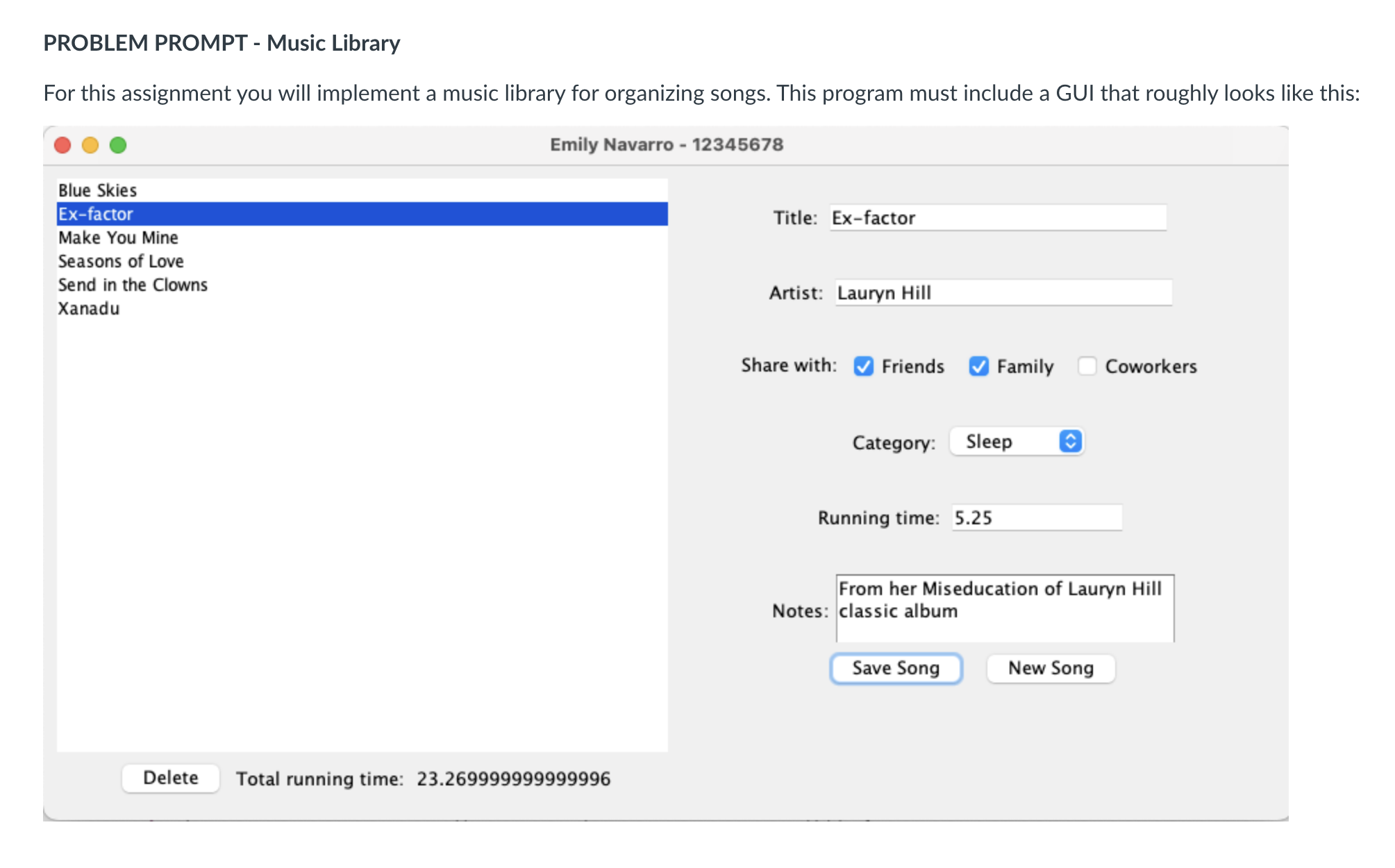
For this assignment you will implement a music library for organizing songs. This program must include a GUI that roughly looks like this:
Music Library must provide the following features:
Add new song: To add a new song:
Click the "New Song" button, at which point all of the input fields clear
Enter the following fields:
Title
Required field
Cannot be blank
Must be unique there must not exist another song with this title
Artist
Required field
Cannot be blank
Share with which groups of people you want to share this song with
Check boxes: Friends, Family, Coworkers
Any number of check boxes can be checked including
Category
Dropdown list of choices: Work, Exercise, Party, Sleep, Driving, Other
Work is the default selection in this list
Running Time
is the default text in this field
Input must be a valid double number
Notes
Optional field, can be left blank
Scrollable text area
Click the "Save Song" button
If any of the input is invalid, a warning dialog pops up stating, "Invalid input!"
If all input is valid, a dialog pops up stating, "Song saved!" The new song then appears in the list on the left, and it is selected.
View songs: To view an existing song, click on the name in the list, and that song's info will show up on the right.
Edit song: To edit an existing song's info:
Select the song in the list
Edit any info in the field on the right
Click the "Save Song" button
If any of the input is invalid, a warning dialog pops up stating, "Invalid input!"
Take care of the case in which the user attempts to change an existing song's title to one that already exists in the list. This should not be allowed.
If all input is valid, a dialog pops up stating, "Song saved!"
Delete song: To delete a song:
Select the song in the list
Click the "Delete" button
Total running time: The total running time of the whole music library song list must be displayed under the song list and updated any time a song is added, edited, or deleted.
RequirementsDetails:
Your GUI layout can vary slightly from the one shown above, but should follow the same basic pattern, and should have components nicely aligned and spaced out.
Your name and student id must be in the title of your window, like the screenshot above.
The song list on the left must always be sorted in alphabetical order by title use the lexicographic ordering used by Java to order strings
Clicking on the Delete button when no song is selected will just do nothing. Clicking on the New Song button when the form is already cleared will just do nothing. Clicking on Save Song when no info has been changed will still pop up the "Song Saved" dialog. Although all this is bad UIUX practice, it's fine for simplification purposes for this lab.
The only required class that you must have is MusicLibrary with a main method Any other classes are entirely up to you, but make sure you include them in your submission.
Hints:
Use a JList for the song list on the left
Use JOptionPane for showing dialogs
Step by Step Solution
There are 3 Steps involved in it
1 Expert Approved Answer
Step: 1 Unlock

Question Has Been Solved by an Expert!
Get step-by-step solutions from verified subject matter experts
Step: 2 Unlock
Step: 3 Unlock
 Study Help