







Question: Procedure: 1. Start the eNSP client. On the guide page, click New Topo 2. Add two routers, two switches, and four PCs to the
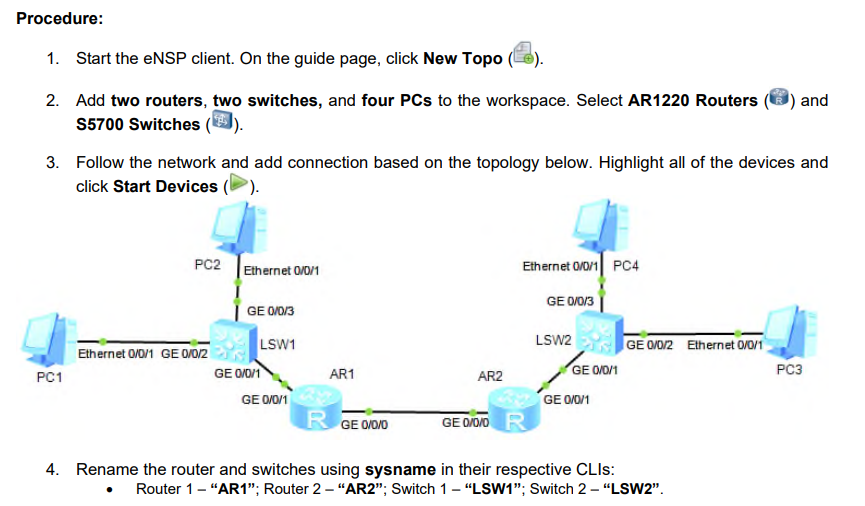
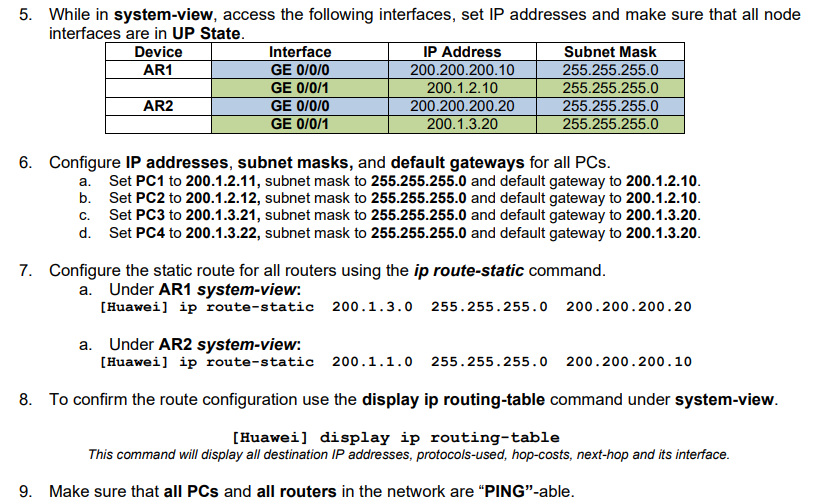
Procedure: 1. Start the eNSP client. On the guide page, click New Topo 2. Add two routers, two switches, and four PCs to the workspace. Select AR1220 Routers S5700 Switches ) and 3. Follow the network and add connection based on the topology below. Highlight all of the devices and click Start Devices (). PC2 Ethernet 0/0/1 Ethernet 0/0/1 PC4 GE 0/0/3 GE 0/0/3 LSW2 LSW1 GE 0/0/2 Ethernet 0/0/1 Ethernet 0/0/1 GE 0/0/2 PC1 GE 0/0/1 AR1 GE 0/0/1 PC3 AR2 GE 0/0/1 GE 0/0/1 R GE 0/0/0 GE 0/0/0 R 4. Rename the router and switches using sysname in their respective CLIs: Router 1 - "AR1"; Router 2 - "AR2"; Switch 1 - "LSW1"; Switch 2 - "LSW2". 5. While in system-view, access the following interfaces, set IP addresses and make sure that all node interfaces are in UP State. Device AR1 Interface GE 0/0/0 GE 0/0/1 AR2 GE 0/0/0 GE 0/0/1 IP Address 200.200.200.10 200.1.2.10 200.200.200.20 200.1.3.20 Subnet Mask 255.255.255.0 255.255.255.0 255.255.255.0 255.255.255.0 6. Configure IP addresses, subnet masks, and default gateways for all PCs. a. Set PC1 to 200.1.2.11, subnet mask to 255.255.255.0 and default gateway to 200.1.2.10. b. C. Set PC2 to 200.1.2.12, subnet mask to 255.255.255.0 and default gateway to 200.1.2.10. Set PC3 to 200.1.3.21, subnet mask to 255.255.255.0 and default gateway to 200.1.3.20. d. Set PC4 to 200.1.3.22, subnet mask to 255.255.255.0 and default gateway to 200.1.3.20. 7. Configure the static route for all routers using the ip route-static command. a. Under AR1 system-view: [Huawei] ip route-static 200.1.3.0 255.255.255.0 200.200.200.20 a. Under AR2 system-view: [Huawei] ip route-static 200.1.1.0 255.255.255.0 200.200.200.10 8. To confirm the route configuration use the display ip routing-table command under system-view. [Huawei] display ip routing-table This command will display all destination IP addresses, protocols-used, hop-costs, next-hop and its interface. 9. Make sure that all PCs and all routers in the network are "PING"-able.
Step by Step Solution
3.50 Rating (157 Votes )
There are 3 Steps involved in it
1 Start the eNSP Client and Create a New Topology Correct Option Open the eNSP client On the guide page click on New Topo RealTime Example Launch eNSP ... View full answer

Get step-by-step solutions from verified subject matter experts
 Study Help