







Question: Processing in Java language to add a mosaic effect on the webcame image. The sample to work on is given, and also the hint. Thank
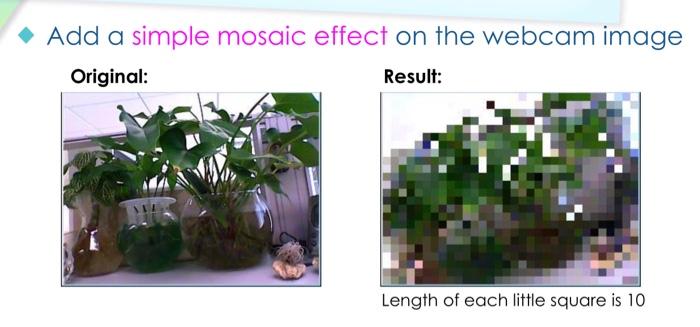
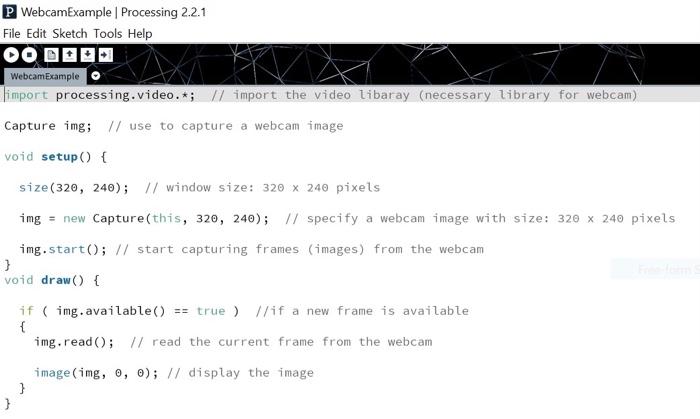
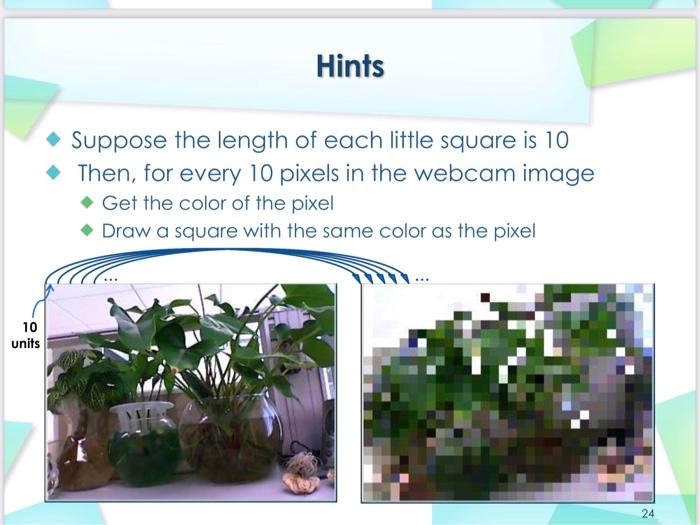
Add a simple mosaic effect on the webcam image Original: Result: Length of each little square is 10 P WebcamExample Processing 2.2.1 File Edit Sketch Tools Help WebcamExample limport processing.video.*; // import the video libaray (necessary library for webcam) Capture img; // use to capture a webcam image void setup() { size(320, 240); // window size: 320 x 240 pixels img = new Capture(this, 320, 240); // specify a webcam image with size: 320 x 240 pixels img.start(); // start capturing frames (images) from the webcam } void draw() { if (img.available() == true ) //if a new frame is available { img.read(); // read the current frame from the webcam image(img, 0, 0); // display the image } } Hints Suppose the length of each little square is 10 Then, for every 10 pixels in the webcam image Get the color of the pixel Draw a square with the same color as the pixel 10 units 24
Step by Step Solution
There are 3 Steps involved in it

Get step-by-step solutions from verified subject matter experts
 Study Help