







Question: Profile name : String contact : int Access # username : String # password: int Register readinput(): void read Contact(Scanner input. Access aUser) : void
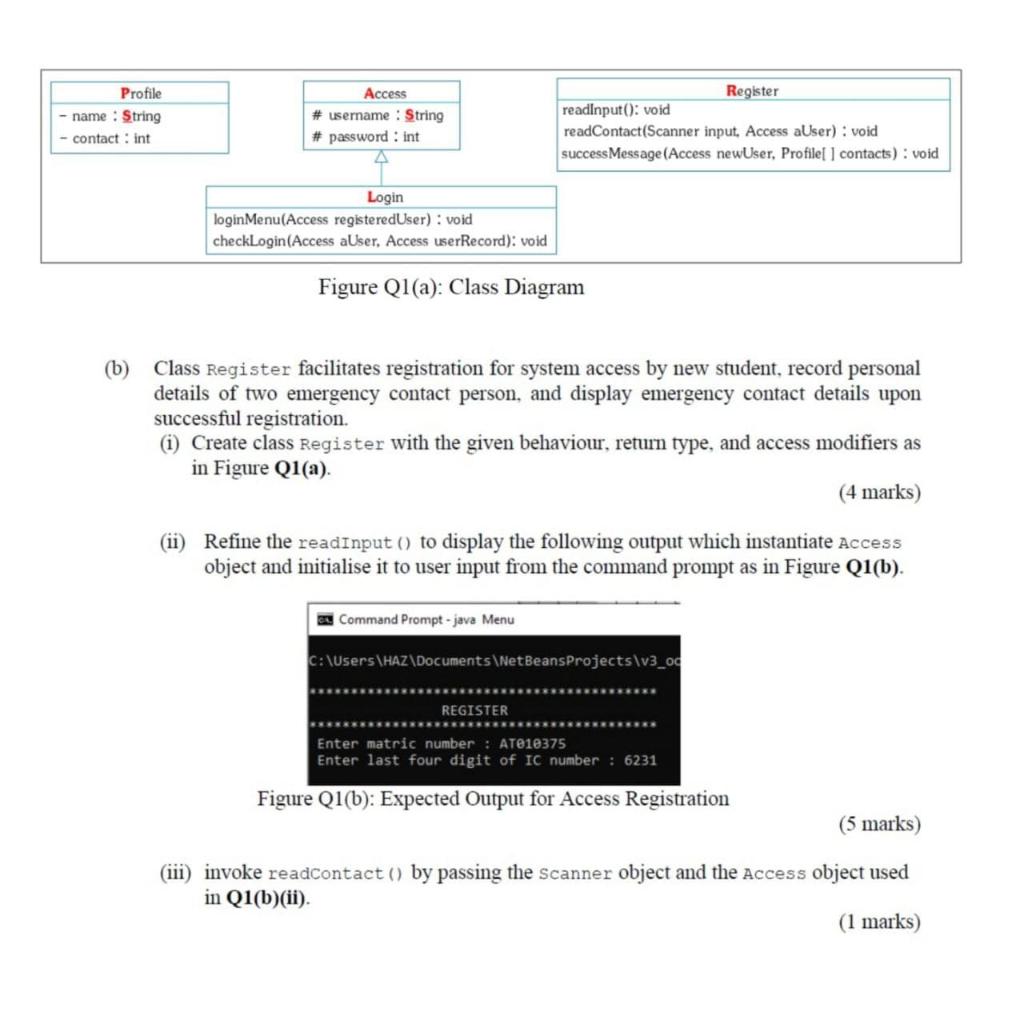
Profile name : String contact : int Access # username : String # password: int Register readinput(): void read Contact(Scanner input. Access aUser) : void success Message (Access newUser, Profile | contacts) : void Login login Menu(Access registeredUser) : void checkLogin(Access aUser, Access userRecord): void Figure Ql(a): Class Diagram (b) Class Register facilitates registration for system access by new student, record personal details of two emergency contact person, and display emergency contact details upon successful registration. (i) Create class Register with the given behaviour, return type, and access modifiers as in Figure Q1(a). (4 marks) (ii) Refine the readInput () to display the following output which instantiate Access object and initialise it to user input from the command prompt as in Figure Q1(b). Command Prompt - java Menu C:\Users\HAZ\Documents\NetBeansProjects\v3_od REGISTER Enter matric number : ATQ10375 Enter last four digit of IC number : 6231 Figure Q1(b): Expected Output for Access Registration (5 marks) (iii) invoke readContact() by passing the scanner object and the Access object used in Q1(b)(ii). (1 marks)
Step by Step Solution
There are 3 Steps involved in it

Get step-by-step solutions from verified subject matter experts
 Study Help