





Question: Program Description Write a BASH script which will backup a directory, keeping only the last N days of backups (default 5). Your script should be
 Program Description Write a BASH script which will backup a directory,

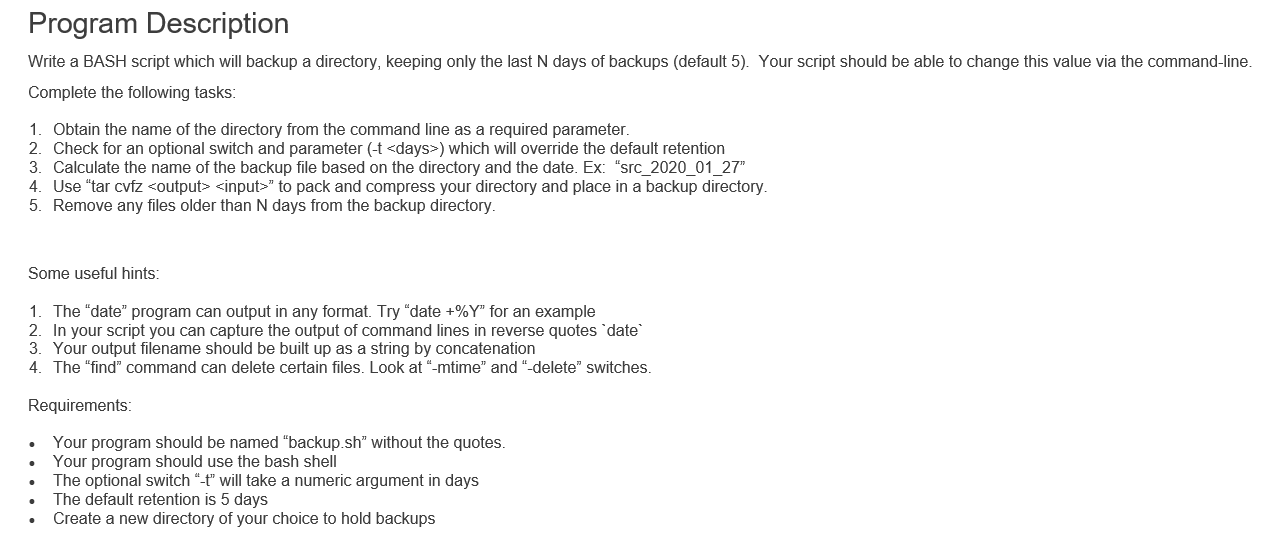
Program Description Write a BASH script which will backup a directory, keeping only the last N days of backups (default 5). Your script should be able to change this value via the command-line. Complete the following tasks: 1. Obtain the name of the directory from the command line as a required parameter. 2. Check for an optional switch and parameter (-t ) which will override the default retention 3. Calculate the name of the backup file based on the directory and the date. Ex: "src 2020 01 27" 4. Use "tar cvfz " to pack and compress your directory and place in a backup directory 5. Remove any files older than N days from the backup directory. Some useful hints: 1. The "date" program can output in any format. Try "date +%Y" for an example 2. In your script you can capture the output of command lines in reverse quotes date 3. Your output filename should be built up as a string by concatenation 4. The "find" command can delete certain files. Look at "-mtime" and "-delete" switches. Requirements: Your program should be named "backup.sh" without the quotes. Your program should use the bash shell The optional switch "-t" will take a numeric argument in days The default retention is 5 days Create a new directory of your choice to hold backups Program Description Write a BASH script which will backup a directory, keeping only the last N days of backups (default 5). Your script should be able to change this value via the command-line. Complete the following tasks: 1. Obtain the name of the directory from the command line as a required parameter. 2. Check for an optional switch and parameter (-t ) which will override the default retention 3. Calculate the name of the backup file based on the directory and the date. Ex: "src 2020 01 27" 4. Use "tar cvfz " to pack and compress your directory and place in a backup directory 5. Remove any files older than N days from the backup directory. Some useful hints: 1. The "date" program can output in any format. Try "date +%Y" for an example 2. In your script you can capture the output of command lines in reverse quotes date 3. Your output filename should be built up as a string by concatenation 4. The "find" command can delete certain files. Look at "-mtime" and "-delete" switches. Requirements: Your program should be named "backup.sh" without the quotes. Your program should use the bash shell The optional switch "-t" will take a numeric argument in days The default retention is 5 days Create a new directory of your choice to hold backups

Step by Step Solution

There are 3 Steps involved in it

1 Expert Approved Answer
Step: 1 Unlock blur-text-image

Question Has Been Solved by an Expert!

Get step-by-step solutions from verified subject matter experts

Step: 2 Unlock
Step: 3 Unlock

Students Have Also Explored These Related Databases Questions!