







Question: **** Program in use is DOSBox***** IV. Do it yourself Use the E-command to place the letters for your name in memory (using the ASCII
**** Program in use is DOSBox*****
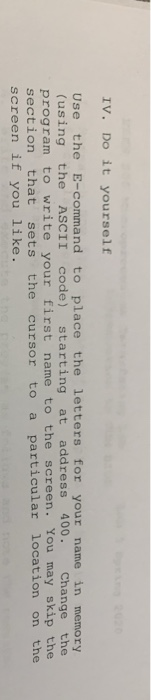
IV. Do it yourself Use the E-command to place the letters for your name in memory (using the ASCII code) starting at address 400. Change the program to write your first name to the screen. You may skip the section that sets the cursor to a particular location on the screen if you like. IV. Do it yourself Use the E-command to place the letters for your name in memory (using the ASCII code) starting at address 400. Change the program to write your first name to the screen. You may skip the section that sets the cursor to a particular location on the screen if you like
Step by Step Solution
There are 3 Steps involved in it
1 Expert Approved Answer
Step: 1 Unlock

Question Has Been Solved by an Expert!
Get step-by-step solutions from verified subject matter experts
Step: 2 Unlock
Step: 3 Unlock
 Study Help