







Question: - Program is for C#. I am completely lost. The instructions are very vague and the instructor posted no video on it. Would be extremely
- Program is for C#. I am completely lost. The instructions are very vague and the instructor posted no video on it. Would be extremely grateful for any help.
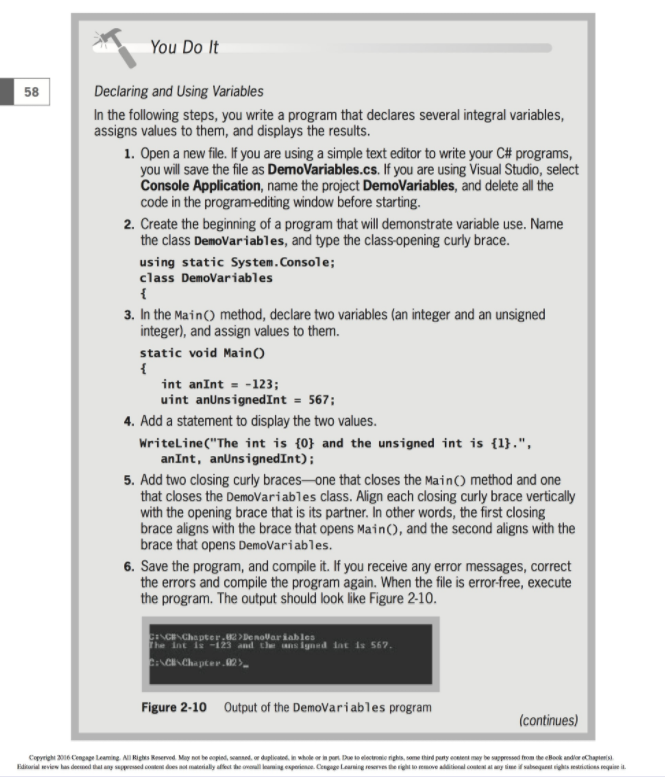
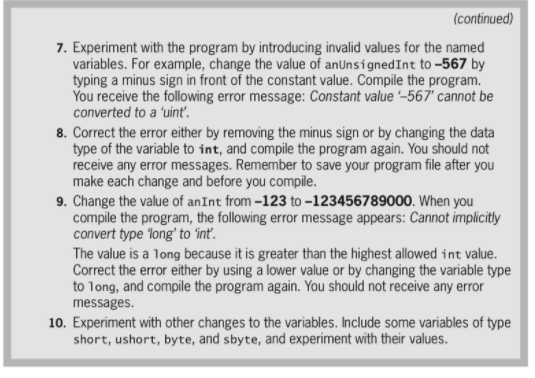
You Do It 58 Declaring and Using Variables In the following steps, you write a program that declares several integral variables, assigns values to them, and displays the results. I. Open a new file. If you are using a simple text editor to write your C# programs, you will save the file as DemoVariables.cs. If you are using Visual Studio, select Console Application, name the project DemoVariables, and delete all the code in the program-editing window before starting. 2. Create the beginning of a program that will demonstrate variable use. Name the class DemoVariables, and type the class opening curly brace. using static System.Console; class DemoVariables 3. In the Main) method, declare two variables (an integer and an unsigned integer), and assign values to them. static void MainO int anInt =-123; uint anUnsignedInt 567 4. Add a statement to display the two values. WriteLine("The int is {0} and the unsigned int is {1}.", anInt, anUnsignedInt) 5. Add two closing curly braces-one that closes the Main) method and one that closes the DemoVariables class. Align each closing curly brace vertically with the opening brace that is its partner. In other words, the first closing brace aligns with the brace that opens MainC), and the second aligns with the brace that opens DemoVariables. 6. Save the program, and compile it. If you receive any error messages, correct the errors and compile the program again. When the file is error-free, execute the program. The output should look like Figure 2-10 Chapter. > DENoVar iab 1es Figure 2-10 Output of the DemoVariables program (continues)
Step by Step Solution
There are 3 Steps involved in it

Get step-by-step solutions from verified subject matter experts
 Study Help