







Question: Programming Activity 4-1 Guidance ================================= Required items -------------- As stated in the textbook activity, your drawing must include at least: 2 rectangles 2 ovals 2
Programming Activity 4-1 Guidance ================================= Required items -------------- As stated in the textbook activity, your drawing must include at least: 2 rectangles 2 ovals 2 circle 2 lines 1 polygon 3 colors (with one being a custom color) 1 text label Required positioning technique ------------------------------ You must use relative positioning. Declare and initialize starting x and y coordinates. Use offsets from these values to code all figure positions. The last video on relative positioning takes this a step further. It shows you how to have more than one base point, if you want. Running the applet ------------------ You will run your applet in the JDK applet viewer, not in a web browser. To run an applet in TextPad: Make sure your applet file is the current tab. Use Tools > External Tools > Run Java Applet To run an applet in NetBeans: Make sure your applet file is the current tab. Use Run > File Control the layout ------------------ Use a html page with an applet tag to define your applet's window size. You can make your applet window whatever dimensions you decide. You do this via the HTML page's width and height attribute values. Make sure your starting x and y coordinates, combined with your shape offsets, do not cause parts of your drawing to disappear beyond the viewing area. Window size ----------- The maximum x and y values depend on the width and height attribute values set in the applet tag in the html page. Coordinate system ----------------- In a traditional math coordinate system, y values increase as you move up. In the Java graphics coordinate system: The origin is in the upper left corner of the viewing window. y values increase as you move down. Negative coordinates are off the visible screen area to the left or above. Other applet methods -------------------- You do not need to include the init(), start(), stop(), and destroy() applet functions. You only need to have a paint method as shown in the book and the videos.
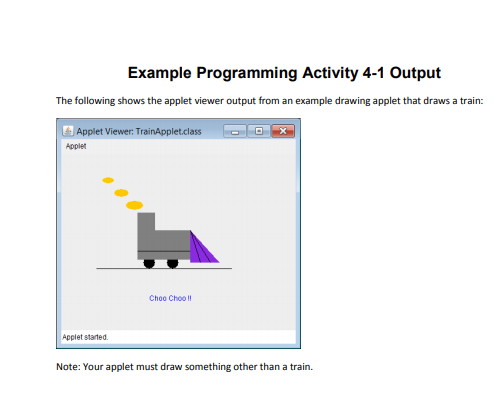
Example Programming Activity 4-1 Output The following shows the applet viewer output from an example drawing applet that draws a train: Applet Viewer: TrainApplet.class oplet Choo Cho0 II Applet stated Note: Your applet must draw something other than a train. Example Programming Activity 4-1 Output The following shows the applet viewer output from an example drawing applet that draws a train: Applet Viewer: TrainApplet.class oplet Choo Cho0 II Applet stated Note: Your applet must draw something other than a train
Step by Step Solution
There are 3 Steps involved in it
1 Expert Approved Answer
Step: 1 Unlock

Question Has Been Solved by an Expert!
Get step-by-step solutions from verified subject matter experts
Step: 2 Unlock
Step: 3 Unlock
 Study Help