







Question: Programming Concepts II Assignment 1 Venue Booking You are working for a concert/fashion/convention venue, with a stage, a runway and seating along the runway. You
Programming Concepts II Assignment 1 Venue Booking
You are working for a concert/fashion/convention venue, with a stage, a runway and seating along the runway. You are writing a booking system, storing bookings in a 2-dimensional array.
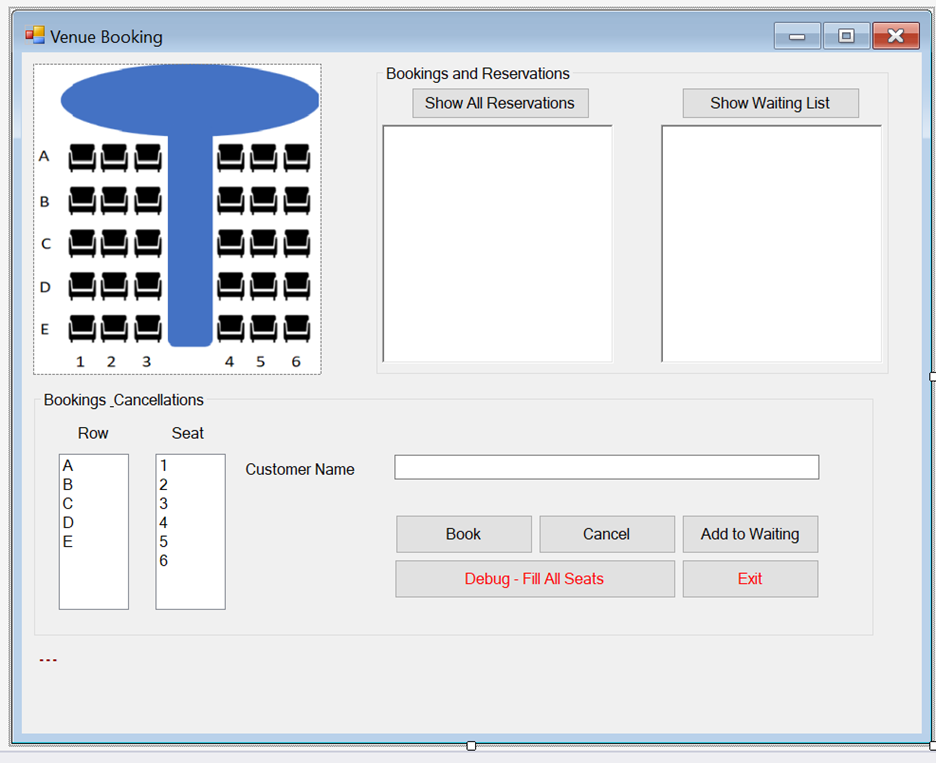
1. The booking clerk should be able to click Show All Reservations to display a list of all seats in the venue, one line per seat. It should show the row letter and seat number for each seat, along with the customers name, if the seat is booked. The listing should be one line per seat, like this: A1 A2 A3 Russell Crowe A4 Shania Twain a. Hint: you can use the arrays row index to index into the ListBox, when translating it into a letter. 2. The clerk would select a seat using the row/seat list boxes and click Book, adding the customers name to the booking array. a. If the selected seat is already booked, a message should display to that effect, along with a list of the seats that are currently available. If no seats are available, it should say so. b. If all seats are booked, the clerk can add the customer to the waiting list. It has a maximum of 10 people. If the waiting list is full, show a message to that effect. Show Waiting List should show the customers already waiting, in first-to-last order. c. If seats are available, the Add to Waiting button will just show the message Seats are available, with a list of the seats that are not booked. d. Clicking the Status button will show the status of the selected seat. 3. Cancelling a customers booking: a. Select the row & seat and click Cancel. A message box should pop up to show the customers name and ask for confirmation. b. If the cancellation works, and the waiting list is not empty, remove the first customer from the list and give her/him the newly vacated seat. 4. You are to use a multi-dimensional array to record seat bookings (ie: persons name at row/column intersection), and a single-dimensional array for the waiting list. a. You are not to store bookings or the waiting list in any of the form controls b. Use a loop to format information from the arrays when Show All Reservations or Show Waiting List are clicked. Display this in the RichTextBoxes, one line per seat or waiting customer (RichTextBoxes honour , which TextBoxes dont). 5. Show a message when a. Book is pressed but either the customers name, row and/or seat is not selected. b. Book is pressed when the chosen seat is already taken c. Add to Waiting List is pressed when there are seats available. d. Cancel is pressed without specifying the row and seat. e. Cancel is pressed but the seat is not booked f. After a successful booking, including one from the waiting list g. After successfully cancelling a seat. h. After successfully adding to the waiting list. 6. Some of the above actions can generate two messages seat cancelled and seat booked from waiting list or name is required, please select a row and please select a seat All relevant messages should show at the same time, on separate lines (labels honour ). 7. Add a Fill All button. Clicking this button will fill all 30 seats with the same customer name. 8. Dont restrict the length of the customers name. For example, I should be able to book a person with name C. 9. Remember, for all programs: a. Program comments before the class, describing what it does & who wrote it. b. Comments before each method describing what they do simply repeating the method name Is not acceptable. c. Form controls and program variable names should be camel notation, full meaningful words d. Form controls can have a prefix denoting their control type: txt, btn, lbl, lst, etc. e. Variables can not have datatype prefixes or suffixes (ie: no Hungarian notation: strName) f. Methods you write should be Pascal notation. Generated event handlers are named after their control, so they can be camel notation.
Venue Booking Bookings and Reservations Show All Reservations Show Waiting List A B U D E 1 2 3 4 5 6 Customer Name Bookings Cancellations Row Seat A 1 B 2 3 D 4 E 5 6 Book Cancel Add to Waiting Debug - Fill All Seats Exit ... Venue Booking Bookings and Reservations Show All Reservations Show Waiting List A B U D E 1 2 3 4 5 6 Customer Name Bookings Cancellations Row Seat A 1 B 2 3 D 4 E 5 6 Book Cancel Add to Waiting Debug - Fill All Seats Exit
Step by Step Solution
There are 3 Steps involved in it

Get step-by-step solutions from verified subject matter experts
 Study Help