







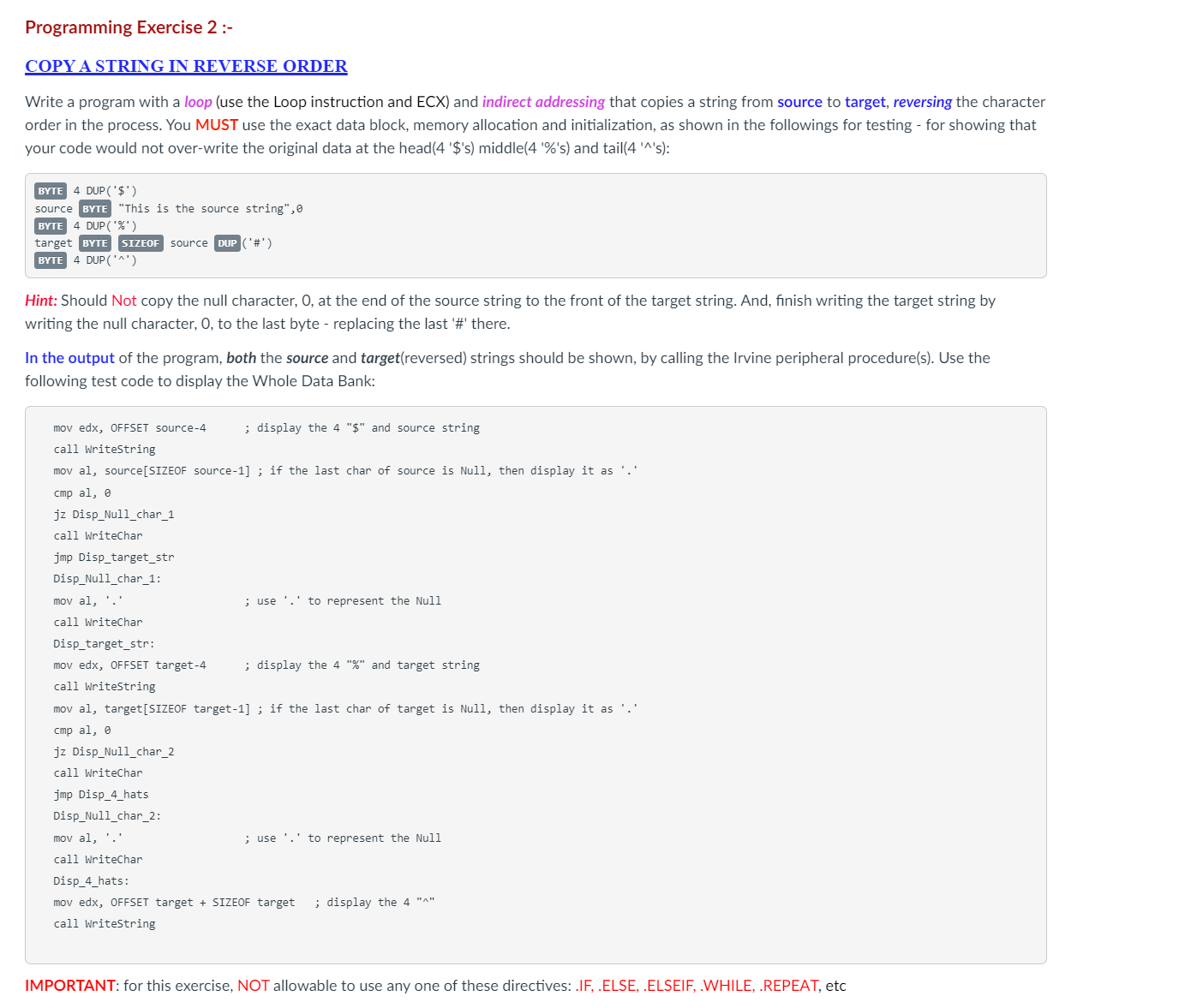
Question: Programming Exercise 2 : - COPY A STRING IN REVERSE ORDER Write a program with a loop ( use the Loop instruction and ECX )
Programming Exercise :
COPY A STRING IN REVERSE ORDER
Write a program with a loop use the Loop instruction and ECX and indirect addressing that copies a string from source to target, reversing the character
order in the process. You MUST use the exact data block, memory allocation and initialization, as shown in the followings for testing for showing that
your code would not overwrite the original data at the head$s middles and tails:
BYTE DUP$
source BYTE "This is the source string",
BYTE DUP
target BYTE SIZEOF source DUP #
BYTE DUP
Hint: Should Not copy the null character, at the end of the source string to the front of the target string. And, finish writing the target string by
writing the null character, to the last byte replacing the last # there.
In the output of the program, both the source and targetreversed strings should be shown, by calling the Irvine peripheral procedures Use the
following test code to display the Whole Data Bank:
mov edx, OFFSET source ; display the $ and source string
call Writestring
mov al sourceSIZEOF source ; if the last char of source is Null, then display it as
cmp al
jz DispNullchar
call Writechar
jmp Disptargetstr
DispNullchar:
mov al ; use to represent the Null
call Writechar
Disptargetstr:
mov edx, OFFSET target ; display the and target string
call Writestring
mov al targetSIZEOF target ; if the last char of target is Null, then display it as
cmp al
jz DispNullchar
call Writechar
jmp Disphats
DispNullchar:
mov al ; use to represent the Null
call Writechar
Disphats:
mov edx, OFFSET target SIZEOF target ; display the
call Writestring
IMPORTANT: for this exercise, NOT allowable to use any one of these directives: IFELSE, ELSEIF, WHILE, REPEAT, etc
Please add a lot of comments to explain stepbystep
Step by Step Solution
There are 3 Steps involved in it
1 Expert Approved Answer
Step: 1 Unlock

Question Has Been Solved by an Expert!
Get step-by-step solutions from verified subject matter experts
Step: 2 Unlock
Step: 3 Unlock
 Study Help