







Question: programming language: Java Assignment 5 Objectives: Understanding conditional statements o Using strings o Using numbers Control program flow using if, else if, and else statements
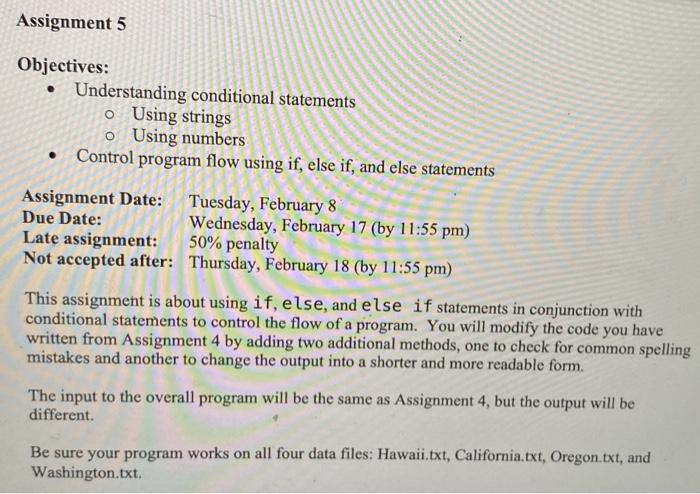
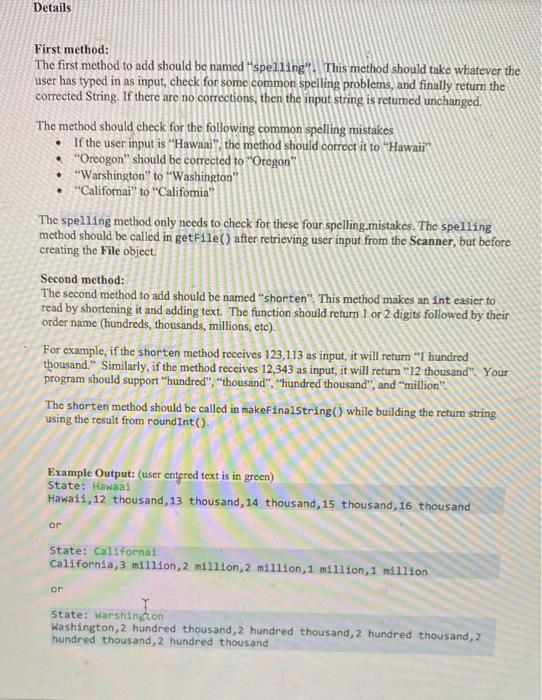
Assignment 5 Objectives: Understanding conditional statements o Using strings o Using numbers Control program flow using if, else if, and else statements Assignment Date: Tuesday, February 8 Due Date: Wednesday, February 17 (by 11:55 pm) Late assignment: 50% penalty Not accepted after: Thursday, February 18 (by 11:55 pm) This assignment is about using if, else, and else if statements in conjunction with conditional statements to control the flow of a program. You will modify the code you have written from Assignment 4 by adding two additional methods, one to check for common spelling mistakes and another to change the output into a shorter and more readable form. The input to the overall program will be the same as Assignment 4, but the output will be different. Be sure your program works on all four data files: Hawaii.txt, California.txt, Oregon.txt, and Washington.txt Details First method: The first method to add should be named "spelling'. This method should take whatever the user has typed in as input, check for some common spelling problems, and finally return the corrected String. If there are no corrections, then the input string is returned unchanged. The method should check for the following common spelling mistakes If the user input is "Hawaai", the method should correct it to "Hawaii" "Oreogon" should be corrected to "Oregon "Warshington" to "Washington" "Californai" to "Califomia" The spelling method only needs to check for these four spelling mistakes. The spelling method should be called in getFile() after retrieving user input from the Scanner, but before creating the File object. Second method: The second method to add should be named "shorten". This method makes an int easier to read by shortening it and adding text. The function should return 1 or 2 digits followed by their order name (hundreds, thousands, millions, etc). For example, if the shorten method receives 123,113 as input, it will return "I hundred thousand." Similarly, if the method receives 12,343 as input, it will return "12 thousand" Your program should support "hundred","thousand", "hundred thousand", and "million" The shorten method should be called in makeFinalstring() while building the retur string using the result from round Int(). Example Output: (user entered text is in green) Hawaii, 12 thousand, 13 thousand, 14 thousand, 15 thousand, 16 thousand State: Hawaai or State: Californa! California,3 million,2 million,2 million 1 million, 1 million or State: Warshington Washington, 2 hundred thousand, 2 hundred thousand, 2 hundred thousand, 2 hundred thousand, 2 hundred thousand
Step by Step Solution
There are 3 Steps involved in it

Get step-by-step solutions from verified subject matter experts
 Study Help