







Question: Programming language = Java Please help! Vote guaranteed!! package easycalc; import java.util.Scanner; import org.antlr.v4.runtime.*; import org.antlr.v4.runtime.tree.*; import easycalc.grammar.*; public class PrettyPrinterApp { public static void
Programming language = Java
Please help! Vote guaranteed!!
package easycalc;
import java.util.Scanner; import org.antlr.v4.runtime.*; import org.antlr.v4.runtime.tree.*; import easycalc.grammar.*;
public class PrettyPrinterApp {
public static void main(String[] args) {
// ====================================================== // Read in multiple lines of input // ======================================================
StringBuilder sb = new StringBuilder(); Scanner scan = new Scanner(System.in); String nextLine = scan.nextLine(); while (!nextLine.contains("$$")) { sb.append(nextLine); scan = new Scanner(System.in); nextLine = scan.nextLine(); } scan.close(); sb.append(nextLine); String str = sb.toString();
// ====================================================== // Create the parse tree from the input stream // ======================================================
CharStream input = CharStreams.fromString(str); EasyCalcLexer lexer = new EasyCalcLexer(input); CommonTokenStream tokens = new CommonTokenStream(lexer); EasyCalcParser parser = new EasyCalcParser(tokens); ParseTree tree = parser.program(); // begin parsing at program rule
// ====================================================== // Walk the tree with the pretty-print listener // ======================================================
ParseTreeWalker walker = new ParseTreeWalker(); // create standard walker PrettyPrinterListener printer = new PrettyPrinterListener(); walker.walk(printer, tree); // initiate walk of tree with listener System.out.println(printer.getProgramString()); // pretty print program } }
Here is .g4 file
grammar EasyCalc;
program : declar* stmt* '$$';
declar : type=('bool' | 'int' | 'real') ID ';';
stmt : ID ':=' expr ';' # AssignStmt | 'read' ID ';' # ReadStmt | 'write' expr ';' # WriteStmt ;
expr : LIT # LitExpr | ID # IdExpr | '(' expr ')' # ParenExpr | op=('to_int'|'to_real') '(' expr ')' # ToExpr | expr op=('*' | '/') expr # MulDivExpr | expr op=('+' | '-') expr # AddSubExpr | expr op=('') expr # LessGrtrExpr | expr op='==' expr # EqualExpr | expr op='and' expr # AndExpr | expr op='or' expr # OrExpr | 'if' expr 'then' expr 'else' expr # IfExpr ;
DSTOP : '$$'; SSTOP : ';'; BOOL : 'bool'; INT : 'int'; REAL : 'real'; ASSIGN : ':='; READ : 'read'; WRITE : 'write'; LPAREN : '('; RRAPEN : ')'; TINT : 'to_int'; TREAL : 'to_real'; MUL : '*'; DIV : '/'; ADD : '+'; SUB : '-'; LESS : ''; EQUAL : '=='; AND : 'and'; OR : 'or'; IF : 'if'; THEN : 'then'; ELSE : 'else';
LIT : [0-9]+ | ([0-9]* ('.' [0-9] | [0-9] '.') [0-9]*) | 'true' | 'false'; ID : [a-zA-Z][a-zA-Z0-9_]*;
WS : [ \t ]+ -> skip;
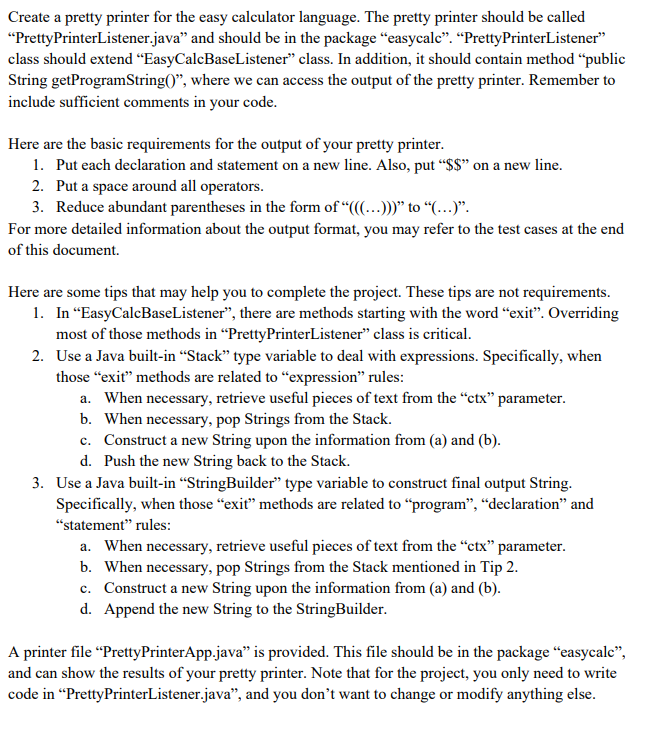
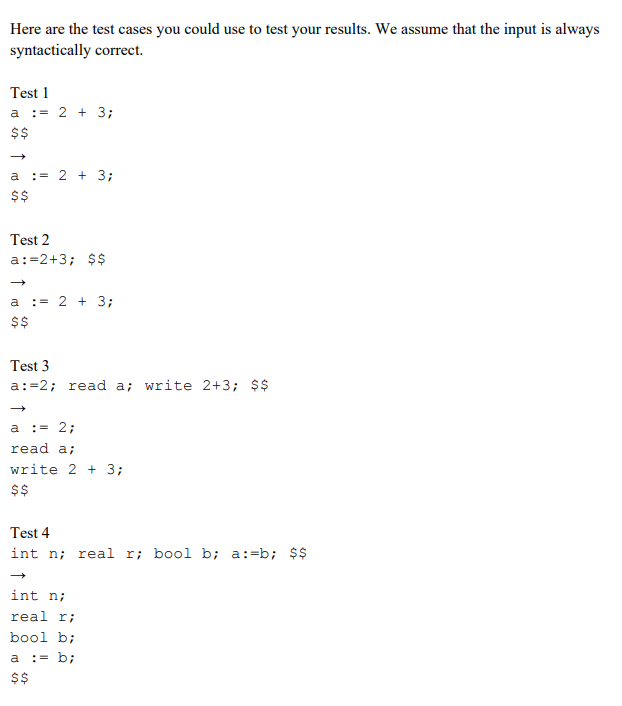
Create a pretty printer for the easy calculator language. The pretty printer should be called Pretty PrinterListener.java and should be in the package "easycale. PrettyPrinterListener" class should extend EasyCalcBaseListener class. In addition, it should contain method public String getProgramStringO, where we can access the output of the pretty printer. Remember to include sufficient comments in your code. Here are the basic requirements for the output of your pretty printer. 1. Put each declaration and statement on a new line. Also, put $$ on a new line. 2. Put a space around all operators. 3. Reduce abundant parentheses in the form of (...))) to (...). For more detailed information about the output format, you may refer to the test cases at the end of this document. Here are some tips that may help you to complete the project. These tips are not requirements. 1. In EasyCalcBaseListener, there are methods starting with the word exit. Overriding most of those methods in PrettyPrinterListener" class is critical. 2. Use a Java built-in Stack type variable to deal with expressions. Specifically, when those "exit methods are related to "expression rules: a. When necessary, retrieve useful pieces of text from the ctx parameter. b. When necessary, pop Strings from the Stack. c. Construct a new String upon the information from (a) and (b). d. Push the new String back to the Stack. 3. Use a Java built-in StringBuilder type variable to construct final output String. Specifically, when those exit methods are related to program, declaration and "statement rules: a. When necessary, retrieve useful pieces of text from the "ctx parameter. b. When necessary, pop Strings from the Stack mentioned in Tip 2. c. Construct a new String upon the information from (a) and (b). d. Append the new String to the StringBuilder. A printer file PrettyPrinterApp.java is provided. This file should be in the package easycale, and can show the results of your pretty printer. Note that for the project, you only need to write code in PrettyPrinterListener.java, and you don't want to change or modify anything else. Here are the test cases you could use to test your results. We assume that the input is always syntactically correct Test 1 a := 2 + 3; $$ $ a := 2 + 3; $$ Test 2 a:=2+3; $$ a : = 2 + 3; $$ Test 3 a:=2; read a; write 2+3; $$ a := 2; read a; write 2 + 3; $ $ Test 4 int n; real r; bool b; a:=b; $$ - int n; real r; bool b; a : = b; $$ a Create a pretty printer for the easy calculator language. The pretty printer should be called Pretty PrinterListener.java and should be in the package "easycale. PrettyPrinterListener" class should extend EasyCalcBaseListener class. In addition, it should contain method public String getProgramStringO, where we can access the output of the pretty printer. Remember to include sufficient comments in your code. Here are the basic requirements for the output of your pretty printer. 1. Put each declaration and statement on a new line. Also, put $$ on a new line. 2. Put a space around all operators. 3. Reduce abundant parentheses in the form of (...))) to (...). For more detailed information about the output format, you may refer to the test cases at the end of this document. Here are some tips that may help you to complete the project. These tips are not requirements. 1. In EasyCalcBaseListener, there are methods starting with the word exit. Overriding most of those methods in PrettyPrinterListener" class is critical. 2. Use a Java built-in Stack type variable to deal with expressions. Specifically, when those "exit methods are related to "expression rules: a. When necessary, retrieve useful pieces of text from the ctx parameter. b. When necessary, pop Strings from the Stack. c. Construct a new String upon the information from (a) and (b). d. Push the new String back to the Stack. 3. Use a Java built-in StringBuilder type variable to construct final output String. Specifically, when those exit methods are related to program, declaration and "statement rules: a. When necessary, retrieve useful pieces of text from the "ctx parameter. b. When necessary, pop Strings from the Stack mentioned in Tip 2. c. Construct a new String upon the information from (a) and (b). d. Append the new String to the StringBuilder. A printer file PrettyPrinterApp.java is provided. This file should be in the package easycale, and can show the results of your pretty printer. Note that for the project, you only need to write code in PrettyPrinterListener.java, and you don't want to change or modify anything else. Here are the test cases you could use to test your results. We assume that the input is always syntactically correct Test 1 a := 2 + 3; $$ $ a := 2 + 3; $$ Test 2 a:=2+3; $$ a : = 2 + 3; $$ Test 3 a:=2; read a; write 2+3; $$ a := 2; read a; write 2 + 3; $ $ Test 4 int n; real r; bool b; a:=b; $$ - int n; real r; bool b; a : = b; $$ a
Step by Step Solution
There are 3 Steps involved in it

Get step-by-step solutions from verified subject matter experts
 Study Help