







Question: Programming Write a program (remember that a program is typically composed of a main script and a collection of functions) will either shade or tint
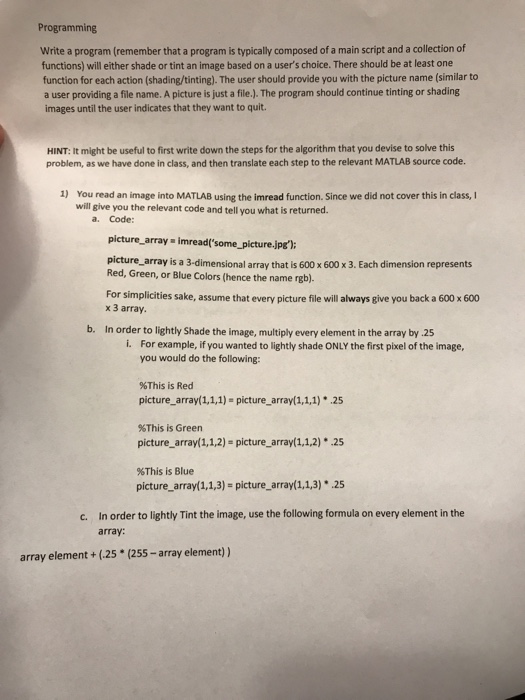
Programming Write a program (remember that a program is typically composed of a main script and a collection of functions) will either shade or tint an image based on a user's choice. There should be at least one function for each action (shading/tinting). The user should provide you with the picture name (similar to a user providing a file name. A picture is just a file.). The program should continue tinting or shading images until the user indicates that they want to quit. HINT: It might be useful to first write down the steps for the algorithm that you devise to solve this problem, as we have done in class, and then translate each step to the relevant MATLAB source code. 1) You read an image into MATLAB using the imread function. Since we did not cover this in class, I will give you the relevant code and tell you what is returned a. Code: picture_array imread'some_picture.jpe) picture_array is a 3-dimensional array that is 600 x 600 x 3. Each dimension represents Red, Green, or Blue Colors (hence the name rgb). For simplicities sake, assume that every picture file will always give you back a 600 x 600 x 3 array. b. In order to lightly Shade the image, multiply every element in the array by 25 i. For example, if you wanted to lightly shade ONLY the first pixel of the image, you would do the following: %This is Red picture_array(1,1,1) picture_array(1,1,1) 25 %This is Green picture_array(1,1,2) picture array(1,1,2)*25 %This is Blue picture-array( 1, 1,3)s picture_array(1,13)25 In order to lightly Tint the image, use the following formula on every element in the array: c. array element+(25 (255-array element))
Step by Step Solution
There are 3 Steps involved in it

Get step-by-step solutions from verified subject matter experts
 Study Help