







Question: Programming Write a program rootTable.cpp which reads in the number of roots, a value increment, and a precision and outputs a table of roots for
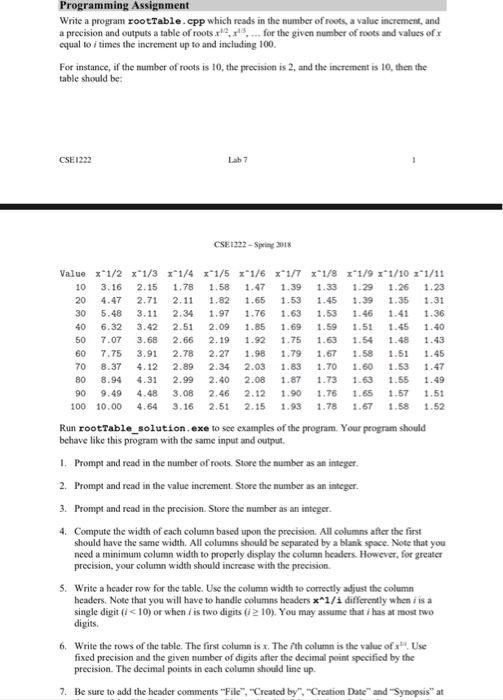
Programming Write a program rootTable.cpp which reads in the number of roots, a value increment, and a precision and outputs a table of roots for the given number of roots and values of x equal to i times the increment up to and including 100 For instance, if the number of roots is 10, the precision is 2, and the increment is 10, then the table should be: CSE1222 Lab 7 CSE1222-Spring 2018 10 3.16 2.15 1.78 1.58 1.47 1.39 1.33 1.29 1.26 1.23 20 4.47 2.71 2.11 1.82 1.65 1.53 1.45 1.39 1.35 1.31 30 5.48 3.11 2.34 1.97 1.76 1.63 1.53 1.46 1.41 1.36 40 6.32 3.42 2.51 2.09 1.85 1.69 1.59 1.51 1.45 1.40 50 7.07 3.68 2.66 2.19 1.92 1.75 1.63 1.54 1.48 1.43 60 7.75 3.91 2.78 2.27 1.98 1.79 17 158 1.51 1.45 70 8.37 4.12 2.89 2.34 2.03 1.83 1.70 1.60 1.53 1.47 80 8.94 4.31 2.99 2.40 2.08 1.87 1.73 1.63 1.55 1.49 90 9.49 4.48 3.08 2.46 2.12 1.90 1.76 1.65 1.57 1.51 100 10.00 4.64 3.16 2.51 2.15 1.93 1.78 1.67 1.58 1.52 Run rootTable solution.exe to see examples of the program. Your program should behave like this program with the same input and output 1. Prompt and read in the number of roots. Store the number as an integer 2. Prompt and read in the value increment. Store the number as an integer. 3. Prompt and read in the precision. Store the number as an integer 4. Compute the width of each column based upon the precision. All columns after the first should have the same width. All columns should be separated by a blank space. Note that you need a minimum column width to properly display the column headers. However, for greater precision, your column width should increase with the precision. 5. Write a header row for the table. Use the column width to correctly adjust the column headers. Note that you will have to handle columns headers x1/i differently when i is a single digit ( 10) or when is two digits (12 10). You may assume that i has at most two digits. 6. Write the rows of the table. The first column is x. The 7th column is the value of x Use fixed precision and the given number of digits after the decimal point specified by the precision. The decimal points in each column should line up. 7. Be sure to add the header comments "File", "Created by "Creation Date" and Synopsis" at
Step by Step Solution
There are 3 Steps involved in it

Get step-by-step solutions from verified subject matter experts
 Study Help