







Question: Project 1: Product Maintenance For this project, youll create a series of pages that allow you to add, update, or delete a product thats available
Project 1: Product Maintenance
For this project, youll create a series of pages that allow you to add, update, or delete a product thats available to the application.
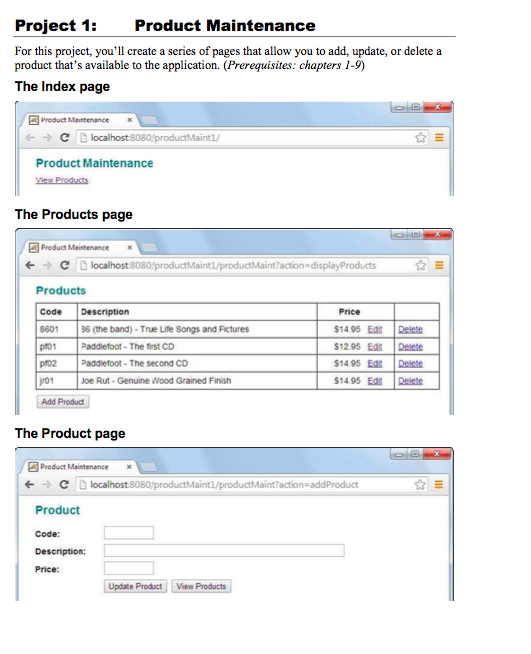
The Index page
The Products page
The Product page
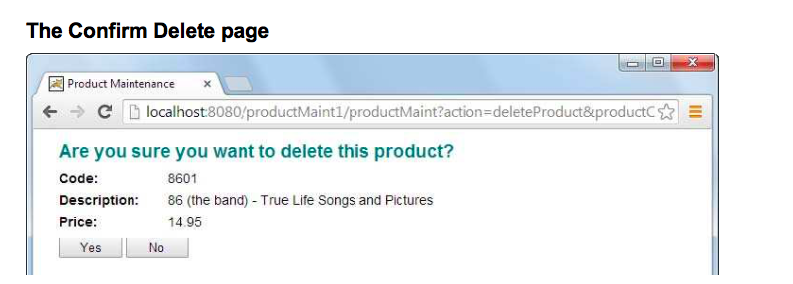
The Confirm Delete page
Operation
When the application starts, it displays the Index page. This page contains a link that leads to the Products page that can be used to add, update, or delete products.
To add a new product, the user selects the Add Product button. This displays the Product page with all text fields empty. Then, the user can fill in the text fields and click on the Update Product button to add the product.
To edit an existing product, the user selects the Edit link for the product. This displays the Product page with all existing data for the product displayed. Then, the user can edit any entries and click on the Update Product button to update the data for the existing product.
To delete a product, the user selects the Delete link for the product. This displays the Confirm Delete page. Then, if the user confirms the deletion by selecting the Yes button, the product is deleted and the Products page is displayed to reflect the new data. If the user selects the No button, the Products page is displayed.
Specifications
Use a Product class like the one shown later in this document to store the product data.
Use a ProductIO class like the one shown later in this document to read and write the
product data to a text file named products.txt in the WEB-INF directory.
Use a text file like the products.txt file shown later in this document as a starting point for the products that are available to the application.
Use server-side validation to validate all user entries. In particular, make sure the user enters a code, description, and price for each product. In addition, make sure the products price is a valid double value.
package music.business;
import java.text.NumberFormat; import java.io.Serializable;
public class Product implements Serializable { private Long productId; private String code; private String description; private double price;
public Product() {} public Long getId() { return productId; }
public void setId(Long productId) { this.productId = productId; }
public void setCode(String code) { this.code = code; }
public String getCode() { return code; }
public void setDescription(String description) { this.description = description; }
public String getDescription() { return description; }
public String getArtistName() { String artistName = description.substring(0, description.indexOf(" - ")); return artistName; }
public String getAlbumName() { String albumName = description.substring(description.indexOf(" - ") + 3); return albumName; }
public void setPrice(double price) { this.price = price; }
public double getPrice() { return price; }
public String getPriceCurrencyFormat() { NumberFormat currency = NumberFormat.getCurrencyInstance(); return currency.format(price); }
public String getImageURL() { String imageURL = "/musicStore/images/" + code + "_cover.jpg"; return imageURL; }
public String getProductType() { return "Audio CD"; } }
The ProductIO class
package music.data;
import java.io.*; import java.util.*;
import music.business.*; public class ProductIO { private static List products = null; private static String filePath = null;
// Called once from the controller based on servlet context public static void init(String filePath) { ProductIO.filePath = filePath; }
public static List selectProducts() { products = new ArrayList(); File file = new File(filePath); try { BufferedReader in = new BufferedReader(
new FileReader(file));
String line = in.readLine(); while (line != null) { StringTokenizer t = new StringTokenizer(line, "|"); if (t.countTokens() >= 3) { String code = t.nextToken(); String description = t.nextToken(); String priceAsString = t.nextToken(); double price = Double.parseDouble(priceAsString);
Product p = new Product(); p.setCode(code); p.setDescription(description); p.setPrice(price);
products.add(p); }
line = in.readLine(); }
in.close(); return products;
} catch (IOException e) { System.out.println(e); return null; } }
public static Product selectProduct(String productCode) { products = selectProducts(); for (Product p : products) { if (productCode != null && productCode.equalsIgnoreCase(p.getCode())) { return p; }
}
return null; }
public static boolean exists(String productCode) { Product p = selectProduct(productCode); if (p != null) return true; else return false; }
private static void saveProducts(List products) { try { File file = new File(filePath); PrintWriter out
= new PrintWriter( new FileWriter(file));
for (Product p : products) { out.println(p.getCode() + "|" + p.getDescription() + "|" + p.getPrice());
}
out.close(); } catch (IOException e) { System.out.println(e); }
}
public static void insertProduct(Product product) { products = selectProducts(); products.add(product); saveProducts(products); }
public static void updateProduct(Product product) { products = selectProducts(); for (int i = 0; i Product p = products.get(i); if (product.getCode() != null
&& product.getCode().equalsIgnoreCase(p.getCode())) { products.set(i, product); } }
saveProducts(products); }
8 Projects for Murachs Java Servlets and JSP (3rd Edition)
public static void deleteProduct(Product product) { products = selectProducts(); for (int i = 0; i
&& product.getCode().equalsIgnoreCase(p.getCode())) { products.remove(i); } }
saveProducts(products); }
}
A product.txt file that contains four products
8601|86 (the band) - True Life Songs and Pictures|14.95 pf01|Paddlefoot - The first CD|12.95 pf02|Paddlefoot - The second CD|14.95 jr01|Joe Rut - Genuine Wood Grained Finish|14.95
The Confirm Delete page Product Maintenance x -> Li localhost8080productMaint1/productMaint?action-deleteProduct&productes Are you sure you want to delete this product? Code: Description: 86 (the band) True Life Songs and Pictures Price: 8601 14.95 No Yes The Confirm Delete page Product Maintenance x -> Li localhost8080productMaint1/productMaint?action-deleteProduct&productes Are you sure you want to delete this product? Code: Description: 86 (the band) True Life Songs and Pictures Price: 8601 14.95 No Yes
Step by Step Solution
There are 3 Steps involved in it

Get step-by-step solutions from verified subject matter experts
 Study Help