







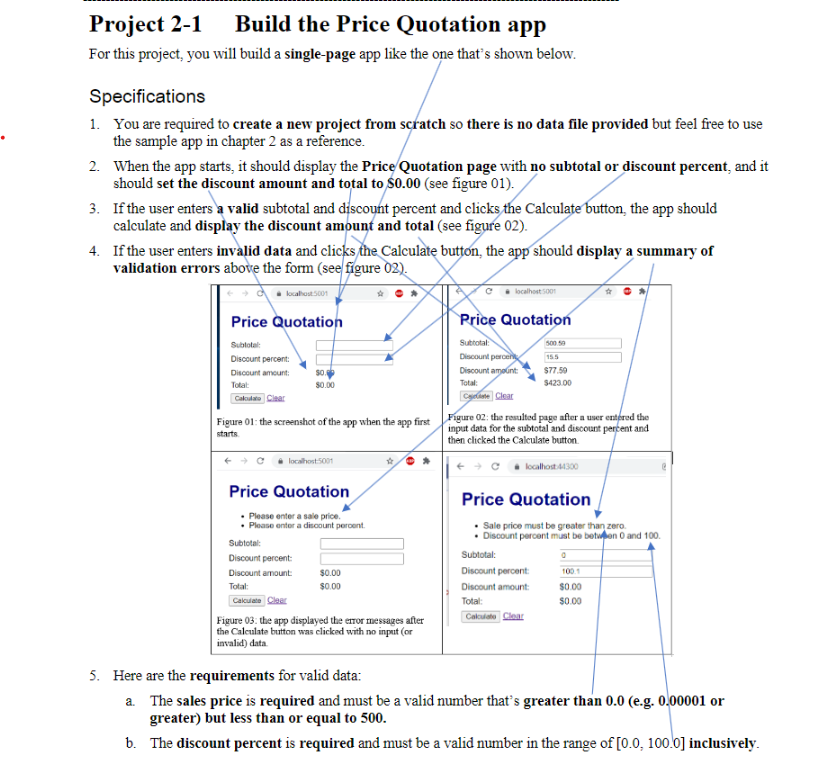
Question: Project 2 - 1 Build the Price Quotation app For this project, you will build a single - page app like the one that's shown
Project Build the Price Quotation app
For this project, you will build a singlepage app like the one that's shown below.
Specifications
You are required to create a new project from scratch so there is no data file provided but feel free to use the sample app in chapter as a reference.
When the app starts, it should display the PriceQuotation page with no subtotal or discount percent, and it should set the discount amount and total to $see figure
If the user enters a valid subtotal and discount percent and clicks the Calculate button, the app should calculate and dicnlav the dicrount amonnt and total eas fionre O
If the us validati
Here are greater but less than or equal to
b The discount percent is required and must be a valid number in the range of inclusively.
This is the code I have, please tell me why my Discount Amount and Total is not appearing when I press the calulate button
@model PriceQuoteModel
@
ViewBag.Title "Price Quote";
Step by Step Solution
There are 3 Steps involved in it
1 Expert Approved Answer
Step: 1 Unlock

Question Has Been Solved by an Expert!
Get step-by-step solutions from verified subject matter experts
Step: 2 Unlock
Step: 3 Unlock
 Study Help