Question: Project 2-6: Correcting Errors in a Project Schedule A student who is interning with your company made some updates to the music video project schedule.
Project 2-6: Correcting Errors in a Project Schedule
A student who is interning with your company made some updates to the music video project schedule. Unfortunately, he is still learning about Microsoft Project and has entered some information incorrectly. In this project, you will correct the problems with the project schedule before distributing it to your team.
------------------------
GET READY. OPEN Remote Drone Incorrect 26 from the data files for this lesson.
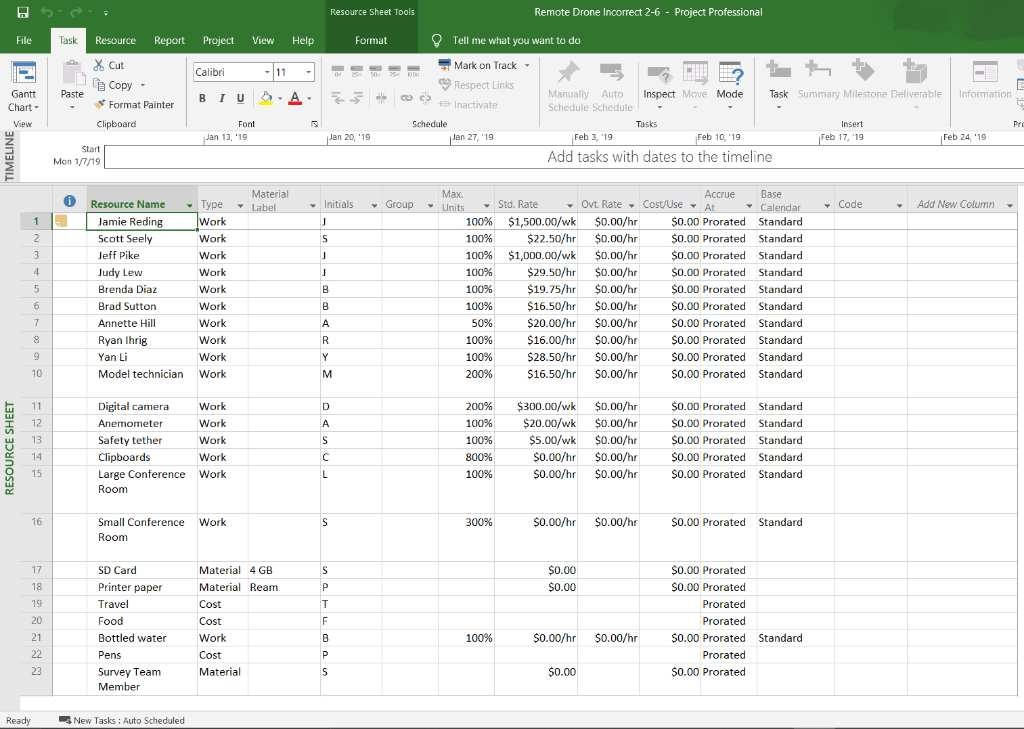
1. Review the Resource Sheet for this project schedule.
2. Based on what you have learned in this lesson about resource types, maximum units, and standard rates, find the resource errors in this project schedule and make corrections to them. (Hint: There are three resource errors in the project schedule.)
3. Study the last three resources on the sheet. For example, if pens are actually a work resource and bottled water is actually a cost resource, make corrections to the information given for these three resources (estimate the rate if necessary).
4. SAVE the project schedule as Remote Drone Corrected Resources and then CLOSE the file.
TAILSPINT REMOTE DRONE 2-6 INCORRECT FILE BELOW. OR CAN BE FOUND ON. Click "Data Files" and open the zip folder and there should be a file named "Remote Drone Incorrect 2-6" http://bcs.wiley.com/he-bcs/Books?action=chapter&bcsId=10826&itemId=1119298288&chapterId=125107
Project 2-6: Correcting Errors in a Project Schedule A student who is interning with your company made some updates to the music video project schedule. Unfortunately, he is still learning about Microsoft Project and has entered some information incorrectly. In this project, you will correct the problems with the project schedule before distributing it to your team. ONLINE The Remote Drone Incorrect 2-6 project schedule is available on the book companion website. GET READY. OPEN Remote Drone Incorrect 2-6 from the data files for this lesson. 1. Review the Resource Sheet for this project schedule. 2. Based on what you have learned in this lesson about resource types, maximum units, and standard rates, find the resource errors in this project schedule and make corrections to them. (Hint. There are three resource errors in the project schedule.) 3. Study the last three resources on the sheet. For example, if pens is actually a work resource and bottled water is actually a cost resource, make corrections to the information given for these three resources (estimate the rate if necessary). 4. SAVE the project schedule as Remote Drone Corrected Resources and then CLOSE the file. CLOSE Project. Resource Sheet Tools Remote Drone Incorrect 2-6 - Project Professional File Task View Help Format - 11 25 100 Resource Report Project X & Cut Calibri Copy BIU Format Painter Clipboard Paste A. Gantt Chart - View Tell me what you want to do Mark on Track - Respect Links E Manually Auto Inspect Move Mode Task Summary Milestone Deliverable Information 2 Inactivate Schedule Schedule Schedule Tasks Insert Pro Jan 27, 19 Feb 3, 19 Feb 10, 19 Feb 17, '19 Feb 24 19 Add tasks with dates to the timeline Font Jan 13, 19 Jan 20, '19 Start Mon 1/7/19 Material 0 Label Initials Group - Code Add New Column 1 2 3 J S j J 4 5 Resource Name - Type Jamie Reding Work Scott Seely Work Jeff Pike Work Judy Lew Work Brenda Diaz Work Brad Sutton Work Annette Hill Work Ryan Ihrig Work Yan Li Work Model technician Work B Max . Units 100% 100% 100% 100% 100% 100% 50% 100% 100% 200% Accrue Base Std. Rate - Ovt. Rate - Cost/Use - At Calendar $1,500.00/wk $0.00/hr $0.00 Prorated Standard $22.50/hr $0.00/hr $0.00 Prorated Standard $1,000.00/wk $0.00/hr $0.00 Prorated Standard $29.50/hr $0.00/hr $0.00 Prorated Standard $19.75/hr $0.00/hr $0.00 Prorated Standard $16.50/hr $ $0.00/hr $0.00 Prorated Standard $20.00/hr $0.00/h $0.00 Prorated Standard $16.00/hr $0.00/hr $0.00 Prorated Standard $28.50/hr $0.00/hr $0.00 Prorated Standard $16.50/hr $0.00/hr $0.00 Prorated Standard B 6 7 . R Y 9 10 M 11 D RESOURCE SHEET 12 13 14 Digital camera Work Anemometer Work Safety tether Work Clipboards Work Large Conference Work Room A S C 200% 100% 100% 800% 100% $300.00/wk $0.00/hr $20.00/wk $0.00/hr $5.00/wk $0.00/hr $0.00/hr $0.00/hr $0.00/hr $0.00/hr $0.00 Prorated Standard S0.00 Prorated Standard $0.00 Prorated Standard $0.00 Prorated Standard $0.00 Prorated Standard 15 L 16 S 300% Small Conference Work Room $0.00/hr $0.00/hr $0.00 Prorated Standard 17 SD Card S S $0.00 $0.00 18 Printer paper 19 Material 4 GB Material Ream Cost Cost Work 20 T F B $0.00 Prorated $ $0.00 Prorated Prorated Prorated $0.00 Prorated Standard Prorated $0.00 Prorated 21 100% Travel Food Bottled water Pens Survey Team Member $0.00/hr $0.00/hr 22 Cost Material 23 S $0.00 Ready New Tasks : Auto Scheduled Project 2-6: Correcting Errors in a Project Schedule A student who is interning with your company made some updates to the music video project schedule. Unfortunately, he is still learning about Microsoft Project and has entered some information incorrectly. In this project, you will correct the problems with the project schedule before distributing it to your team. ONLINE The Remote Drone Incorrect 2-6 project schedule is available on the book companion website. GET READY. OPEN Remote Drone Incorrect 2-6 from the data files for this lesson. 1. Review the Resource Sheet for this project schedule. 2. Based on what you have learned in this lesson about resource types, maximum units, and standard rates, find the resource errors in this project schedule and make corrections to them. (Hint. There are three resource errors in the project schedule.) 3. Study the last three resources on the sheet. For example, if pens is actually a work resource and bottled water is actually a cost resource, make corrections to the information given for these three resources (estimate the rate if necessary). 4. SAVE the project schedule as Remote Drone Corrected Resources and then CLOSE the file. CLOSE Project. Resource Sheet Tools Remote Drone Incorrect 2-6 - Project Professional File Task View Help Format - 11 25 100 Resource Report Project X & Cut Calibri Copy BIU Format Painter Clipboard Paste A. Gantt Chart - View Tell me what you want to do Mark on Track - Respect Links E Manually Auto Inspect Move Mode Task Summary Milestone Deliverable Information 2 Inactivate Schedule Schedule Schedule Tasks Insert Pro Jan 27, 19 Feb 3, 19 Feb 10, 19 Feb 17, '19 Feb 24 19 Add tasks with dates to the timeline Font Jan 13, 19 Jan 20, '19 Start Mon 1/7/19 Material 0 Label Initials Group - Code Add New Column 1 2 3 J S j J 4 5 Resource Name - Type Jamie Reding Work Scott Seely Work Jeff Pike Work Judy Lew Work Brenda Diaz Work Brad Sutton Work Annette Hill Work Ryan Ihrig Work Yan Li Work Model technician Work B Max . Units 100% 100% 100% 100% 100% 100% 50% 100% 100% 200% Accrue Base Std. Rate - Ovt. Rate - Cost/Use - At Calendar $1,500.00/wk $0.00/hr $0.00 Prorated Standard $22.50/hr $0.00/hr $0.00 Prorated Standard $1,000.00/wk $0.00/hr $0.00 Prorated Standard $29.50/hr $0.00/hr $0.00 Prorated Standard $19.75/hr $0.00/hr $0.00 Prorated Standard $16.50/hr $ $0.00/hr $0.00 Prorated Standard $20.00/hr $0.00/h $0.00 Prorated Standard $16.00/hr $0.00/hr $0.00 Prorated Standard $28.50/hr $0.00/hr $0.00 Prorated Standard $16.50/hr $0.00/hr $0.00 Prorated Standard B 6 7 . R Y 9 10 M 11 D RESOURCE SHEET 12 13 14 Digital camera Work Anemometer Work Safety tether Work Clipboards Work Large Conference Work Room A S C 200% 100% 100% 800% 100% $300.00/wk $0.00/hr $20.00/wk $0.00/hr $5.00/wk $0.00/hr $0.00/hr $0.00/hr $0.00/hr $0.00/hr $0.00 Prorated Standard S0.00 Prorated Standard $0.00 Prorated Standard $0.00 Prorated Standard $0.00 Prorated Standard 15 L 16 S 300% Small Conference Work Room $0.00/hr $0.00/hr $0.00 Prorated Standard 17 SD Card S S $0.00 $0.00 18 Printer paper 19 Material 4 GB Material Ream Cost Cost Work 20 T F B $0.00 Prorated $ $0.00 Prorated Prorated Prorated $0.00 Prorated Standard Prorated $0.00 Prorated 21 100% Travel Food Bottled water Pens Survey Team Member $0.00/hr $0.00/hr 22 Cost Material 23 S $0.00 Ready New Tasks : Auto Scheduled









 Study Help