


Question: Project Description: You have recently become the CFO for Beta Manufacturing, a small cap company that produces auto parts. As you step into your new

Project Description:

You have recently become the CFO for Beta Manufacturing, a small cap company that produces auto parts. As you step into your new position, you have decided to compile a report that details all aspects of the business, including: employee tax withholding, facility management, sales data, and product inventory. To complete the task, you will duplicate existing formatting, utilize various conditional logic functions, complete an amortization table with financial functions, visualize data with PivotTables, and lastly import data from another source.
Project Description: You have recently become the

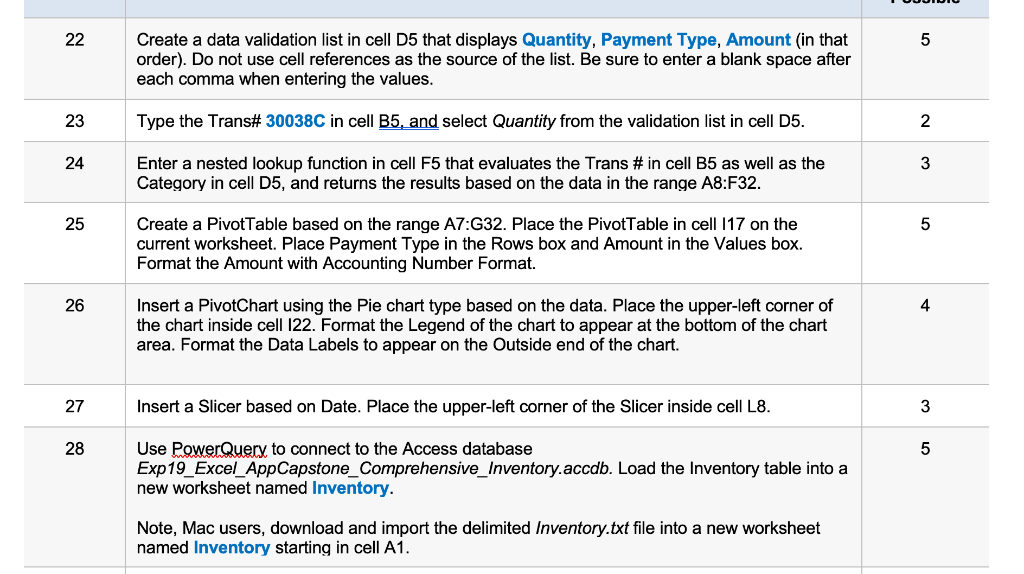
22 5 Create a data validation list in cell D5 that displays Quantity, Payment Type, Amount (in that order). Do not use cell references as the source of the list. Be sure to enter a blank space after each comma when entering the values. 23 Type the Trans# 30038C in cell B5, and select Quantity from the validation list in cell D5. 2 24 3 Enter a nested lookup function in cell F5 that evaluates the Trans # in cell B5 as well as the Category in cell D5, and returns the results based on the data in the range A8:F32. 25 5 Create a Pivot Table based on the range A7:G32. Place the PivotTable in cell 117 on the current worksheet. Place Payment Type in the Rows box and Amount in the Values box. Format the Amount with Accounting Number Format. 26 4 Insert a PivotChart using the Pie chart type based on the data. Place the upper-left corner of the chart inside cell 122. Format the Legend of the chart to appear at the bottom of the chart area. Format the Data Labels to appear on the Outside end of the chart. 27 Insert a Slicer based on Date. Place the upper-left corner of the Slicer inside cell L8. 3 28 5 Use PowerQuery to connect to the Access database Exp19_Excel_AppCapstone_Comprehensive_Inventory.accdb. Load the Inventory table into a new worksheet named Inventory. Note, Mac users, download and import the delimited Inventory.txt file into a new worksheet named Inventory starting in cell A1

Step by Step Solution

There are 3 Steps involved in it

1 Expert Approved Answer
Step: 1 Unlock blur-text-image

Question Has Been Solved by an Expert!

Get step-by-step solutions from verified subject matter experts

Step: 2 Unlock
Step: 3 Unlock

Students Have Also Explored These Related General Management Questions!