







Question: Project Name: - _ . SW _ Count _ Up _ Down Description: - This program should increment a binary counter count if pushbutton PB
Project Name: SWCountUpDown
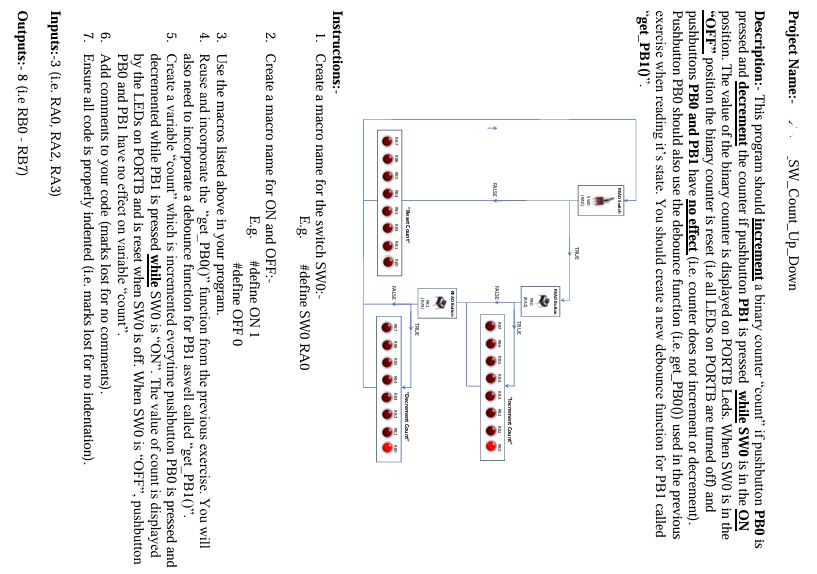
Description: This program should increment a binary counter "count" if pushbutton PB is pressed and decrement the counter if pushbutton PB is pressed while SW is in the ON position. The value of the binary counter is displayed on PORTB Leds. When SW is in the "OFF" position the binary counter is reset ie all LEDs on PORTB are turned off and pushbuttons PB and PB have no effect ie counter does not increment or decrement Pushbutton PB should also use the debounce function ie getPB used in the previous exercise when reading it's state. You should create a new debounce function for PB called "getPB
Instructions:
Create a macro name for the switch SW:
Eg#define SW RA
Create a macro name for ON and mathrmOFF:
Eg#define ON
#define OFF
Use the macros listed above in your program.
Reuse and incorporate the "getPB function from the previous exercise. You will also need to incorporate a debounce function for PB aswell called "getPB
Create a variable "count" which is incremented everytime pushbutton PB is pressed and decremented while PB is pressed while SW is ON The value of count is displayed by the LEDs on PORTB and is reset when SW is off. When SW is "OFF", pushbutton PB and PB have no effect on variable "count".
Add comments to your code marks lost for no comments
Ensure all code is properly indented ie marks lost for no indentation
Inputs:ie RA RA RA
Outputs:ie RB RB
Step by Step Solution
There are 3 Steps involved in it
1 Expert Approved Answer
Step: 1 Unlock

Question Has Been Solved by an Expert!
Get step-by-step solutions from verified subject matter experts
Step: 2 Unlock
Step: 3 Unlock
 Study Help