



Question: PROJECT STEPS Elizabeth is the office manager for P & H Air Systems, a heating, ventilation, and air conditioning (HVAC) business with two offices in
PROJECT STEPS
- Elizabeth is the office manager for P & H Air Systems, a heating, ventilation, and air conditioning (HVAC) business with two offices in the Philadelphia area. She has asked you to help her analyze service contract sales from the companys two offices and to look at loan options for expanding the business.
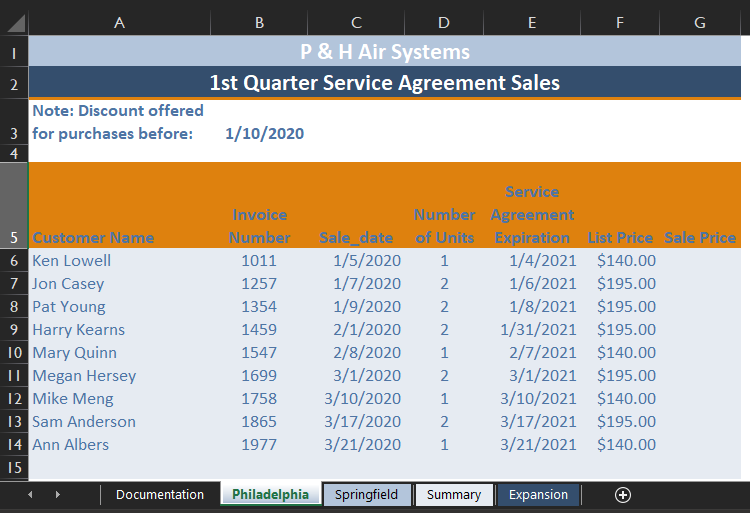
Switch to the Philadelphia worksheet. Assign the name sale_date to the range C6:C14.
- In cell E6, enter a formula without using a function to determine the service agreement expiration date by adding 365 to the sale date in cell C6, using the range name sale_date in the formula. Copy the formula in cell E6 into the range E7:E14.
- Delete the range name invoice_number from the workbook. (Hint: Do not delete the cell contents in this range, only the custom range name.)
- In the first nine days of January, the company offered a 15% discount on the list price of service agreements. Elizabeth asks for your help in calculating the sale prices of all agreements sold in the Philadelphia office during the first quarter.
In cell G6, create a formula using the IF function to determine the sale price based on the following criteria:
- If the sale_date is before (i.e., less than) 1/10/2020 (refer to the date in cell B3 using an absolute reference), the sale price is calculated by multiplying the list price (cell F6) by .85.
- If the sale_date is 1/10/2020 or later, the sale price is the list price (cell F6).
Copy the formula in cell G6 into the range G7:G14.
- In cell G15, create a formula using the SUM function to total the values in the range G6:G14. Format cell G15 using bold formatting.
- Elizabeth would like more information on sales of 2-unit agreements in the Philadelphia office.
In cell B20, create a formula using the COUNTIF function to count the number of 2-unit agreements sold. Use D6:D14 as the range and 2 as the criteria in your formula.
- In cell B21, create a formula using the AVERAGEIF function to find the average sale price of a 2-unit agreement. Use D6:D14 as the range, 2 as the criteria, and G6:G14 as the average_range in your formula.
- In cell B22, use the SUMIF function to total the sales of 2-unit agreements. Use D6:D14 as the range, 2 as the criteria and G6:G14 as the sum_range in your formula.
- Format cells B21 and B22 using the Currency number format with two decimal places and the $ symbol.
- Elizabeth would like you to calculate the total service agreement sales for both offices.
Switch to the Summary worksheet. In cell A5, create a formula using the SUM function and 3-D references to total cell G15 on the Philadelphia worksheet and cell G15 on the Springfield worksheet.
- Format cell A5 using the Accounting number format with two decimal places and the $ symbol.
- Elizabeth would like you to separate the customer names from their invoice numbers and format the names with the last name first.
Enter the text Lowell, Ken in cell E5, then enter the text Casey, Jon in cell E6. Then, select the range E5:E22 and use Flash Fill to fill in the range E7:E22.
- P & H is considering expanding the business to add a third office. Elizabeth asks you to help with the analysis of loan options to fund the expansion.
Switch to the Expansion worksheet, then create a formula using the PMT function in cell B8 to determine the monthly payment using the loan information shown in the range B5:B7. In your formula, divide the rate (cell B6) by 12, use the term in months (cell B7) as the nper, and use a negative value for the pv (cell B5). Copy the formula from cell B8 into the range C8:D8.
- In cell B9, enter a formula without using a function to calculate the total payments by multiplying the monthly payments (cell B8) by the term in months (cell B7) for Loan Option 1. Copy the formula from cell B9 into the range C9:D9.
- In cell B10, enter a formula without using a function that calculates the total interest by subtracting the loan amount (cell B5) from the total payments (cell B9) for Loan Option 1. Copy the formula from cell B10 into the range C10:D10.
Step by Step Solution
There are 3 Steps involved in it

Get step-by-step solutions from verified subject matter experts